Breaking News

AMD announces Ryzen AI Halo GIGABYTE Expands LGA1700 Processor Support Across Its Full Z790, B760 and H610 Lineup SWIT K7 Combines 2,800-Nit Daylight Monitoring with 4K60 HDMI and Built-In SDI Conversion ASUS ProArt RTX Spark Windows PCs Available for Immediate Pre-Order Kioxia Introduces E1.L QLC-based SSDs for Hyperscale Data Centers

logo

  • Share Us
    • Facebook
    • Twitter
  • Home
  • Home
  • News
  • Reviews
  • Essays
  • About
    • Submit News

    • Contact Us
    • Privacy

    • Promotion
    • Advertise

    • RSS Feed

Search form

Thermaltake Bigwater 760i

Nov 13,2007 0

4. Installation


Review Pages

1. Introduction
2. Features, Specifications
3. The retail package
4. Installation
5. Performance
6. Verdict


Thermaltake has placed a webpage with installation instructions and how the whole system works. We will try and give you with pictures the major steps. First you need to secure the waterblock on the motherboard. Place the metal H-type clip, cushion and insulator together below the motherboard. Use the four silver (for Socket 775 in our case) 5cm screws, don't forget the white/red washers

and use the stands offs to secure the whole structure to the motherboard.

Next step is to carefully install the waterblock and by using the thumb nuts to secure the whole thing:

Then unscrew the nut of the waterblock, insert a tube through the nut of waterblock and tighten the nut on the waterblock, you must get something like this...Do the same for the other nut and cut the tube at the appropriate length according to your case. Finally use the hose clips and female quick connector through the tube and by using pliers tighten the hose clips. It's necessary to make the properly tighten all parts to prevent water leakage.
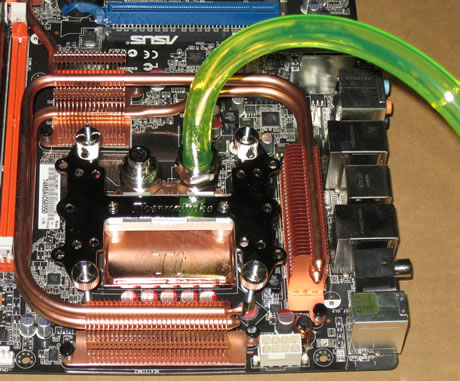
The installation of the 2U Bay water cooling system needs two empty 5.25 bays. For our tests we used Thermaltake's Soprano case. Thermaltake suggests having the 2U bay system above the CPU level . The refill is an easy task with the included box. After connecting all the cables, make sure to power up and check the coolant level, it will drop as it starts to flow around the pump and tubes. Continue to fill the reservoir tank until it's above the low level. Secure the cap and that's all. There will be air bubbles around the tube, don't worry though, just leave the system working for at least 20 minutes and gently bend the tubes until all the air bubbles are removed from the tubes, this is an essential step. If things are getting rather difficult, tilt the chassis at an angle of 45° to the left and then to the right. This will help the air move through the system. Remember to refill the reservoir as the air is pushed out.

When everything has finished, you will notice that the 2U water cooling system is about 5cm (2") longer than a standard optical drive. Now if there isn't enough empty space between the motherboard and the 2U water cooling bay the installation may not be possible. The black tubes can be easily replaced with the included UV sensitive water tube. The fan on the top glows blue, but I guess you can easily remove it and add something else if you prefer other colors. The speed control knob included it's obviously placed in the wrong place, since it's almost very hard to use it with so many cables at the back. We assume that Thermaltake could have placed it at the front for easy access. The un installation procedure is almost the same, Thermaltake has an installation/un installation video in their webpage that you should check before doing anything.


Review Pages

1. Introduction
2. Features, Specifications
3. The retail package
4. Installation
5. Performance
6. Verdict


Pages

  • « first
  • ‹ previous
  • 1
  • 2
  • 3
  • 4
  • 5
  • 6
  • next ›
  • last »

Thermaltake

Tags: Thermaltake
Previous Post
MSI NX8600GTS-T2D256E-HD-OC
Next Post
Roboform2Go

Related Posts

  • Thermaltake Launches AW360/420 AIO Liquid Cooler and WAir CPU Cooler for Workstations

  • Begin the Racing Journey with the Thermaltake GR300 Racing Simulator Cockpit

  • Thermaltake Unveils the Massive EXTREME with Cross-flow Fan

  • Thermaltake Releases the Toughpower TF3 1300W with Support for RTX50 Series GPUs

  • Thermaltake Unveils G6 Direct Drive Racing Wheel Bundle and GM5 3DOF Motion System

  • Thermaltake Launches the TT150 LED Bag in Different Sizes and New Colors

  • Thermaltake New TH V2 Ultra EX ARGB Sync AIO – Snow Edition is Now Available Worldwide

  • Thermaltake Coolers Support New-Gen Intel and AMD CPUs

Latest Reviews

Fanxiang MP83 M.2 NVMe SSD Enclosure
Enterprise & IT

Fanxiang MP83 M.2 NVMe SSD Enclosure

Ugreen CM642 USB4.0 Enclosure
PC components

Ugreen CM642 USB4.0 Enclosure

be quiet! Dark Power 14 IO
PC components

be quiet! Dark Power 14 IO

SanDisk High Endurance 512GB microSDXC
Cameras

SanDisk High Endurance 512GB microSDXC

Samsung PRO Ultimate 512GB microSDXC
Cameras

Samsung PRO Ultimate 512GB microSDXC

Popular News

MSI’s Latest AMD X870E MAX & EVO Series Motherboards

MSI’s Latest AMD X870E MAX & EVO Series Motherboards

COLORFUL Launches iGame B850M ULTRA Series Micro-ATX Motherboards

COLORFUL Launches iGame B850M ULTRA Series Micro-ATX Motherboards

COLORFUL Presents Limited Edition Chitu MAG-60 Magnetic Keyboard Inspired by the Year of the Horse

COLORFUL Presents Limited Edition Chitu MAG-60 Magnetic Keyboard Inspired by the Year of the Horse

COLORFUL Launches iGame B850I MINI OC V14 Motherboard

COLORFUL Launches iGame B850I MINI OC V14 Motherboard

COLORFUL Presents iGame Z890 ULTRA-S W and iGame Z890M ULTRA Z Motherboards

COLORFUL Presents iGame Z890 ULTRA-S W and iGame Z890M ULTRA Z Motherboards

COLORFUL Launches the iGame X870E VULCAN W OC Motherboard

COLORFUL Launches the iGame X870E VULCAN W OC Motherboard

COLORFUL Expands B850 Motherboard Lineup with New CVN, Battle-Ax, and MEOW Models

COLORFUL Expands B850 Motherboard Lineup with New CVN, Battle-Ax, and MEOW Models

ASRock Adds Support for One Sub-Channel DRAM Module on Intel DDR5 Motherboards

ASRock Adds Support for One Sub-Channel DRAM Module on Intel DDR5 Motherboards

Main menu

  • Home
  • News
  • Reviews
  • Essays
  • About
    • Submit News

    • Contact Us
    • Privacy

    • Promotion
    • Advertise

    • RSS Feed
  • About
  • Privacy
  • Contact Us
  • Promotional Opportunities @ CdrInfo.com
  • Advertise on out site
  • Submit your News to our site
  • RSS Feed