Breaking News

G.SKILL Officially Commences World Cup 2026 Overclocking Competition with $40,000 USD Total Prize Pool Sharkoon announces SKILLER SGK55W Western Digital Accelerates Storage Innovation for AI Era Leica LUX Case for the iPhone 17 Pro/Pro Max ASUS Announces ROG Strix Aiolos

logo

  • Share Us
    • Facebook
    • Twitter
  • Home
  • Home
  • News
  • Reviews
  • Essays
  • Forum
  • Legacy
  • About
    • Submit News

    • Contact Us
    • Privacy

    • Promotion
    • Advertise

    • RSS Feed
    • Site Map

Search form

Thermaltake Blue Orb II

Oct 26,2005 0

4. Conclusion


Review Pages

1. Introduction
2. Installation
3. Performance
4. Conclusion


The Blue Orb II, as with the previous Golden Orb II we had reviewed in the past, does not use heat-pipe technology, or any advanced cooling system. It is simple, made from godd materials and with a huge fan.
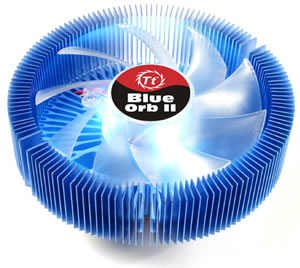
The copper base and the 140 aluminium fins, seem to be much more effective than the stock cooler. The temperature at the beginning of our measurement was 35°C with the stock cooler from AMD while with the Blue Orb II, 3 degrees lower at 32°C. At full load, the difference in temperature was more dramatic. 52 °C for the AMD cooler and 45 °C for the Blue Orb II. You needn't worry if you want to overclock your AMD since with such a performance, your processor will be running much cooler.

This is not the only good thing with the Blue Orb II. Most times, a cooler with a fan running at high speeds can do a great job, but the rotation speed of the Thermaltake cooling system is half that of the stock cooler, at only 1620~1650rpm. Low rotation speeds usually means low noise levels. The Blue Orb II is extremely silent and you don't have to worry about noises eminating from your case.

Up and working...

Installation of the Blue Orb II is still a minor issue in comparison to some other coolers we have tried. Fortunately, Thermaltake includes in the package everything you'll need, even thermal compound. However, in the case of the Intel 775 socket as well as in most AMD's platforms, you'll have to remove the motherboard from the PC case in order to attach either the two mounting brackets in the case of the 775 socket, or the different plastic plate in the case of AMD.

The Blue Orb II will enhance the look of your PC case, especially if it has a side window. The blue light is more than visible and the volume of the cooler rather noticable.

At the time of this review, the price for the Blue Orb II was US$34.

Pros:
-
Very low noise levels (17dBA)
- Good thermal reduction

Cons:
- Installation


Performance:
Features/Design:
Installation:
Value for money:


Review Pages

1. Introduction
2. Installation
3. Performance
4. Conclusion


Pages

  • « first
  • ‹ previous
  • 1
  • 2
  • 3
  • 4

Thermaltake

Tags: Thermaltake
Previous Post
Plasmon UDO30D-SE
Next Post
Thermaltake Max4

Related Posts

  • Thermaltake Launches AW360/420 AIO Liquid Cooler and WAir CPU Cooler for Workstations

  • Begin the Racing Journey with the Thermaltake GR300 Racing Simulator Cockpit

  • Thermaltake Unveils the Massive EXTREME with Cross-flow Fan

  • Thermaltake Releases the Toughpower TF3 1300W with Support for RTX50 Series GPUs

  • Thermaltake Unveils G6 Direct Drive Racing Wheel Bundle and GM5 3DOF Motion System

  • Thermaltake Launches the TT150 LED Bag in Different Sizes and New Colors

  • Thermaltake New TH V2 Ultra EX ARGB Sync AIO – Snow Edition is Now Available Worldwide

  • Thermaltake Coolers Support New-Gen Intel and AMD CPUs

Latest Reviews

be quiet! Pure Power 13M 1200W
PC components

be quiet! Pure Power 13M 1200W

Server-Side Gaming Why Canadian Online Casinos Are Abandoning Local Clients for HTML5 Clouds
Enterprise & IT

Server-Side Gaming Why Canadian Online Casinos Are Abandoning Local Clients for HTML5 Clouds

Airfanta 3 Pro Air
Consumer Electronics

Airfanta 3 Pro Air

Akaso Brave 8 Lite
Cameras

Akaso Brave 8 Lite

Soundpeats Air 5
Consumer Electronics

Soundpeats Air 5

Popular News

COLORFUL Introduces CVN B850I GAMING FROZEN Motherboard

COLORFUL Introduces CVN B850I GAMING FROZEN Motherboard

COLORFUL Presents CVN X870 ARK FROZEN Motherboard for AMD Ryzen 9000 CPUs

COLORFUL Presents CVN X870 ARK FROZEN Motherboard for AMD Ryzen 9000 CPUs

TEAMGROUP Launches EXPERT P34F Find My External SSD

TEAMGROUP Launches EXPERT P34F Find My External SSD

ASRock AM5 Motherboards Now Fully Support AMD Ryzen 9 9950X3D & 9900X3D Processors

ASRock AM5 Motherboards Now Fully Support AMD Ryzen 9 9950X3D & 9900X3D Processors

Samsung announces Galaxy Tab S11 and Galaxy S25 FE series

Samsung announces Galaxy Tab S11 and Galaxy S25 FE series

Viltrox Showcases Upcoming Lens Lineup and New TTL Flash at IBC 2025

Viltrox Showcases Upcoming Lens Lineup and New TTL Flash at IBC 2025

CORSAIR announces Vanguard Pro 96 and Vanguard 96 Gaming Keyboards

CORSAIR announces Vanguard Pro 96 and Vanguard 96 Gaming Keyboards

Panasonic Introduces the First Ultra-Telephoto Zoom Lens in the LUMIX S Series

Panasonic Introduces the First Ultra-Telephoto Zoom Lens in the LUMIX S Series

Main menu

  • Home
  • News
  • Reviews
  • Essays
  • Forum
  • Legacy
  • About
    • Submit News

    • Contact Us
    • Privacy

    • Promotion
    • Advertise

    • RSS Feed
    • Site Map
  • About
  • Privacy
  • Contact Us
  • Promotional Opportunities @ CdrInfo.com
  • Advertise on out site
  • Submit your News to our site
  • RSS Feed