
Writing Quality
13. Jitter - Page 1
Review Pages
2. Pits and Lands
3. Error Correction - Page 1
4. Error Correction - Page 2
5. Error Correction - Page 3
6. CIRC - Page 1
7. CIRC - Page 2
8. CD Decoding system
9. C1/C2 Errors - Page 1
10. C1/C2 Errors - Page 2
11. EFM - Page 1
12. EFM - Page 2
13. Jitter - Page 1
14. Jitter - Page 2
15. Jitter - Page 3
16. Oscilloscope
17. Jitter at DVD
18. Technologies for Reducing Jitter
19. JVC ENC K2
20. AudioMASTER
21. VariREC
22. TEAC Boost Function
23. Testing Equipement - Page 1
24. Testing Equipement - Page 2
25. Calibration media
26. Tests before recording
27. Tests after recording
28. Atomic Force Microscopy
Writing Quality - Page 13
Jitter - Page 1
- Introduction
Along the 5km of track in a typical CD, there are bright and dark marks ranging in size from about 0.8mm to 3.1im in length. Without any defects or noise, these sequences of bright and dark marks contain all the information necessary to play back the original recording.
To read these sequences, a laser is focused on to the track and a photo detector
(PD) measures the amount of light reflected back from the track. The RF signal
from the PD represents the reflectivity of a small region of track. An example
of the marks in the track and the RF signal are shown in picture below. To determine
the pattern of marks on the discs, a clock is generated off the data and a threshold
is set for the RF signal.
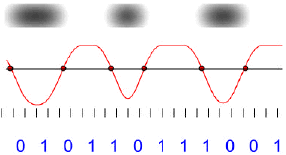
If the RF signal crosses the threshold, a "1" is entered for that
time bin, otherwise a zero is entered. This binary bit stream represents the
"EFM" code, the first of the three primary codes used in the CD system
(EFM, C1, and C2). If the RF signal contains noise, the time of the threshold
crossing can be too early or too late. The average amount of time there threshold
crossings move around with respect the time bin is called "Jitter".
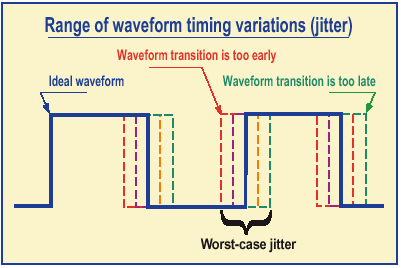
If the "Jitter" is large enough, the threshold crossings will be assigned to incorrect time bins and result in errors introduced into the EFM bit stream. While the next two codes in the CD system protect against these types of errors, it is possible for jitter to appear at your speaks as distorted audio if these errors go uncorrected.
- History Of Jitter
Jitter first appeared as a required measurement for optical disc in the Orange book. Subsequently it was amended to the Red Book. The Red Book stipulated that the measurements specified must be performed on a single beam drive. This relates to the method of tracking and was the early standard for consumer players. Early tester equipment was based on the Philips CDM1 or CDM4 mechanisms, both single beam. However, by the time the jitter amendment to the Red Book was ready, most drives were triple beam.
Research revealed that there was low correlation between single and triple beam measurements of jitter. The standard for jitter measurement became another Philips drive, the CDM12, which was triple beam.
Data to data jitter had a drive dependency due to the method of measuring pit and land lengths in time. A drive contributed variations from its electronics and optics. This was one of the main reasons that drive selection was important to CD test equipment manufacturers: they had to try to constrain the range of variation by selecting the drives they used. When a consumer drive looks at a disc its job is to get the best out of that disc regardless of what the disc is like. Hence optimising focus, tracking or slicing is all part of the strategy.
Review Pages
2. Pits and Lands
3. Error Correction - Page 1
4. Error Correction - Page 2
5. Error Correction - Page 3
6. CIRC - Page 1
7. CIRC - Page 2
8. CD Decoding system
9. C1/C2 Errors - Page 1
10. C1/C2 Errors - Page 2
11. EFM - Page 1
12. EFM - Page 2
13. Jitter - Page 1
14. Jitter - Page 2
15. Jitter - Page 3
16. Oscilloscope
17. Jitter at DVD
18. Technologies for Reducing Jitter
19. JVC ENC K2
20. AudioMASTER
21. VariREC
22. TEAC Boost Function
23. Testing Equipement - Page 1
24. Testing Equipement - Page 2
25. Calibration media
26. Tests before recording
27. Tests after recording
28. Atomic Force Microscopy





