Breaking News

Noctua at Computex 2026 GIGABYTE announces AORUS GeForce RTX 50 Series AI BOX Sony Expands Professional Display Lineup with Crystal LED UNIFY PlayStation Plus Game Catalog for June 2026 Introducing the Razer Seiren V3 Pro

logo

  • Share Us
    • Facebook
    • Twitter
  • Home
  • Home
  • News
  • Reviews
  • Essays
  • Forum
  • Legacy
  • About
    • Submit News

    • Contact Us
    • Privacy

    • Promotion
    • Advertise

    • RSS Feed
    • Site Map

Search form

Google Android 7+ Phone Becomes a FIDO2 Security Key

Google Android 7+ Phone Becomes a FIDO2 Security Key

Smartphones Apr 10,2019 0

Starting today, any phone running Android 7+ can function as a FIDO2 security key.

Android users can now use their phones to log into their Google accounts on Windows, Chrome OS or macOS devices with phishing-resistant FIDO Authentication. Google’s Android platform was FIDO2 Certified in February.

While the WebAuthn component of FIDO2 enables FIDO Authentication to be built directly into browsers and platforms, Google’s newest offering utilizes the complementary component of FIDO2 — the Client to Authenticator Protocol (CTAP). CTAP is what facilitates the use of external devices like FIDO security keys or mobile devices for logins on FIDO2-enabled browsers and operating systems.

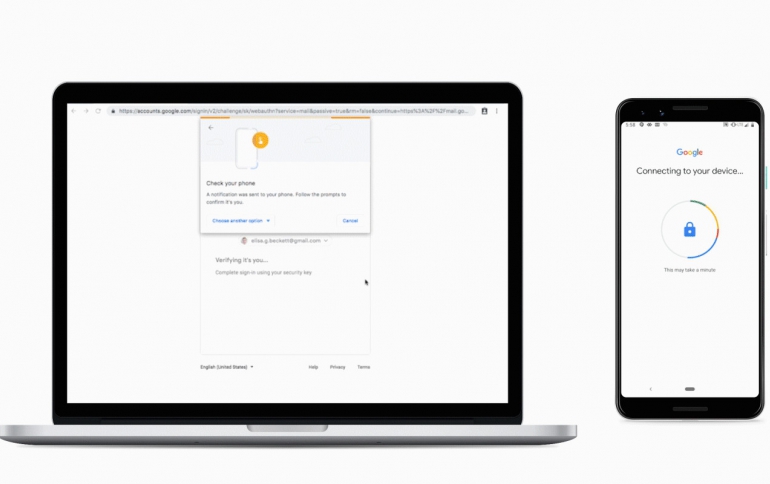
Now, users can add Android 7+ devices to the long list of options available to protect themselves from phishing and other credential-based attacks with FIDO Authentication. Currently, your Android phone can be a security key only for Google accounts. This means you can use your existing phone as your primary 2FA method for your work (G Suite, Cloud Identity, and GCP) and personal Google accounts to sign in on a Bluetooth-enabled Chrome OS, macOS X, or Windows 10 devices with a Chrome browser.

To activate your phone’s built-in security key, all you need is an Android 7.0+ phone and a Bluetooth-enabled Chrome OS, macOS X or Windows 10 computer with a Chrome browser. Here’s how to do it:

  • Add your Google Account to your Android phone.
  • Make sure you’re enrolled in 2SV.
  • On your computer, visit the 2SV settings and click "Add security key".
  • Choose your Android phone from the list of available devices—and you’re done.

When signing in, make sure Bluetooth is turned on on your phone and the device you are signing in on.
Tags: SecurityandroidFIDO
Previous Post
U.S. House Passes Bill to Restore ‘net neutrality’ Rules
Next Post
Google Announces Cloud Code to Accelerating Cloud-native Application Development

Related Posts

  • What’s new in Android 15, plus more updates

  • Connecting all things Android at MWC Barcelona

  • New features for businesses in Android 13

  • Lucky number Android 13: The latest features and updates

  • What’s beta than Android 13?

  • HP Threat Research Shows Attackers Exploiting Zero‐Day Vulnerability Before Enterprises Can Patch

  • HLDS UD Station DVDRW (Preview)

  • Samsung Develops New Security Chip For Mobile Devices

Latest News

Noctua at Computex 2026
Cooling Systems

Noctua at Computex 2026

GIGABYTE announces AORUS GeForce RTX 50 Series AI BOX
GPUs

GIGABYTE announces AORUS GeForce RTX 50 Series AI BOX

Sony Expands Professional Display Lineup with Crystal LED UNIFY
Consumer Electronics

Sony Expands Professional Display Lineup with Crystal LED UNIFY

PlayStation Plus Game Catalog for June 2026
Gaming

PlayStation Plus Game Catalog for June 2026

Introducing the Razer Seiren V3 Pro
Enterprise & IT

Introducing the Razer Seiren V3 Pro

Popular Reviews

Akaso 360 Action camera

Akaso 360 Action camera

Dragon Touch Digital Calendar

Dragon Touch Digital Calendar

Endorfy Thock V2 Wireless Keyboard

Endorfy Thock V2 Wireless Keyboard

be quiet! Pure Loop 3 280mm

be quiet! Pure Loop 3 280mm

Noctua NF-A12x25 G2 fans

Noctua NF-A12x25 G2 fans

Soft2bet and the unseen hardware that makes instant play possible

Soft2bet and the unseen hardware that makes instant play possible

Crucial T710 2TB NVME SSD

Crucial T710 2TB NVME SSD

be quiet! Pure power 13M 750W

be quiet! Pure power 13M 750W

Main menu

  • Home
  • News
  • Reviews
  • Essays
  • Forum
  • Legacy
  • About
    • Submit News

    • Contact Us
    • Privacy

    • Promotion
    • Advertise

    • RSS Feed
    • Site Map
  • About
  • Privacy
  • Contact Us
  • Promotional Opportunities @ CdrInfo.com
  • Advertise on out site
  • Submit your News to our site
  • RSS Feed