Breaking News

Sony Introduces New Colour to INZONE H9 II Headset and INZONE E9 In-ear Headphones Club 3D announces new products for October 2026 Razer Unveils All-New Wolverine V4 Line ASUS Republic of Gamers Ships ROG Rapture GT-BN98 Router GMK Unveils TriggerKey, a New Mechanical Key System for Greater Precision and Comfort

logo

  • Share Us
    • Facebook
    • Twitter
  • Home
  • Home
  • News
  • Reviews
  • Essays
  • About
    • Submit News

    • Contact Us
    • Privacy

    • Promotion
    • Advertise

    • RSS Feed

Search form

 Google Lens Get More productivity Features

Google Lens Get More productivity Features

Smartphones May 7,2020 0

Google is ading a few new features to Google Lens to make you more productive.

You can already use Lens to quickly copy and paste text from paper notes and documents to your phone to save time. Now, when you select text with Lens, you can tap "copy to computer" to quickly paste it on another signed-in device with Chrome. This is great for quickly copying handwritten notes and pasting it on your laptop without having to retype them all.

Copying text to your computer requires the latest version of Chrome, and for both devices to be signed into the same Google account.

Searches for learn a new language have doubled over the last few months. If you're using the extra time at home to pick up a new language, you can already use Lens to translate words in Spanish, Chinese and more than 100 other languages, by pointing your camera at the text.

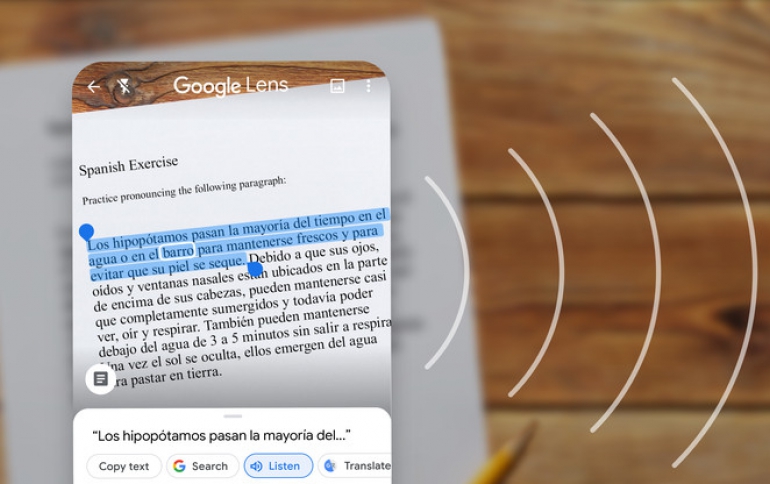
Now, you can also use Lens to practice words or phrases that are difficult to say. Select the text with Lens and tap the new Listen button to hear it read out loud.

If you come across a word or phrase you don’t understand in a book or newspaper, like “gravitational waves,” Google Lens can help. Now, with in-line Google Search results, you can select complex phrases or words to quickly learn more.

These features are rolling out today, except for Listen which is available on Android and coming soon to iOS. Lens is available in the Google app on iOS and the Google Lens app on Android.

Tags: Google LEns
Previous Post
AMD Socket AM4 Will be Compatible With Ryzen 3 Chips
Next Post
AMD Delivers Performance and Work Anywhere Flexibility with AMD Ryzen PRO 4000 Series Mobile Processors

Related Posts

  • Google Announces New Visual features in Search and Lens

  • Google Lens Enhanced, Recognizes More than one Billion Products

  • Google Lens Come to Google Images

Latest News

Sony Introduces New Colour to INZONE H9 II Headset and INZONE E9 In-ear Headphones
Consumer Electronics

Sony Introduces New Colour to INZONE H9 II Headset and INZONE E9 In-ear Headphones

Club 3D announces new products for October 2026
Consumer Electronics

Club 3D announces new products for October 2026

Razer Unveils All-New Wolverine V4 Line
Gaming

Razer Unveils All-New Wolverine V4 Line

ASUS Republic of Gamers Ships ROG Rapture GT-BN98 Router
Enterprise & IT

ASUS Republic of Gamers Ships ROG Rapture GT-BN98 Router

GMK Unveils TriggerKey, a New Mechanical Key System for Greater Precision and Comfort
PC components

GMK Unveils TriggerKey, a New Mechanical Key System for Greater Precision and Comfort

Popular Reviews

Endorfy Thock V2 Wireless Keyboard

Endorfy Thock V2 Wireless Keyboard

The Quiet Technology Behind the Spin

The Quiet Technology Behind the Spin

SoundPeats Cove Pro

SoundPeats Cove Pro

Akaso Brave 8 Lite

Akaso Brave 8 Lite

SoundPeats C30

SoundPeats C30

Kioxia Exceria Plus G3 512GB microSD

Kioxia Exceria Plus G3 512GB microSD

be quiet! Dark Perk Mice

be quiet! Dark Perk Mice

XbotGo Chamaleon

XbotGo Chamaleon

Main menu

  • Home
  • News
  • Reviews
  • Essays
  • About
    • Submit News

    • Contact Us
    • Privacy

    • Promotion
    • Advertise

    • RSS Feed
  • About
  • Privacy
  • Contact Us
  • Promotional Opportunities @ CdrInfo.com
  • Advertise on out site
  • Submit your News to our site
  • RSS Feed