Breaking News

SAMA Introduces the S32 WOOD, a Compact M-ATX Case Bundled with an 80 PLUS Gold PSU Thypoch Completes Simera-C Cine Prime Lineup with New 100mm T1.9 Lens CORSAIR Launches the RM1200e Power Supply with Built-in PinProtect GPU Overcurrent Protection and Platinum-certified Efficiency CORSAIR Changes the Game with PureVector, a Science-Based Personalized Aiming Technology, Launching Exclusively in the SABRE v3 PRO PureVector Mouse Series AMD FSR Upscaling 4.1 Boosts Frames and Image Quality on More Devices

logo

  • Share Us
    • Facebook
    • Twitter
  • Home
  • Home
  • News
  • Reviews
  • Essays
  • About
    • Submit News

    • Contact Us
    • Privacy

    • Promotion
    • Advertise

    • RSS Feed

Search form

BenQ DW1655

Jan 25,2006 0

23. QSuite Utility


Review Pages

1. Introduction
2. Reading Tests
3. CD Error Correction
4. DVD Error Correction
5. Protected Discs
6. CD Writing Tests
7. CD Writing Quality - Plextools
8. CD Writing Quality - Clover System
9. DVD Writing Tests
10. DVD Writing Quality - Page 1
11. DVD Writing Quality - Page 2
12. DVD Writing Quality - Page 3
13. DVD Writing Quality - Page 4
14. DVD Writing Quality - Page 5
15. DVD Writing Quality - Almedio
16. DVDR DL - Page 1
17. DVDR DL - Page 2
18. DW1655 vs SA300 - Page 1
19. DW1655 vs SA300 - Page 2
20. DW1655 vs SA300 - Page 3
21. DW1655 vs SA300 - Page 4
22. Booktype Support
23. QSuite Utility
24. LightScribe Feature
25. Firmware upgrade - BCDB
26. Conclusion


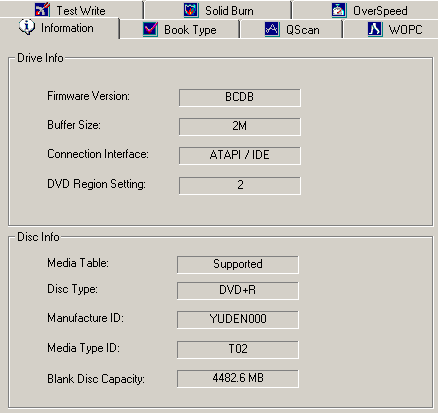
The QSuite utility is a management tool for BenQ drives, which can be used to enable or disable certain features, as well as run a Quality test or even simulate a burning. Let's have a look at the software's functions and analyse each one separately.

1. Information Tab

Under the Information tab, the user will find valuable info about their drive (in our case the DW-1655) such as Firmware Version and Region Setting, as well as any currently inserted media.
2. BookType Tab

As explained in the previous page, through the Booktype controls of the QSuite utility, the user can set the desired Booktype setting for each of the three eligible types of media (+R, +RW, +R DL), as well as collecting information on the current booktype of the inserted media.

3. QScan Tab

With the aid of this QScan feature, the user can test various blank media in order to achieve best results pertaining to media max speed and best quality burn.

4. WOPC Tab

The well known writing strategy used in BenQ drives can be disabled through the WOPC tab, even though BenQ informs that the results are not guaranteed (burned quality).

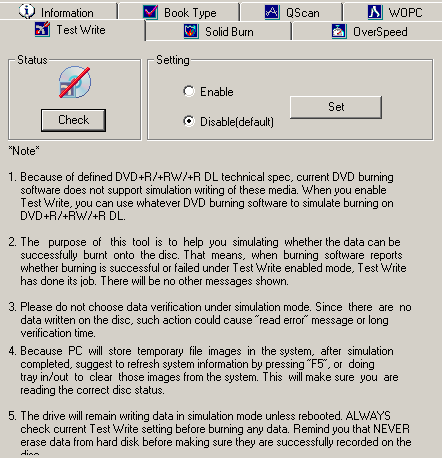
5. Test Write Tab

Through the Test write tab, the user can enable writing simulation with any burning software used (only for +R,+RW,+R DL).
6. Solid Burn Tab

Solid Burn can be adjusted to suit the end user's needs. In addition to that, the user can clean the learned disc pool (for the un-known media inserted).

7. Overspeed Tab

Overspeed is by default disabled, although the user can enable this function to achieve even higher writing speeds. Once again, quality may be affected through the use of this option.


Review Pages

1. Introduction
2. Reading Tests
3. CD Error Correction
4. DVD Error Correction
5. Protected Discs
6. CD Writing Tests
7. CD Writing Quality - Plextools
8. CD Writing Quality - Clover System
9. DVD Writing Tests
10. DVD Writing Quality - Page 1
11. DVD Writing Quality - Page 2
12. DVD Writing Quality - Page 3
13. DVD Writing Quality - Page 4
14. DVD Writing Quality - Page 5
15. DVD Writing Quality - Almedio
16. DVDR DL - Page 1
17. DVDR DL - Page 2
18. DW1655 vs SA300 - Page 1
19. DW1655 vs SA300 - Page 2
20. DW1655 vs SA300 - Page 3
21. DW1655 vs SA300 - Page 4
22. Booktype Support
23. QSuite Utility
24. LightScribe Feature
25. Firmware upgrade - BCDB
26. Conclusion
 

Pages

  • « first
  • ‹ previous
  • …
  • 18
  • 19
  • 20
  • 21
  • 22
  • 23
  • 24
  • 25
  • 26
  • next ›
  • last »

Benq

Tags: Benq
Previous Post
Toshiba MK1032GAX
Next Post
Club3D X1800XT

Related Posts

  • BenQ Releases True 4K HDR Smart Home Projectors Powered by Google

  • BenQ Debuts HDR Console Gaming Projector With High Brightness

  • BenQ Expands 4K UHD HDR Home Cinema Lineup With Midrange Projector

  • BenQ's True 4K UHD HDR Home Cinema Projector Debuts at Less Than $2000

  • BenQ Professional Designer Monitor Promises Individually Factory-Calibrated Color Precision

  • New BenQ SW320 Flagship Photographer Monitor Released

  • New BenQ Projector Supports 5-GHz WHDI Technology

  • BenQ to Showcase 3D-Ready Home Cinema Projectors, Mini Projectors, and Gaming Monitors at CES 2012

Latest Reviews

Why Intelligent Firmware Matters More Than Peak Throughput in NAS Systems
Enterprise & IT

Why Intelligent Firmware Matters More Than Peak Throughput in NAS Systems

Fanxiang MP83 M.2 NVMe SSD Enclosure
Enterprise & IT

Fanxiang MP83 M.2 NVMe SSD Enclosure

Ugreen CM642 USB4.0 Enclosure
PC components

Ugreen CM642 USB4.0 Enclosure

be quiet! Dark Power 14 IO
PC components

be quiet! Dark Power 14 IO

SanDisk High Endurance 512GB microSDXC
Cameras

SanDisk High Endurance 512GB microSDXC

Popular News

MSI’s Latest AMD X870E MAX & EVO Series Motherboards

MSI’s Latest AMD X870E MAX & EVO Series Motherboards

COLORFUL Launches iGame B850M ULTRA Series Micro-ATX Motherboards

COLORFUL Launches iGame B850M ULTRA Series Micro-ATX Motherboards

COLORFUL Presents Limited Edition Chitu MAG-60 Magnetic Keyboard Inspired by the Year of the Horse

COLORFUL Presents Limited Edition Chitu MAG-60 Magnetic Keyboard Inspired by the Year of the Horse

COLORFUL Launches iGame B850I MINI OC V14 Motherboard

COLORFUL Launches iGame B850I MINI OC V14 Motherboard

COLORFUL Launches the iGame X870E VULCAN W OC Motherboard

COLORFUL Launches the iGame X870E VULCAN W OC Motherboard

COLORFUL Presents iGame Z890 ULTRA-S W and iGame Z890M ULTRA Z Motherboards

COLORFUL Presents iGame Z890 ULTRA-S W and iGame Z890M ULTRA Z Motherboards

COLORFUL Expands B850 Motherboard Lineup with New CVN, Battle-Ax, and MEOW Models

COLORFUL Expands B850 Motherboard Lineup with New CVN, Battle-Ax, and MEOW Models

ASRock Adds Support for One Sub-Channel DRAM Module on Intel DDR5 Motherboards

ASRock Adds Support for One Sub-Channel DRAM Module on Intel DDR5 Motherboards

Main menu

  • Home
  • News
  • Reviews
  • Essays
  • About
    • Submit News

    • Contact Us
    • Privacy

    • Promotion
    • Advertise

    • RSS Feed
  • About
  • Privacy
  • Contact Us
  • Promotional Opportunities @ CdrInfo.com
  • Advertise on out site
  • Submit your News to our site
  • RSS Feed