Breaking News

CORSAIR Changes the Game with PureVector, a Science-Based Personalized Aiming Technology, Launching Exclusively in the SABRE v3 PRO PureVector Mouse Series AMD FSR Upscaling 4.1 Boosts Frames and Image Quality on More Devices TerraMaster TerraSync Update COLORFUL Launches iGame X870E ULTRA-S V14 Motherboard SWIT Packs 210Wh and 200W Output into Compact MINO-A Gold Mount Battery Series

logo

  • Share Us
    • Facebook
    • Twitter
  • Home
  • Home
  • News
  • Reviews
  • Essays
  • About
    • Submit News

    • Contact Us
    • Privacy

    • Promotion
    • Advertise

    • RSS Feed

Search form

Intel P35 Motherboard Roundup

Aug 30,2007 0

17. Conclusion


Review Pages

1. Introduction
2. Asus P5K Premium WiFi - Overview
3. Asus P5K Premium WiFi - The Package
4. Asus P5K Premium WiFi - BIOS and Installation
5. Asus P5K3 Deluxe WiFi - Overview
6. Asus P5K3 Deluxe WiFi - The Package
7. Asus P5K3 Deluxe WiFi - BIOS and Installation
8. Gigabyte P35-DQ6 - Overview
9. Gigabyte P35-DQ6 - The Package
10. Gigabyte P35-DQ6 - BIOS and Installation
11. Test Configuration
12. Everest Ultimate Edition 2006 - SiSoft Sandra
13. PCMARK - 3DMARK
14. Science Mark - PovRay - Nero Digital
15. CINEBENCH -SuperPI
16. Overclocking
17. Conclusion


- Overclocking

Motherboards should generally be good overclocks if they want to be popular amongst enthusiast users. For our overclocking attempts, we left as many settings at Auto to see how much we could overclock either the CPU or FSB. In our first attempt, we left the CPU multiplier locked at x9 and tried to raise the FSB, while checking for a fully stable system. We left all settings at auto (CPU/Memory voltages, memory timings/dividers) and allowed each motherboard to choose the best possible (i.e. highest) combination for the tested processor (Intel E6600).
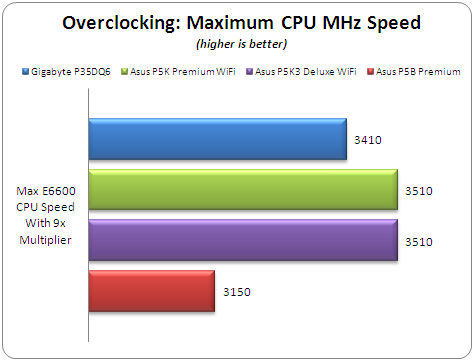
The best results were observed from the two Asus P5K motherboards. Without making any adjustments to the voltages and memory timings, we overclocked our Intel E6600 (2.4GHz) up to 3.510GHz. The Gigabyte P35-DQ6 was a little lower at 3.410GHz. The "worst" performer in this case was the P5B Premium. With auto settings, we could only get up to 3.150GHz overclocking speed. Below you can view the CPU-Z screenshots for each motherboard:

  • Gigabyte P35-DQ6 (#1, #2)
  • Asus P5K Premium (#1, #2)
  • Asus P5K3 Deluxe (#1, #2)

Next test was to lower the internal CPU multiplier (x6) and try to get the maximum possible FSB frequency. Without making any special adjustments and leaving all voltages at auto (except FSB/NB), we got....

The best performance came from the Gigabyte P35-DQ6 and Asus P5K3 Deluxe, which managed to reach 490MHz FSB without any problem and with perfect stability. The Asus P5K Premium is very close at 485MHz. Below you can view the CPU-Z screenshots for each motherboard:

  • Gigabyte P35-DQ6 (#1, #2)
  • Asus P5K Premium (#1, #2)
  • Asus P5K3 Deluxe (#1, #2)

- Overclocking stability

Apart from the fact that all motherboards overclocked well, there are some notes we have to make. The Asus P5B Premium, Gigabyte P35-DQ6 and Asus P5K Premium showed the best overclocking stability, since after each failure, they managed to POST back to original settings.

With the latest 0801 BIOS from Asus, the Asus P5K3 Deluxe unleashed its performance and showed superb overclocking performance and stability, with all settings left at Auto. It's highly recommended that you update your Asus P5K3 Deluxe with the 0801 BIOS when it becomes available:

The problems faced with the SuperTalent DDR3-1600CL7 were also solved and we managed to get a high 1850MHz overclocking speed as our recent review showed.


Review Pages

1. Introduction
2. Asus P5K Premium WiFi - Overview
3. Asus P5K Premium WiFi - The Package
4. Asus P5K Premium WiFi - BIOS and Installation
5. Asus P5K3 Deluxe WiFi - Overview
6. Asus P5K3 Deluxe WiFi - The Package
7. Asus P5K3 Deluxe WiFi - BIOS and Installation
8. Gigabyte P35-DQ6 - Overview
9. Gigabyte P35-DQ6 - The Package
10. Gigabyte P35-DQ6 - BIOS and Installation
11. Test Configuration
12. Everest Ultimate Edition 2006 - SiSoft Sandra
13. PCMARK - 3DMARK
14. Science Mark - PovRay - Nero Digital
15. CINEBENCH -SuperPI
16. Overclocking
17. Conclusion


 

Pages

  • « first
  • ‹ previous
  • …
  • 9
  • 10
  • 11
  • 12
  • 13
  • 14
  • 15
  • 16
  • 17

Intel

P35

Tags: Intel P35
Previous Post
Behringer BCD3000
Next Post
Super Talent Vista Exelerator

Related Posts

  • Akasa Launches Newton N16, Compact Fanless Case for ASUS NUC 16 Pro

  • Intel Gamer Days 2026 Kicking Off with AAA Gaming Bundle - Partnerships

  • Intel Arc G-Series Processors Set a New Standard for Handheld PC Gaming

  • Intel at Computex 2026

  • Intel Launches Intel Core Series 3 Processors

  • ASRock Unveils Intel Arc Pro B70 Graphics Cards, Redefining Professional Workspaces

  • G.SKILL DDR5 Memory Kits Confirmed as Intel XMP 3.0 'Ready' for Intel Core Ultra 200S Plus Series Processors

  • Intel Launches New Core Ultra 200HX Plus Series Mobile Processors

Latest Reviews

Fanxiang MP83 M.2 NVMe SSD Enclosure
Enterprise & IT

Fanxiang MP83 M.2 NVMe SSD Enclosure

Ugreen CM642 USB4.0 Enclosure
PC components

Ugreen CM642 USB4.0 Enclosure

be quiet! Dark Power 14 IO
PC components

be quiet! Dark Power 14 IO

SanDisk High Endurance 512GB microSDXC
Cameras

SanDisk High Endurance 512GB microSDXC

Samsung PRO Ultimate 512GB microSDXC
Cameras

Samsung PRO Ultimate 512GB microSDXC

Popular News

MSI’s Latest AMD X870E MAX & EVO Series Motherboards

MSI’s Latest AMD X870E MAX & EVO Series Motherboards

COLORFUL Launches iGame B850M ULTRA Series Micro-ATX Motherboards

COLORFUL Launches iGame B850M ULTRA Series Micro-ATX Motherboards

COLORFUL Presents Limited Edition Chitu MAG-60 Magnetic Keyboard Inspired by the Year of the Horse

COLORFUL Presents Limited Edition Chitu MAG-60 Magnetic Keyboard Inspired by the Year of the Horse

COLORFUL Launches iGame B850I MINI OC V14 Motherboard

COLORFUL Launches iGame B850I MINI OC V14 Motherboard

COLORFUL Launches the iGame X870E VULCAN W OC Motherboard

COLORFUL Launches the iGame X870E VULCAN W OC Motherboard

COLORFUL Presents iGame Z890 ULTRA-S W and iGame Z890M ULTRA Z Motherboards

COLORFUL Presents iGame Z890 ULTRA-S W and iGame Z890M ULTRA Z Motherboards

COLORFUL Expands B850 Motherboard Lineup with New CVN, Battle-Ax, and MEOW Models

COLORFUL Expands B850 Motherboard Lineup with New CVN, Battle-Ax, and MEOW Models

ASRock Adds Support for One Sub-Channel DRAM Module on Intel DDR5 Motherboards

ASRock Adds Support for One Sub-Channel DRAM Module on Intel DDR5 Motherboards

Main menu

  • Home
  • News
  • Reviews
  • Essays
  • About
    • Submit News

    • Contact Us
    • Privacy

    • Promotion
    • Advertise

    • RSS Feed
  • About
  • Privacy
  • Contact Us
  • Promotional Opportunities @ CdrInfo.com
  • Advertise on out site
  • Submit your News to our site
  • RSS Feed