
Breaking News

ASUS Announces T1 GeForce RTX 5070 and RTX 5060 Ti Graphics Cards COLORFUL Launches iGame B850M ULTRA Series Micro-ATX Motherboards Sony Unveils 1000X THE COLLEXION Samsung Launches Next-Gen Odyssey, ViewFinity and The Movingstyle Essential Monitors LG Electronics Introduces World’s First Native 1000Hz Full HD Gaming Monitor

logo

  • Share Us
    • Facebook
    • Twitter
  • Home
  • Home
  • News
  • Reviews
  • Essays
  • Forum
  • Legacy
  • About
    • Submit News

    • Contact Us
    • Privacy

    • Promotion
    • Advertise

    • RSS Feed
    • Site Map

Search form

AC Ryan PlayOnHD!

Jan 11,2010 0

6. Playing media files


Review Pages

1. Basic features
2. The package
3. Powering up the player
4. Setup Menus
5. Installing a HDD
6. Playing media files
7. Online services
8. Final words


With all these video files stored into our player's HDD, we are ready to watch them. All you need to do is to navigate through the desired folder and select a video file. The the AC Ryan PlayonHD! player will automatically preview the video file (right area of TV). Pressing the 'enter' will maximize the screen (full screen):
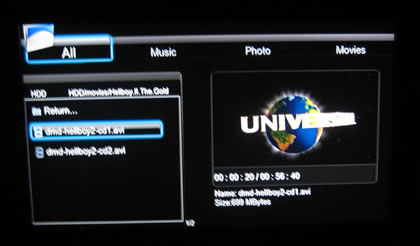
The 'info' button gives us information about the file size, the filename and the elapsed/remaining playback time:

Pressing again the 'info' button will get us more information about the video/audio formats of the selected file:

The FF/FW functions work very well and fast - up to 32x. The player will also conveniently display the exact minute of the movie you are currently navigating through - another usefully function we missed when we tested some other media players:
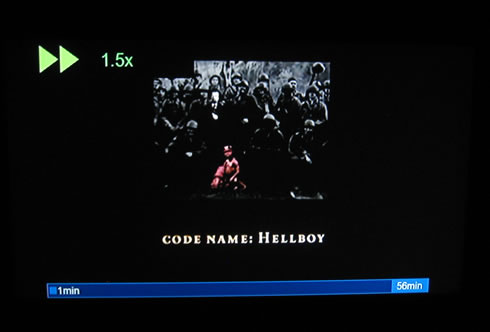
The AC Ryan PlayonHD! is also displaying SRT subtitles perfectly:

Support for more complicated languages such as "Greek" and many other Eastern European/Asia languages is also available:

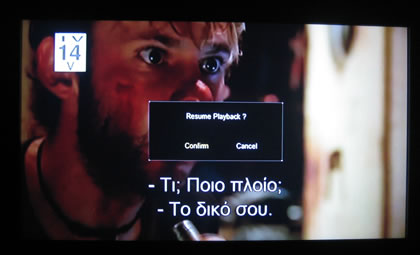
and Greek subtitles are displayed without any issues, as we have experienced with some other media players:

If you stop the play back and then select the file again, a resume option is available:
Another neat feature of the PlayonHD! player is the ability to stretch movies so they can fully displayed in your TV screen. For example, a WMV HD file isn't automatically stretched, but this can be done using the zoom (+) button. We hope that AC Ryan will make this feature work automatically so users won't have to press the zoom button again and again (very useful for Cartoon TV Series).

You can select among the 'fit,' 'stretch,' 'wide' as well as more options for the picture stretching:

- Audio playback

The player can also reproduce audio files. In our case, we tested several MP3 files (VBR quality) and we didn't have any issues. Information about the artist, title or album of the audio file you have selected is available. Too bad that there is not any equalizer and maybe some visual effects are present here:

Most of the DTS/THX formats are also supported:

However, the Dolby Digital+ 7.1 and the Dolby TrueHD 7.1 formats are not supported (unknown codec, no sound):

The AC. Ryan PlayonHD! also supports playback of ISO DVD-Video and Blu-Ray movies. The player will accept any non copy-protected content. For any other content, a software such as the AnyDVD HD could help..
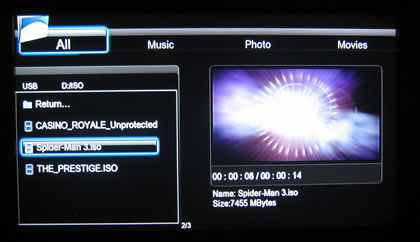
The DVD-Menus were working perfectly:
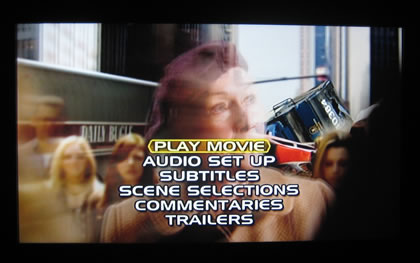
Although Blu-Ray ISO images do not include any working menus (for now), the main movie works just fine.


Review Pages

1. Basic features
2. The package
3. Powering up the player
4. Setup Menus
5. Installing a HDD
6. Playing media files
7. Online services
8. Final words


Pages

  • « first
  • ‹ previous
  • 1
  • 2
  • 3
  • 4
  • 5
  • 6
  • 7
  • 8
  • next ›
  • last »

AC Ryan

Tags: AC Ryan
Previous Post
Tuniq Tower 120 Extreme
Next Post
Club3D HD5770

Related Posts

  • AC Ryan And Twentieth Century Fox To Promote X-MEN: First Class Movie

  • AC Ryan Launches VEOLO Smart Android Hub For TV

  • AC Ryan Playon!HD Mini 2 review

  • AC Ryan PlayOn!HD2 review

  • AC RYAN Launches Latest PLAYON!DVRHD Full HD Media Player And Recorder

Latest Reviews

The Technology Stack Behind Modern Digital Gaming Platforms
Consumer Electronics

The Technology Stack Behind Modern Digital Gaming Platforms

be quiet! Dark Rock Pro 6
Cooling Systems

be quiet! Dark Rock Pro 6

How Online Casinos Use Encryption, Verification, and Risk Controls to Build User Trust
Enterprise & IT

How Online Casinos Use Encryption, Verification, and Risk Controls to Build User Trust

Why Low-Latency Infrastructure Matters More Than Raw Specs
Enterprise & IT

Why Low-Latency Infrastructure Matters More Than Raw Specs

In the Age of AI Phishing, the Best User Experience Might Be the One That Feels Safest
Enterprise & IT

In the Age of AI Phishing, the Best User Experience Might Be the One That Feels Safest

Popular News

TEAMGROUP Launches EXPERT P34F Find My External SSD

TEAMGROUP Launches EXPERT P34F Find My External SSD

CORSAIR announces Vanguard Pro 96 and Vanguard 96 Gaming Keyboards

CORSAIR announces Vanguard Pro 96 and Vanguard 96 Gaming Keyboards

Samsung announces Galaxy Tab S11 and Galaxy S25 FE series

Samsung announces Galaxy Tab S11 and Galaxy S25 FE series

Viltrox Showcases Upcoming Lens Lineup and New TTL Flash at IBC 2025

Viltrox Showcases Upcoming Lens Lineup and New TTL Flash at IBC 2025

MSI Launches FORGE GK600 TKL WIRELESS Special Edition Compact Mechanical Keyboard

MSI Launches FORGE GK600 TKL WIRELESS Special Edition Compact Mechanical Keyboard

Panasonic Introduces the First Ultra-Telephoto Zoom Lens in the LUMIX S Series

Panasonic Introduces the First Ultra-Telephoto Zoom Lens in the LUMIX S Series

MSI Launches DATAMAG 40Gbps Magnetic Portable SSD

MSI Launches DATAMAG 40Gbps Magnetic Portable SSD

Viltrox Joins the L-Mount Alliance, Expanding Creative Possibilities

Viltrox Joins the L-Mount Alliance, Expanding Creative Possibilities

Main menu

  • Home
  • News
  • Reviews
  • Essays
  • Forum
  • Legacy
  • About
    • Submit News

    • Contact Us
    • Privacy

    • Promotion
    • Advertise

    • RSS Feed
    • Site Map
  • About
  • Privacy
  • Contact Us
  • Promotional Opportunities @ CdrInfo.com
  • Advertise on out site
  • Submit your News to our site
  • RSS Feed