Breaking News

Kioxia and Sandisk Extend Yokkaichi Joint Venture Agreement Through 2034 KIOXIA Unveils EXCERIA PRO G2 SD Memory Card Series Leica announces Noctilux-M 35 f/1.2 ASPH CORSAIR’s GALLEON 100 SD now Shipping Worldwide DJI Launches the RS 5, an All-New Lightweight Commercial Gimbal

logo

  • Share Us
    • Facebook
    • Twitter
  • Home
  • Home
  • News
  • Reviews
  • Essays
  • Forum
  • Legacy
  • About
    • Submit News

    • Contact Us
    • Privacy

    • Promotion
    • Advertise

    • RSS Feed
    • Site Map

Search form

Aopen MVP player

Sep 6,2004 0

10. Conclusions


Review Pages

1. Introduction - Retail Package
2. Inside the MVP Player
3. HDD Enclosure Installation
4. MVP Configuration
5. Video/Audio files analysis
6. File Mode
7. Photo Mode
8. Video Mode
9. Music Mode
10. Conclusions


AOpen MVP Player - Page 10

Conclusions

The AOpen MVP player is indeed a universal multimedia playback device. The question that still remains is will this device replace standard DVD players? And the answer is rather simple. This type of device is not yet able to replace stand-alone DVD players. But that was never the purpose of the MVP player. Simple DVD video menu functions are not supported, there is no option for 16:9 and 4:3 screen viewing, and last but not least, stand-alone DVD players offer better sound quality than the basic level stereo channel sound the MVP has to offer.

However, AOpen offers a versatile device that can be used as a simple DivX/XviD player, or even as a simple DVD player. Music playback sounds great with a wide range of supported quality formats, especially when equalizer presets are used.

The external HDD enclosure can also be used to convert a 2.5" hard disk into an external USB2.0 storage drive. The remote control makes things even easier, with a rather long range. Unfortunately, PC connectivity is something that we all missed, since the MVP player cannot be used as a card reader.
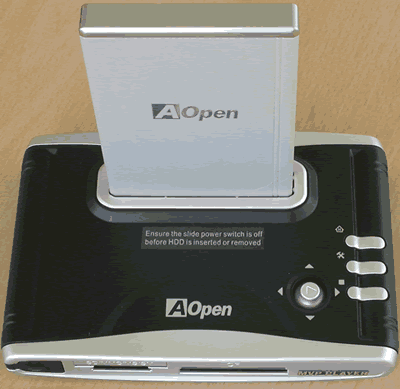
The device is available in two different colors, the black coloured device that we received, and a red coloured device. The retail package has everything a user will need to get started, but the hard disk drive is not included since this whould raise the price.

- The Good

  • Very easy to use
  • Full retail package that has anything users need to get started
  • Wide range of supported Video/Audio formats
  • Light weight and very small
  • Supports all popular media cards (SM, SD, MMC, MS, MS PRO, CF I/II/IBM Micro Drive)
  • S-Video/Composite and VGA support
  • JPEG slide show with background MP3 music
  • Supports rotate, zoom in photo, photo/video thumbnail, auto slide show
  • Can be fully programmeed with the provided remote control

- The Bad

  • No USB2.0 connectivity
  • Does not support WAV and OGG audio files
  • Cannot handle DVD video menu
  • Does not support DivX/XviD subtitles
  • No hardware support for Dolby Surround and 5.1 sound
  • Cannot handle video streams with Quarter Pixel flags (QPEL)
  • No support of anamorphic 16:9 widescreen format media
 

Review Pages

1. Introduction - Retail Package
2. Inside the MVP Player
3. HDD Enclosure Installation
4. MVP Configuration
5. Video/Audio files analysis
6. File Mode
7. Photo Mode
8. Video Mode
9. Music Mode
10. Conclusions


Pages

  • « first
  • ‹ previous
  • …
  • 2
  • 3
  • 4
  • 5
  • 6
  • 7
  • 8
  • 9
  • 10

Aopen

Tags: Aopen
Previous Post
BenQ DW1620A
Next Post
Optorite DD1205

Related Posts

  • AOPEN Introduces AMD-based Multi-Screen 4K Video Wall Solutions

  • SAMSUNG and AOpen To Jointly Promote Their Digital Signage Systems

  • AOpen Launched The XC mini MP45-BDR with Blu-ray Capabilities

  • AOpen's First Blu-ray Disc Drive BDR0412SA Released

  • AOpen Unveils 20X SATA DVD Burner

  • AOpen's DSW2012P 20X DVD burner

  • AOpen DSW1812P 18x DVD Burner Launched in the U.S.

  • Aopen Cube goes dual core

Latest Reviews

be quiet! Power Zone 2 1200W
PC components

be quiet! Power Zone 2 1200W

The Difference Between American and European Stakes and Why It Changes How People Bet
Enterprise & IT

The Difference Between American and European Stakes and Why It Changes How People Bet

Endorfy Thock V2 Wireless Keyboard
PC components

Endorfy Thock V2 Wireless Keyboard

Noctua NH-D15 G2 Chromax.Black
Cooling Systems

Noctua NH-D15 G2 Chromax.Black

EnGenius ECW520 AP
Enterprise & IT

EnGenius ECW520 AP

Popular News

COLORFUL Introduces CVN B850I GAMING FROZEN Motherboard

COLORFUL Introduces CVN B850I GAMING FROZEN Motherboard

COLORFUL Presents CVN X870 ARK FROZEN Motherboard for AMD Ryzen 9000 CPUs

COLORFUL Presents CVN X870 ARK FROZEN Motherboard for AMD Ryzen 9000 CPUs

TEAMGROUP Launches EXPERT P34F Find My External SSD

TEAMGROUP Launches EXPERT P34F Find My External SSD

ASRock AM5 Motherboards Now Fully Support AMD Ryzen 9 9950X3D & 9900X3D Processors

ASRock AM5 Motherboards Now Fully Support AMD Ryzen 9 9950X3D & 9900X3D Processors

Samsung announces Galaxy Tab S11 and Galaxy S25 FE series

Samsung announces Galaxy Tab S11 and Galaxy S25 FE series

Viltrox Showcases Upcoming Lens Lineup and New TTL Flash at IBC 2025

Viltrox Showcases Upcoming Lens Lineup and New TTL Flash at IBC 2025

CORSAIR announces Vanguard Pro 96 and Vanguard 96 Gaming Keyboards

CORSAIR announces Vanguard Pro 96 and Vanguard 96 Gaming Keyboards

Panasonic Introduces the First Ultra-Telephoto Zoom Lens in the LUMIX S Series

Panasonic Introduces the First Ultra-Telephoto Zoom Lens in the LUMIX S Series

Main menu

  • Home
  • News
  • Reviews
  • Essays
  • Forum
  • Legacy
  • About
    • Submit News

    • Contact Us
    • Privacy

    • Promotion
    • Advertise

    • RSS Feed
    • Site Map
  • About
  • Privacy
  • Contact Us
  • Promotional Opportunities @ CdrInfo.com
  • Advertise on out site
  • Submit your News to our site
  • RSS Feed