Breaking News

TerraMaster Offers up to 25% Off on Selected NAS & DAS Razer Debuts the New Seiren V3 Chroma Pulsar and Noctua release Feinmann F01 Noctua Edition gaming mouse ASUS Republic of Gamers Announces Availability of ROG Swift OLED PG27UCWM and PG32UCWM Tandem RGB OLED Gaming Monitors TAMRON announces 12-20mm F2.8 Ultra Wide-Angle Zoom

logo

  • Share Us
    • Facebook
    • Twitter
  • Home
  • Home
  • News
  • Reviews
  • Essays
  • Forum
  • Legacy
  • About
    • Submit News

    • Contact Us
    • Privacy

    • Promotion
    • Advertise

    • RSS Feed
    • Site Map

Search form

Asus Extreme Striker

Jan 16,2007 0

11. Overclocking


Review Pages

1. Intro - Specs
2. Retail package
3. Bios settings
4. Installation
5. Benchmarks page 1
6. Benchmarks page 2
7. Benchmarks page 3
8. Benchmarks page 4
9. Benchmarks page 5
10. Benchmarks page 6
11. Overclocking
12. Final words


The Asus Striker Extreme is based on the Nvidia 680i SLI, which offers many options within the BIOS to optimize voltage, CPU multiplier and of course, FSB. This motherboard is advertised as an overclocking champion, so we had to find out if Asus' claim was true.

The most impressive feature of this board is the ability to raise the memory voltage up to 3.45V! Of course, such a high voltage will "fry" your memory modules, but in any case, it's a good option for serious overclockers. The memory settings from within the BIOS offer the chance to have both FSB and memory linked or unlinked, and don't forget that you can run 1T with this board. Great help for overclockers too. If something goes wrong (such as settings the memory/cpu cannot handle), the board resumes in about 90% of cases. So no need for CMOS reset and he like.

Let's now pass on to our results. The board could POST at a maximum of 470FSB, lowering of course the CPU multiplier to 6x. We didn't touch vcore voltages and only DRAM was set to 2.20V. It's possible that you need to adjust NBB and set Vcore voltages higher, to get a totally perfect, stable system.
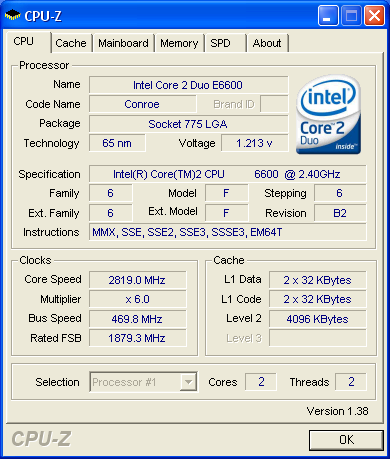
Having read other users reports, this board can definitely go up to 500+FSB (with the proper voltage tweaks and the selected CPU/RAM combination). Overall, we are very satisfied with the overclocking capabilities of this board, and with a bit of work, you can have a fully stable system.

Below are our settings that reached 470MHZ FSB

AI Tuning: Manual
Nvidia GPU Ex: Disabled
LinkBoost: Disabled

FSB - Memory Clock Mode: Unlinked
x FSB - Memory Ratio: N/A
FSB (QDR), Mhz: 1880 (means 470FSB)
Actual FSB (QDR), Mhz: 1700
MEM (DDR), Mhz: 800 (means 400mhz speeds)
Actual MEM (DDR), Mhz: 880.2

Vcore Voltage: AUTO
Memory Voltage: 2AUTO
1.2v HT Voltage: AUTO
NB Core Voltage: AUTO
SB Core Voltage: AUTO
CPU VTT Voltage: AUTO
DDRII Controller Ref Voltage: AUTO
DDRII Channel A Ref Voltage: AUTO
DDRII Channel B Ref Voltage: AUTO

tCL (CAS Latency): 4
tRCD: 4
tRP: 4
tRAS: 8
Command Per Clock (CMD): 2 clock (2T)

Advance Memory Settings
tRRD: AUTO
tRC: AUTO
tWR: AUTO
tWTR: AUTO
tREF: AUTO
Async Latency: AUTO

CPU Spread Spectrum: Disabled
PCIE Spread Spectrum: Disabled
MCP PCIE Spread Spectrum: Disabled
SATA Spread Spectrum: Disabled
LDT Spread Spectrum: Disabled

CPU Internal Thermal Control: Disabled
Limit CPUID MaxVal: Disabled
Enhanced C1 (C1E): Disabled
Execute Disable Bit: Disabled
Virtualization Technology: Disabled
Enhanced Intel Speedstep Tech: Disabled
LDT Frequency: 5x

PCIEX16_1 Frequency (Mhz): 100
PCIEX16_2 Frequency (Mhz): 100
PCIEX16_3 Frequency (Mhz): 100
SPP<->MCP Ref Clock, Mhz: 200


Review Pages

1. Intro - Specs
2. Retail package
3. Bios settings
4. Installation
5. Benchmarks page 1
6. Benchmarks page 2
7. Benchmarks page 3
8. Benchmarks page 4
9. Benchmarks page 5
10. Benchmarks page 6
11. Overclocking
12. Final words


Pages

  • « first
  • ‹ previous
  • …
  • 4
  • 5
  • 6
  • 7
  • 8
  • 9
  • 10
  • 11
  • 12
  • next ›
  • last »

ASUS

Tags: ASUS
Previous Post
Asus P5N32-E SLI
Next Post
Apple's iPhone

Related Posts

  • ASUS Announces T1 GeForce RTX 5070 and RTX 5060 Ti Graphics Cards

  • ASUS Announces ProArt GeForce RTX 5090 Graphics Card

  • ASUS Announces ProArt Display OLED PA27USD and PA32USD

  • ASUS Announces TUF Gaming Platinum Power Supply Series

  • ASUS Announces ProArt PA40SU USB4 SSD Enclosure

  • ASUS Showcases Comprehensive AI-Powered Creator Workflows at NAB Show 2026

  • ASUS Announces ProArt Router PRT-BE5000 and ProArt Switch PQG-U1080

  • ASUS Announces Intel Core Ultra 200S Plus Series Support on W880, Z890, Q870, B860 and H810 Motherboards

Latest Reviews

Latency Is No Longer a Backend Detail
Enterprise & IT

Latency Is No Longer a Backend Detail

Noctua NL-LC1-36
Cooling Systems

Noctua NL-LC1-36

Swit NP-FZ100 Battery
Cameras

Swit NP-FZ100 Battery

The Technology Stack Behind Modern Digital Gaming Platforms
Consumer Electronics

The Technology Stack Behind Modern Digital Gaming Platforms

be quiet! Dark Rock Pro 6
Cooling Systems

be quiet! Dark Rock Pro 6

Popular News

CORSAIR announces Vanguard Pro 96 and Vanguard 96 Gaming Keyboards

CORSAIR announces Vanguard Pro 96 and Vanguard 96 Gaming Keyboards

TEAMGROUP Launches EXPERT P34F Find My External SSD

TEAMGROUP Launches EXPERT P34F Find My External SSD

MSI Launches FORGE GK600 TKL WIRELESS Special Edition Compact Mechanical Keyboard

MSI Launches FORGE GK600 TKL WIRELESS Special Edition Compact Mechanical Keyboard

Samsung announces Galaxy Tab S11 and Galaxy S25 FE series

Samsung announces Galaxy Tab S11 and Galaxy S25 FE series

Viltrox Showcases Upcoming Lens Lineup and New TTL Flash at IBC 2025

Viltrox Showcases Upcoming Lens Lineup and New TTL Flash at IBC 2025

Panasonic Introduces the First Ultra-Telephoto Zoom Lens in the LUMIX S Series

Panasonic Introduces the First Ultra-Telephoto Zoom Lens in the LUMIX S Series

MSI Launches DATAMAG 40Gbps Magnetic Portable SSD

MSI Launches DATAMAG 40Gbps Magnetic Portable SSD

Viltrox Joins the L-Mount Alliance, Expanding Creative Possibilities

Viltrox Joins the L-Mount Alliance, Expanding Creative Possibilities

Main menu

  • Home
  • News
  • Reviews
  • Essays
  • Forum
  • Legacy
  • About
    • Submit News

    • Contact Us
    • Privacy

    • Promotion
    • Advertise

    • RSS Feed
    • Site Map
  • About
  • Privacy
  • Contact Us
  • Promotional Opportunities @ CdrInfo.com
  • Advertise on out site
  • Submit your News to our site
  • RSS Feed