
Asus Maximus Extreme
2. The package
Review Pages
2. The package
3. BIOS settings
4. Testing configuration
5. Benchmarks - EVEREST Ultimate Edition
6. Benchmarks - SiSoftware Sandra
7. Benchmarks - PCMark05, 3DMark 06
8. Benchmarks - Science Mark 2.0, Pov-Ray
9. Benchmarks - MAXON CINEBENCH
10. Benchmarks - SuperPI
11. Benchmarks - SYSmark 2007 Preview, WorldBench
12. Lost Planet: Extreme Condition
13. Overclocking
14. Asus AI Gear 3
15. Summary
The Asus Maximus Extreme costs between 260 and 280 Euros (+shipping), according to prices found online. It is cheaper than the Asus P5E3 Deluxe WiFi edition, since those two models are not exactly the same in terms of features. The main differences are that the P5E3 Deluxe includes a 802.11n WiFi card and the ExtremeGateway bootup system, while the Maximus Extreme is more oriented for hardcore users.
The retail package follows the usual design of Asus special edition motherboards, with all the needed logos printed to inform you about the motherboard's unique features. We did noticed that the retail box is somewhat bigger than the usual Asus motherboards:

Opening the retail box, we find many cables, various connectors and adapters.


Below is a list of what's included in the package
- 1x UltraDMA 133/100/66 cable
- 1x FDD cable
- 3x Thermal sensor cables
- 6 x Serial ATA cables
- 1x 2-port Serial ATA power cable
- 1x ASUS EL I/Q-Shield
- 1x printed quick start guide
- 1x printed user's manual
- 1x DVD-ROM with drivers/with various software
- 1x 3 in 1 Q-connector
- 1x 2-port USB2.0 / 1-port IEEE1394 module
- 2 x Optional Fan for Water-Cooling or Passive-Cooling only
- Fusion Block System Accessory
- 1x LCD poster
- Cable ties, DIY Pedestal
The board itself looks very "clean" as most parts can be identified easily. Its overall dimensions are slightly bigger than P5E3 Deluxe (12"x 10.6" (30.5cm x 26.9cm) vs 12"x 9.6" (30.5cm x 24.4cm)) so it should be installed at a full ATX PC case.

Below is an overall overview of the motherboard layout

Let's take a closer look at the CPU area.

We can see an 8-phase power design and low heighted MOSFETs for minimum switching loss & lower temperature. The Ferrite Core chokes have lower hysteresis loss, while they all have long life conductive polymer capacitors. The Asus Maximus Extreme has many copper heatsinks around the CPU area all well connected with the central fusion block. According to Asus "...The Fusion Block System is a more efficient thermal solution compared to competing followers with complicated looks. By taking the entire integrated solution into design considerations, the user can enjoy exceptional thermal improvement to Northbridge, Southbridge, Crosslinx, and even VRM with a single connection. The Fusion Block System is the most versatile, efficient, and advanced thermal system there is on a motherboard...".

To be honest, the whole design does look better and more solid than what Asus has used at the Blitz Series (Formula/Extreme). The Intel X38 chipset as well as the CrossLinx get easily hot so a water cooling solution would perfectly match here. The height of these components is also low enough allowing you to possibly install bigger aftermarket coolers.
There are four DDR3 DIMMs for up to 8GB memory configurations:

Passing to the lower left, we find six (6) SATAII connectors and of course the ATA133 connectors, all colored in red to be easialy spotted . The Southbridge chip is also covered with a passive copper heatsink featuring the CrossLinx logo. The copper heatsink gets really hot, especially after overclocking so its suggested to use the included water cooling embedded system. There are also eight (8) additional fan connectors there:

Two power/reset buttons are present and they are very useful:

On the top left side of the mainboard there are the three PCI-e v2.0 x16 lanes (blue colored) that fully support the ATI Crossfire technology. Due to the CrossLinx technology, you can have a dual PCIe2.0 x16 or 1x PCIe2.0 x16 and dual x8 speed. According to Asus "...CrossLinx is a unique technology utilizing a dedicated special graphics controller to optimize PCIe allocation with x16, x8, x8 lanes. Such architecture eliminates the x4 bottleneck found on competing x16, x16, x4 solutions. Hence, the Crosslinx is able to provide faster graphics performance...
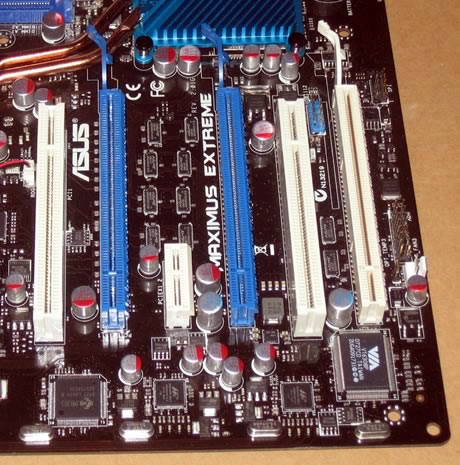
The newly adopted PCI-e v2.0 has higher bandwidth and several graphics cards are starting take advantage of it, like Nvidia's 8800GT and the upcoming ATI 3800 series. There is enough space between them, so you shouldn't have any problem when you will try to install oversized graphics cards.

The I/O panel has the following ports and connectors:
- 1 x PS/2 Keyboard port (purple)
- 1 x Optical + 1 x Coaxial S/PDIF Output
- 2 x External SATA
- 2 x LAN (RJ45) port
- 6 x USB 2.0/1.1 ports
- 1 x IEEE1394a port
- 1 x Clr CMOS switch
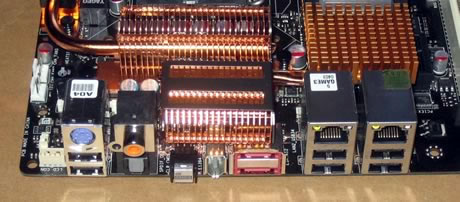
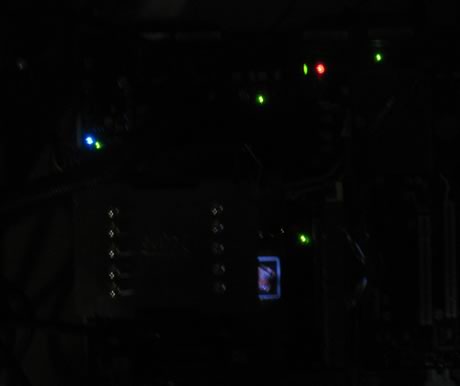
The PS2 Mouse port has been replaced by two USB2.0 ports. In the following pictures you can see the mainboard in the dark, where various leds on it indicate the operation conditions of the motherboard, in terms of overclocking/FSB and voltage level:

Of course all these LEDS be disabled under BIOS.
Review Pages
2. The package
3. BIOS settings
4. Testing configuration
5. Benchmarks - EVEREST Ultimate Edition
6. Benchmarks - SiSoftware Sandra
7. Benchmarks - PCMark05, 3DMark 06
8. Benchmarks - Science Mark 2.0, Pov-Ray
9. Benchmarks - MAXON CINEBENCH
10. Benchmarks - SuperPI
11. Benchmarks - SYSmark 2007 Preview, WorldBench
12. Lost Planet: Extreme Condition
13. Overclocking
14. Asus AI Gear 3
15. Summary





