
Asus Maximus Extreme
15. Summary
Review Pages
2. The package
3. BIOS settings
4. Testing configuration
5. Benchmarks - EVEREST Ultimate Edition
6. Benchmarks - SiSoftware Sandra
7. Benchmarks - PCMark05, 3DMark 06
8. Benchmarks - Science Mark 2.0, Pov-Ray
9. Benchmarks - MAXON CINEBENCH
10. Benchmarks - SuperPI
11. Benchmarks - SYSmark 2007 Preview, WorldBench
12. Lost Planet: Extreme Condition
13. Overclocking
14. Asus AI Gear 3
15. Summary
 The Asus Maximus Extreme is Asus' new motherboard for enthusiast and experienced users, based on the Intel X38 Express
chipset, offering full support for the not very cheap DDR3 memory.
The Asus Maximus Extreme is Asus' new motherboard for enthusiast and experienced users, based on the Intel X38 Express
chipset, offering full support for the not very cheap DDR3 memory.

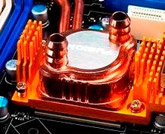
The X38 Express chipset offers two PCI-e v2.0 with official ATI Crossfire configuration. With Maximus Extreme, Asus has included CrossLinx, this way you can add a third video card and work at 16x, x8, 8x, when usual you are going for 16x, 16x, 4x. We assume Asus is correct about which setup is faster, since we didn't;t have three ATI based graphics cards to test this out. Again the specific additional chipset that allows this would be useful for specific users only, so consider it as a good addition. What's most obvious is the central fusion block, which is improved, compared to what we had seen in the Blitz Series. Asus includes all the needed cable and accessories for users to install their own water cooling system and of course add Maximus Extreme to the rig.
Compared with another Asus X38 motherboard, the P5E3 Deluxe WiFi Edition, we found that the P5E3 seems to be faster in memory tests, while Maximus Extreme is faster at the CPU tests. Again the performance differences are too small so we would say both motherboards performed more or less the same. As far as overclocking is concerned, we saw that both mainboards reached very easily the 490MHz FSB, with potential to go up even higher.
We had some issues when we attempted to overclock the SuperTalent DDR3 memory, at least when we selected the Auto settings. That is strange, because the P5E3 Deluxe WiFi Edition worked just fine with the exactly same components out-of-the-box so we assume it's a BIOS glitch.
Lastly, don't forget that this motherboard is slightly bigger than other motherboards (12"x 10.6" vs 12"x 9.6").
 Passing to the retail price, you can buy the Asus Maximus Extreme at the price range of 260~280 Euro, more or less 30~40 Euro less than P5E3 Deluxe WiFi Edition. Of course there is also the P5E3 Deluxe Edition (without WiFi) available that would cost you even less than Maximus Extreme. So we have three models with different features that give similar performance. What users should choose? Obviously the one that covers their needs. We could say that the Maximus Extreme represents Asus's top X38 model and aims at the overclocking community (with its water cooling ready system). However the P5E3 Deluxe WiFi edition is also a top performer, either in benchmarks or overclocking, so we could easily suggest both.
With the X48 chipset not planned to be released before Q2 2008, proceed and get your Asus Maximus Extreme now :-).
| Retail package |  |
| Features | |
| Price |  |
| Bios | |
| Performance | |
| Overclocking performance |  |
| Overclocking stability | |