BenQ DW1655
23. QSuite Utility
Review Pages
2. Reading Tests
3. CD Error Correction
4. DVD Error Correction
5. Protected Discs
6. CD Writing Tests
7. CD Writing Quality - Plextools
8. CD Writing Quality - Clover System
9. DVD Writing Tests
10. DVD Writing Quality - Page 1
11. DVD Writing Quality - Page 2
12. DVD Writing Quality - Page 3
13. DVD Writing Quality - Page 4
14. DVD Writing Quality - Page 5
15. DVD Writing Quality - Almedio
16. DVDR DL - Page 1
17. DVDR DL - Page 2
18. DW1655 vs SA300 - Page 1
19. DW1655 vs SA300 - Page 2
20. DW1655 vs SA300 - Page 3
21. DW1655 vs SA300 - Page 4
22. Booktype Support
23. QSuite Utility
24. LightScribe Feature
25. Firmware upgrade - BCDB
26. Conclusion
 The
QSuite utility is a management tool for BenQ drives, which can be used to enable
or disable certain features, as well as run a Quality test or even simulate
a burning. Let's have a look at the software's functions and analyse each one
separately.
The
QSuite utility is a management tool for BenQ drives, which can be used to enable
or disable certain features, as well as run a Quality test or even simulate
a burning. Let's have a look at the software's functions and analyse each one
separately.
1. Information Tab
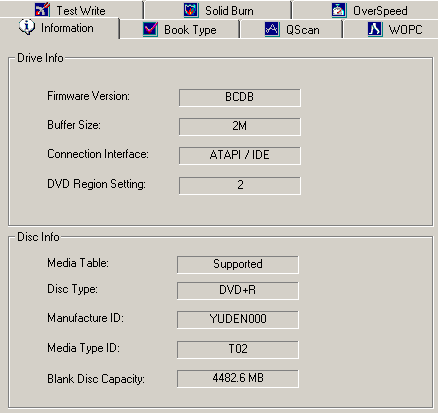
Under the Information tab, the user will find valuable info about their drive (in our case the DW-1655) such as Firmware Version and Region Setting, as well as any currently inserted media.
2. BookType Tab
As explained in the previous page, through the Booktype controls of the QSuite utility, the user can set the desired Booktype setting for each of the three eligible types of media (+R, +RW, +R DL), as well as collecting information on the current booktype of the inserted media.

3. QScan Tab
With the aid of this QScan feature, the user can test various blank media in order to achieve best results pertaining to media max speed and best quality burn.

4. WOPC Tab
The well known writing strategy used in BenQ drives can be disabled through the WOPC tab, even though BenQ informs that the results are not guaranteed (burned quality).

5. Test Write Tab
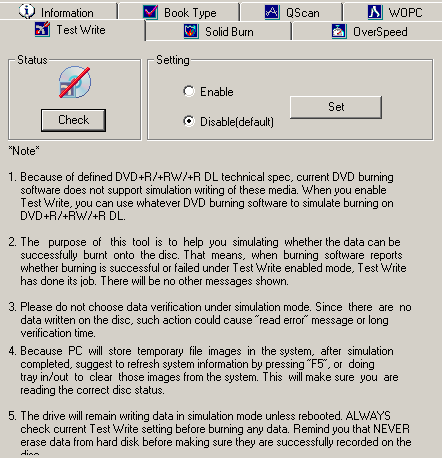
Through the Test write tab, the user can enable writing simulation with any burning software used (only for +R,+RW,+R DL).
6. Solid Burn Tab
Solid Burn can be adjusted to suit the end user's needs. In addition to that, the user can clean the learned disc pool (for the un-known media inserted).

7. Overspeed Tab
Overspeed is by default disabled, although the user can enable this function to achieve even higher writing speeds. Once again, quality may be affected through the use of this option.

Review Pages
2. Reading Tests
3. CD Error Correction
4. DVD Error Correction
5. Protected Discs
6. CD Writing Tests
7. CD Writing Quality - Plextools
8. CD Writing Quality - Clover System
9. DVD Writing Tests
10. DVD Writing Quality - Page 1
11. DVD Writing Quality - Page 2
12. DVD Writing Quality - Page 3
13. DVD Writing Quality - Page 4
14. DVD Writing Quality - Page 5
15. DVD Writing Quality - Almedio
16. DVDR DL - Page 1
17. DVDR DL - Page 2
18. DW1655 vs SA300 - Page 1
19. DW1655 vs SA300 - Page 2
20. DW1655 vs SA300 - Page 3
21. DW1655 vs SA300 - Page 4
22. Booktype Support
23. QSuite Utility
24. LightScribe Feature
25. Firmware upgrade - BCDB
26. Conclusion