
Breaking News

Intel Launches Intel Core Series 3 Processors Sony at NAB Show 2026 ADATA Launches URBAN TAPSAFE External SSD Sony Expands Gaming Gear Range with INZONE H6 Air and INZONE M10S II Transcend Launches RDE3 microSD Express Card Reader for Next-Generation High-Speed Performance

logo

  • Share Us
    • Facebook
    • Twitter
  • Home
  • Home
  • News
  • Reviews
  • Essays
  • Forum
  • Legacy
  • About
    • Submit News

    • Contact Us
    • Privacy

    • Promotion
    • Advertise

    • RSS Feed
    • Site Map

Search form

BenQ DW822A

May 3,2004 0

13. Booktype change


Review Pages

1. Package - Installation
2. Data CD Reading Tests
3. CD Error Correction Tests
4. DVD reading tests
5. DVD Error Correction Tests
6. Protected Disc Tests
7. DAE Tests
8. CD Recording Tests
9. Writing quality - 3T Jitter Tests
10. C1 / C2 Error Measurements
11. DVD Recording Tests
12. KProbe PI/PO quality tests
13. Booktype change
14. Conclusion


BenQ DW822A 8X Dual - Page 13

The BenQ Book Type Management program allows you to freely choose a DVD+RW or DVD+R disc to be written as DVD-Rom book type, the most recongnizable format for DVD players.

The user is able to set the Booktype Setting to either the drive itself, in order to record all DVD+R/+RW media as a "DVD-ROM" or to already recorded DVD+RW discs. Note that the bitsetting of a recorded DVD+R cannot be changed.

We used the latest version of Book Type Ver 7.0 and a rewritable DVD+RW media.
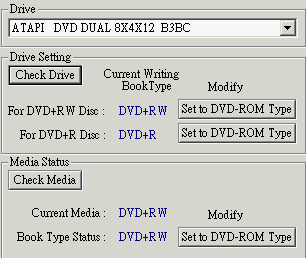
When we launched Book Type Management, the book type status of the insterted rewritable media was the DVD+RW, as expected.

In the media status tab we set the media type to DVD-ROM:
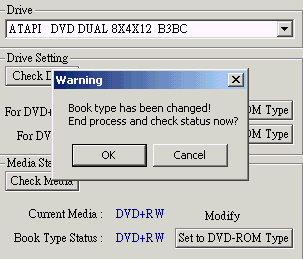


The process finished after about 4 seconds and a warning dialog message informed us that the book type had changed.


When we checked the Book Type status of the tested media, it was recognized as a DVD-ROM.

In the majority of cases, you will not need to change the book type of your DVD media, as most DVD players and DVD-ROM drives have no problem reading recordable DVD media. However, some players (especially older models) cannot recognize discs that are characterized as DVD+RW/-RW or DVD+R/-R book types. In these instances, this compatibility issue can be easily resolved by changing the book type of the DVD media being written to DVD-ROM. The end user should also notice that:

  • Only DVD+RW discs can “change” book type after being burnt.
  • DVD+R discs can’t change book type after burning. You have to set the writing book type mode of your writer before you burn a DVD+R disc.
  • This tool can only be used for BENQ drives


Review Pages

1. Package - Installation
2. Data CD Reading Tests
3. CD Error Correction Tests
4. DVD reading tests
5. DVD Error Correction Tests
6. Protected Disc Tests
7. DAE Tests
8. CD Recording Tests
9. Writing quality - 3T Jitter Tests
10. C1 / C2 Error Measurements
11. DVD Recording Tests
12. KProbe PI/PO quality tests
13. Booktype change
14. Conclusion


Pages

  • « first
  • ‹ previous
  • …
  • 6
  • 7
  • 8
  • 9
  • 10
  • 11
  • 12
  • 13
  • 14
  • next ›
  • last »

Tags:
Previous Post
BenQ DW830A DL recorder
Next Post
Optorite DD0405

Related Posts

Latest Reviews

In the Age of AI Phishing, the Best User Experience Might Be the One That Feels Safest
Enterprise & IT

In the Age of AI Phishing, the Best User Experience Might Be the One That Feels Safest

SoundPeats C30
Consumer Electronics

SoundPeats C30

Why Streaming Live Casino Games Demands Smarter Tech
Enterprise & IT

Why Streaming Live Casino Games Demands Smarter Tech

Kioxia Exceria Plus G3 512GB microSD
Cameras

Kioxia Exceria Plus G3 512GB microSD

SoundPeats Cove Pro
Consumer Electronics

SoundPeats Cove Pro

Popular News

TEAMGROUP Launches EXPERT P34F Find My External SSD

TEAMGROUP Launches EXPERT P34F Find My External SSD

Samsung announces Galaxy Tab S11 and Galaxy S25 FE series

Samsung announces Galaxy Tab S11 and Galaxy S25 FE series

Viltrox Showcases Upcoming Lens Lineup and New TTL Flash at IBC 2025

Viltrox Showcases Upcoming Lens Lineup and New TTL Flash at IBC 2025

CORSAIR announces Vanguard Pro 96 and Vanguard 96 Gaming Keyboards

CORSAIR announces Vanguard Pro 96 and Vanguard 96 Gaming Keyboards

Panasonic Introduces the First Ultra-Telephoto Zoom Lens in the LUMIX S Series

Panasonic Introduces the First Ultra-Telephoto Zoom Lens in the LUMIX S Series

MSI Launches DATAMAG 40Gbps Magnetic Portable SSD

MSI Launches DATAMAG 40Gbps Magnetic Portable SSD

MSI Launches FORGE GK600 TKL WIRELESS Special Edition Compact Mechanical Keyboard

MSI Launches FORGE GK600 TKL WIRELESS Special Edition Compact Mechanical Keyboard

Viltrox Joins the L-Mount Alliance, Expanding Creative Possibilities

Viltrox Joins the L-Mount Alliance, Expanding Creative Possibilities

Main menu

  • Home
  • News
  • Reviews
  • Essays
  • Forum
  • Legacy
  • About
    • Submit News

    • Contact Us
    • Privacy

    • Promotion
    • Advertise

    • RSS Feed
    • Site Map
  • About
  • Privacy
  • Contact Us
  • Promotional Opportunities @ CdrInfo.com
  • Advertise on out site
  • Submit your News to our site
  • RSS Feed



