
CD Protection Overview
5. DiscGuard
Review Pages
2. CD Protections
3. Cactus Data Shield
4. CD-Cops
5. DiscGuard
6. LaserLock
7. LockBlocks
8. MusicGuard
9. ProtectCD
10. SafeCast
11. SafeDisc
12. SafeDisc 2
13. SecuROM
14. The Copy-Protected CD & The Bongle
15. CD Protections using other means to "protect" the CD
16. Console CD protection
17. Other Recources
DiscGuard
(
TTR Technologies Inc.)
History
TTR Technologies Inc. was established in 1994, and since February 1997 has been publicly traded. The company's US offices are located in New York and Silicon Valley. The company's research & development, as well as sales for the Middle East and Europe are handled through TTR in Israel. TTR has distributors in Japan and China, and sales representatives in South Korea and Singapore.
Product: DiscGuard
DiscGuard is an anti-piracy technology for optical media that works by putting a "signature" onto a glass master during mastering, using a specially enhanced mastering machine, or onto a CD-R via DG-Author, a forthcoming product (Q3 '99) consisting of a specially enhanced CD-R recorder with proprietary software. It effects two basic changes to the software package:
- The main executable files on a DiscGuard-protected
CD-ROM are encrypted.
- A special digital signature is inscribed onto a pressed CD-ROM, and mapped
into a software decryption key. The digital signature is not reproducible by
either counterfeiting (re-mastering) or disc burning.
When an authentic disc is used, the signature is present, decryption occurs and the application runs. The user is not even aware that the product is protected. When a copy is used, the signature is not present, no decryption occurs and the application does not run. Instead, a message, a limited demo, a link to an e-commerce web site or a presentation is launched. This transforms every illegal copy into a marketing tool and revenue generator.
How it works?
There are three main steps needed to make DiscGuard protected CD-ROMs
A.Protection: The software publisher protects the application using TTR's DG-Protector software. DG-Protector encrypts the executable files (.EXE's) and adds the ability to detect a valid DiscGuard signature. To verify that the application of anti-piracy protection has been successful, the publisher may install and test the protected application using a TestKey.
After testing, the publisher burns a "Client Master" CD-R containing the complete software package, including the protected files, and sends it to a DiscGuard authorized mastering & replication plant with the order documents.
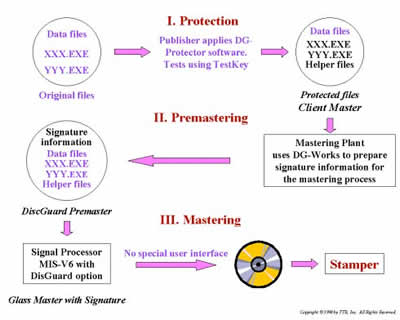
B.Premastering: Production of a DiscGuard premaster from the Client Master, using TTR's DG-Works software at a mastering facility. The premaster contains additional information needed to produce a digital signature, to be used by the mastering machine.
C.Mastering: A TTR-authorized mastering facility creates from the premaster a glass master containing the DiscGuard signature. After mastering, replication proceeds.
Price: Not available (at website)
How to recognize it
Theses files : IOSLINK.VXD and IOSLINK.SYS can be found on CD or Installation directory
Does it work in real life?
DiscGuard is also the second protection which cannot be copied with CloneCD. However again there are several tools out which will help you overcome this protection and <backup> your favorite CD.
Review Pages
2. CD Protections
3. Cactus Data Shield
4. CD-Cops
5. DiscGuard
6. LaserLock
7. LockBlocks
8. MusicGuard
9. ProtectCD
10. SafeCast
11. SafeDisc
12. SafeDisc 2
13. SecuROM
14. The Copy-Protected CD & The Bongle
15. CD Protections using other means to "protect" the CD
16. Console CD protection
17. Other Recources





