Breaking News

Sony Announces the Launch of Xperia 1 VIII Kioxia Unveils High Performance KIOXIA XG10 Series SSDs for PC OEMs AMD Expands AMD Ryzen PRO 9000 Series Processor Lineup Thypoch enters autofocus market with Voyager 24-50mm f/2.8 for Sony E-mount PlayStation Plus Game Catalog for May 2026

logo

  • Share Us
    • Facebook
    • Twitter
  • Home
  • Home
  • News
  • Reviews
  • Essays
  • Forum
  • Legacy
  • About
    • Submit News

    • Contact Us
    • Privacy

    • Promotion
    • Advertise

    • RSS Feed
    • Site Map

Search form

Creative Zen Hybrid

Jul 10,2022 0

3. How it works?


Review Pages

1. Introduction
2. The package
3. How it works?
4. SXFI READY
5. Performance
6. Conclusion


In order to operate the device you need first to charge it via USB Type-C. The package doesn't include any wall charger but we assume you must have already one handy. Another idea is to connect to a PC/MAC via the included USB-Type C to A cable, however you need at least 1A output to charge up the device at around 1.5h, else charging would be much slower.
According to specs, battery life is up to 37 hours with ANC turned off, up to 27 hours with ANC turned on, and offers up to 5 hours of playback with a quick 5-minute charge! Those numbers however should be taken with caution, since real life usage and result could be different.
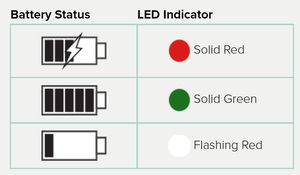
In case you need to remove included lithium 500mAh battery, users should first make sure the product is disconnected from the charging cable before removing the battery. Cover one of the battery terminals with insulation tape to prevent short circuit - not applicable to battery with connector. Then you need to

  1. Remove the Earcushion from the left Earcup Inner Frame
  2. Remove the Earcup Inner Ring from the left Earcup Inner Frame
  3. Unfasten the screws
  4. Open the left Earcup Inner Frame
  5. Remove the battery

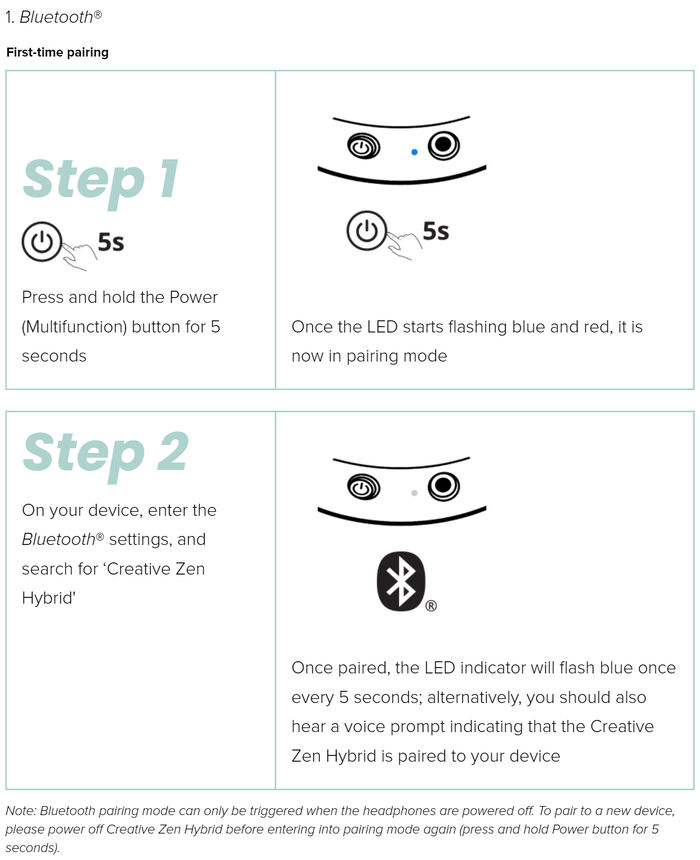
Audio playback and all other functions will not be available while it’s charging. All first-time pairing requires the headphones to be powered off before Bluetooth pairing mode can be triggered. If the headphones are in use, power it off to trigger pairing mode, refer to the included manual for further explanation/information.

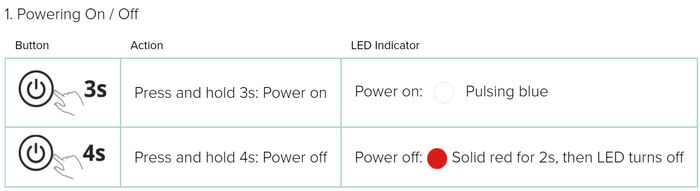
After powering up, you will need to connect to your phone/PC/MAC via the following procedure
Switching between wireless connectivity and wired analog mode is as easy as 1-2-3. Free yourself from wired hurdles when you’re out and about with wireless Bluetooth 5.0 and AAC audio codec; simply plug in a 3.5 mm analog cable to switch over to analog mode for an easy and straightforward music listening experience by simply plugging in to a compatible device.

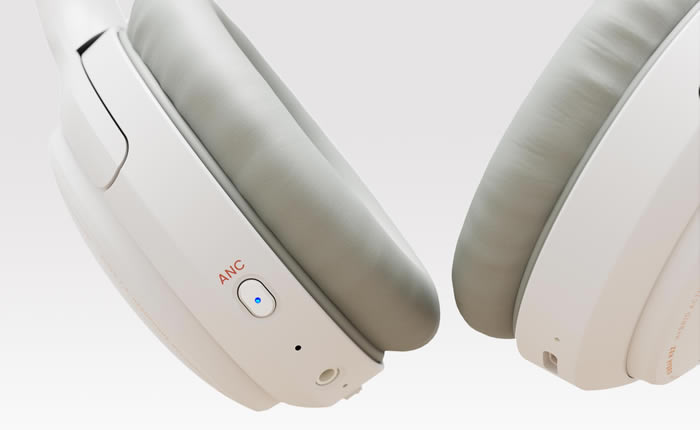
At the right earcup are all the needed buttons/controls.
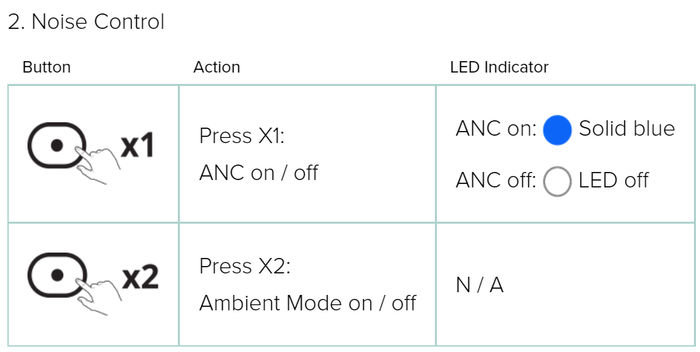
For the playback mode, you have the following options

and lastly, for the call modes:


Review Pages

1. Introduction
2. The package
3. How it works?
4. SXFI READY
5. Performance
6. Conclusion


Pages

  • « first
  • ‹ previous
  • 1
  • 2
  • 3
  • 4
  • 5
  • 6
  • next ›
  • last »

Creative

Tags: Creative
Previous Post
EnGenius ECW230S AP
Next Post
10 Top Majors for Students Who Aren't Sure

Related Posts

  • Creative Zen Air SXFI & Creative Zen Hybrid SXFI: Tap into the World of Super X-Fi

  • Super X-Fi Gen4: A New Sound Awaits

  • Creative introduces Aurvana Ace Series True Wireless Earbuds

  • Creative and Skyworth Partner to Unleash Next-Level Audio-Visual Experience with Super X-Fi

  • Creative Zen Hybrid Pro: Unlocking the Future of Audio

  • Creative and xMEMS Labs Partner to Deliver Superior High-Fidelity TWS Earbuds

  • Creative Stage SE: Power Up Your PC Audio

  • Creative Outlier Free Pro: This One's for the Pros

Latest Reviews

How Online Casinos Use Encryption, Verification, and Risk Controls to Build User Trust
Enterprise & IT

How Online Casinos Use Encryption, Verification, and Risk Controls to Build User Trust

Why Low-Latency Infrastructure Matters More Than Raw Specs
Enterprise & IT

Why Low-Latency Infrastructure Matters More Than Raw Specs

In the Age of AI Phishing, the Best User Experience Might Be the One That Feels Safest
Enterprise & IT

In the Age of AI Phishing, the Best User Experience Might Be the One That Feels Safest

SoundPeats C30
Consumer Electronics

SoundPeats C30

Why Streaming Live Casino Games Demands Smarter Tech
Enterprise & IT

Why Streaming Live Casino Games Demands Smarter Tech

Popular News

TEAMGROUP Launches EXPERT P34F Find My External SSD

TEAMGROUP Launches EXPERT P34F Find My External SSD

CORSAIR announces Vanguard Pro 96 and Vanguard 96 Gaming Keyboards

CORSAIR announces Vanguard Pro 96 and Vanguard 96 Gaming Keyboards

Samsung announces Galaxy Tab S11 and Galaxy S25 FE series

Samsung announces Galaxy Tab S11 and Galaxy S25 FE series

Viltrox Showcases Upcoming Lens Lineup and New TTL Flash at IBC 2025

Viltrox Showcases Upcoming Lens Lineup and New TTL Flash at IBC 2025

MSI Launches FORGE GK600 TKL WIRELESS Special Edition Compact Mechanical Keyboard

MSI Launches FORGE GK600 TKL WIRELESS Special Edition Compact Mechanical Keyboard

Panasonic Introduces the First Ultra-Telephoto Zoom Lens in the LUMIX S Series

Panasonic Introduces the First Ultra-Telephoto Zoom Lens in the LUMIX S Series

MSI Launches DATAMAG 40Gbps Magnetic Portable SSD

MSI Launches DATAMAG 40Gbps Magnetic Portable SSD

Viltrox Joins the L-Mount Alliance, Expanding Creative Possibilities

Viltrox Joins the L-Mount Alliance, Expanding Creative Possibilities

Main menu

  • Home
  • News
  • Reviews
  • Essays
  • Forum
  • Legacy
  • About
    • Submit News

    • Contact Us
    • Privacy

    • Promotion
    • Advertise

    • RSS Feed
    • Site Map
  • About
  • Privacy
  • Contact Us
  • Promotional Opportunities @ CdrInfo.com
  • Advertise on out site
  • Submit your News to our site
  • RSS Feed