Breaking News

Samsung Introduces Galaxy Tab S12 Series PlayStation Plus Monthly Games for October 2026 Logitech announces Zone Vibe Pro Headset Razer Expands Sanrio Collection With Pompompurin Eared Headset And Kuromi Earbuds TerraMaster Launches Storage Upgrade Season with Up to 30% Off During Prime Big Deal Days

logo

  • Share Us
    • Facebook
    • Twitter
  • Home
  • Home
  • News
  • Reviews
  • Essays
  • About
    • Submit News

    • Contact Us
    • Privacy

    • Promotion
    • Advertise

    • RSS Feed

Search form

Crucial X10Pro 2TB Portable SSD

Aug 2,2023 0

4. Tests


Review Pages

1. Introduction
2. Retail Package
3. Installation
4. Tests
5. Conclusion


To test the Crucial X10 Pro 2TB portable SSD, we used the included USB Type-C to Type-C with the following system configuration. Note that if you are using another type C-to-Type C cable, performance could be much slower, so for the best possible performance use only the included cable.

Our main test system was compiled from the following components and we used the front I/O USB Type-C port for all tests:

  • CPU: AMD Ryzen 9 7950X
  • Case: be quiet! Dark Base Pro 901
  • Case fans: 2x140 be quiet! Silent Wings 4 PWM
  • CPU Cooler: Noctua NH-U12A Chromax.Black + 2x120mm Stock Noctua fans
  • Motherboard: Asus ProArt X670E-CREATOR WIFI with 1516 BIOS
  • Memory: 2x16GB AddLink Spider X5 DDR5-6000MHz (EXPO Profile)
  • PSU: be quiet! Dark Pro 13 1300Watt
  • Main Storage: Samsung 980Pro 1TB
  • VGA: MSI GeForce RTX 4090 SUPRIM X 24G
  • Operating system: Windows 11 x64 + latest motherboard/AMD chipset drivers installed (DirectStorage enabled drive)

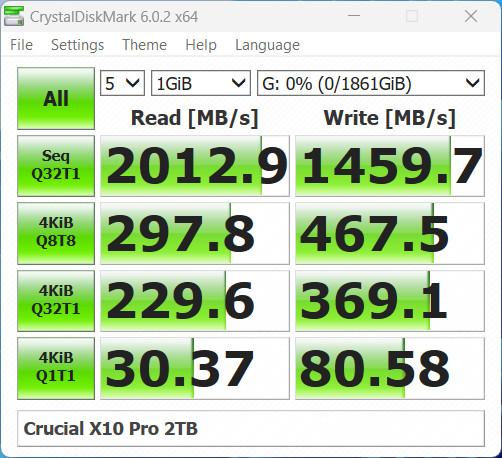
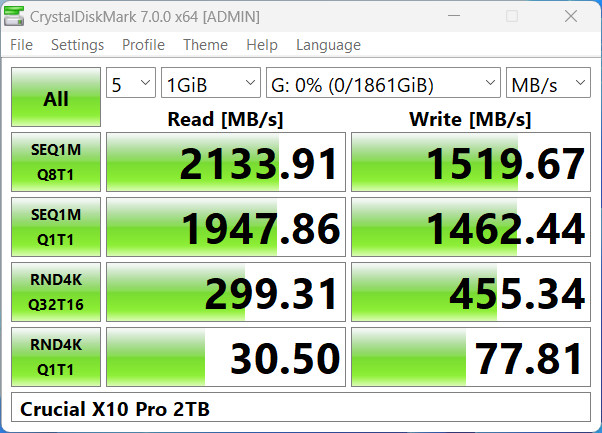
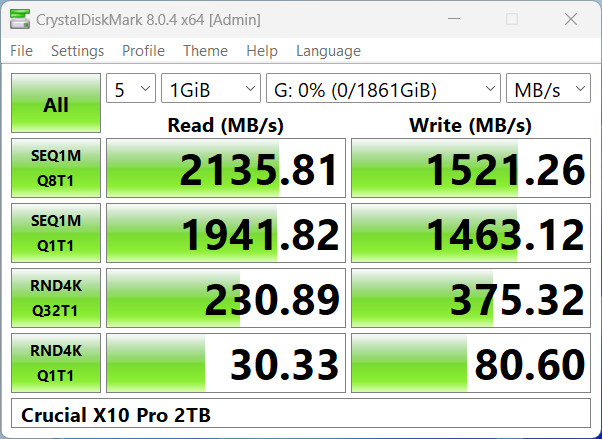
The CryctalDiskMark results are very good in most cases
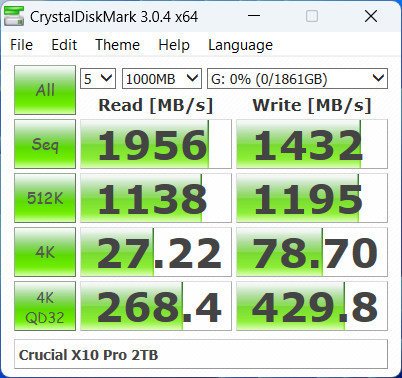
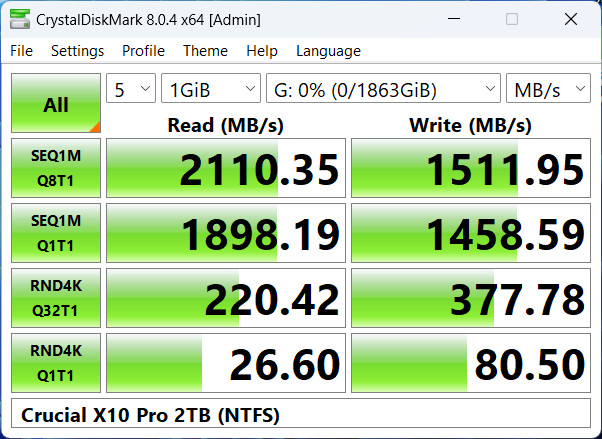
The latest version of CrystalDiskMark reports around 2.1GB/sec reading and 1.5GB/sec writing sequential files, which is half the advertised 2.1GB/sec reading and 2.0GB/sec writing speeds.
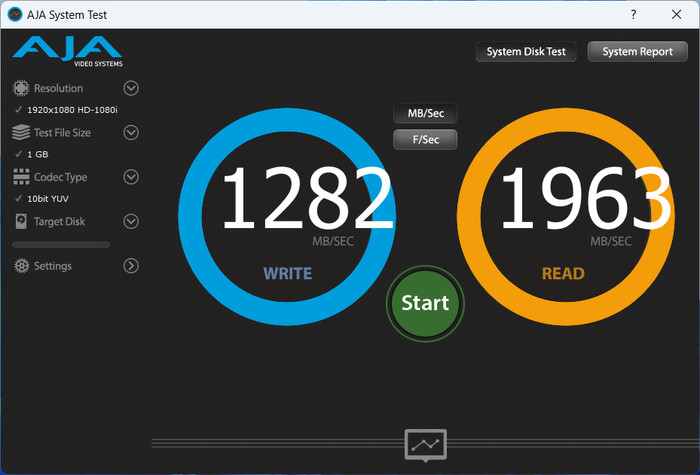
The AJA Test Suite also gives a quick read/write test result.
Passing to the AS SSD Benchmark, we got a low score of 1258 points. However, note that this software is mainly used in internal SSDs. With 4K files, performance is not great, which is why the overall score was low.
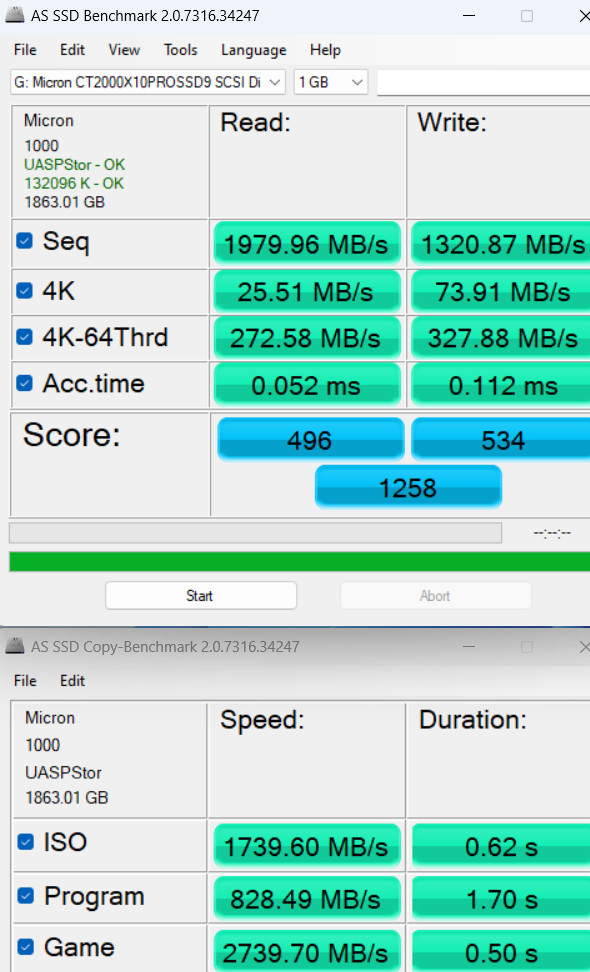
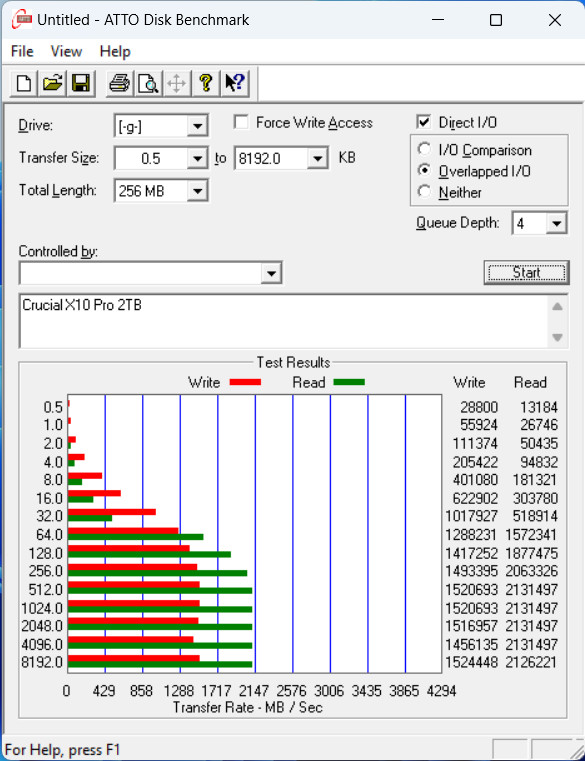
The ATTO Disk Benchmark v2.0 showed good performance after 32.0kb file size.
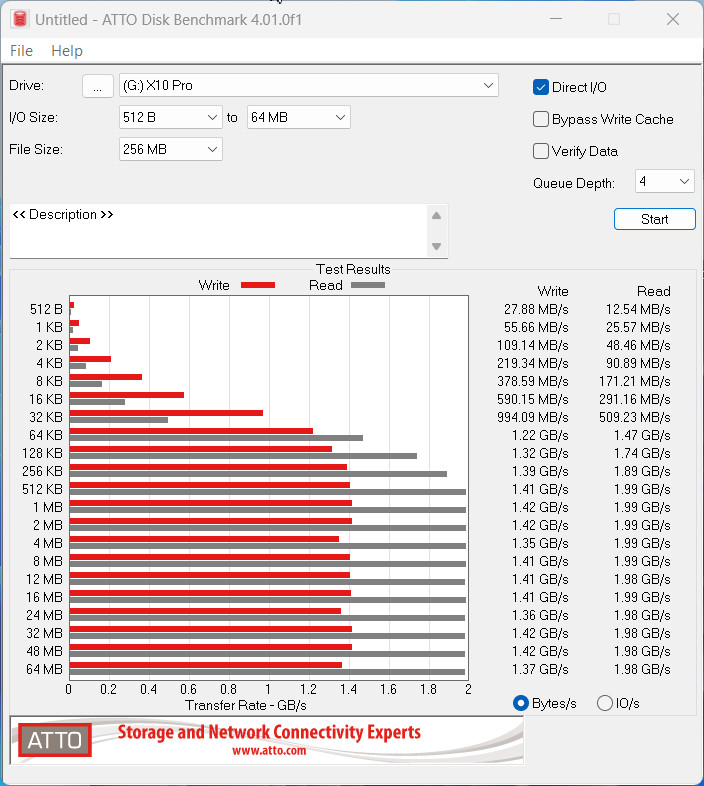
, while with the latest ATTO Disk Benchmark 4.01.0f1 version, we got a better view of the drive's performance. The drive will perform best if your usual transfers include a file size bigger than 32kb.
We didn't test the drive with I/O Meter, PCMark10, and 3DMark storage tests, since we feel that these tests should be performed with full size SSDs.

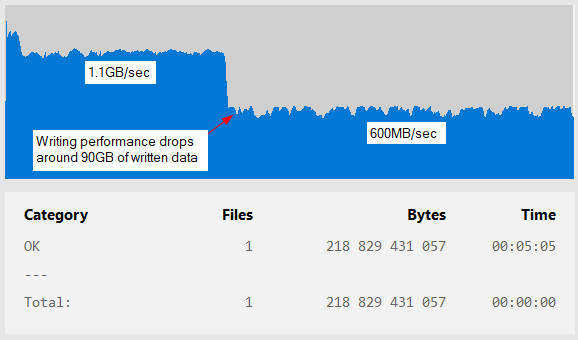
Then we tried to copy big files from the internal NVME SSD to the Crucial X10Pro Portable to test the writing endurance of the drive. The first test was to copy a 47GB single file with the Terracopy Software. The writing process was very good, and the Crucial X10Pro performed well with around 1.1GB/sec real writing speed. No writing speed drop was noticed.
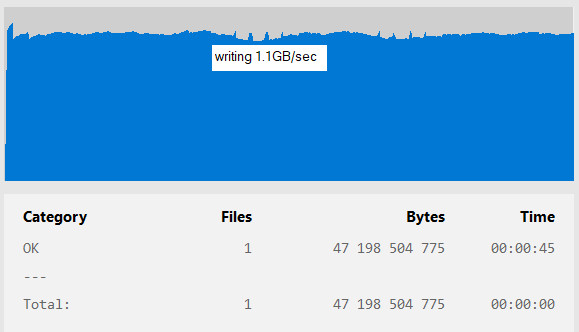
Performing the same test with a single 218GB file, gave us an idea, of what to expect when you are moving very big file sizes. In that case, while the drive started writing at 1.1GB/sec, after the 90GB point, it drops the writing speed down to 600MB/sec and finishes the test after 5mins and 5 secs.
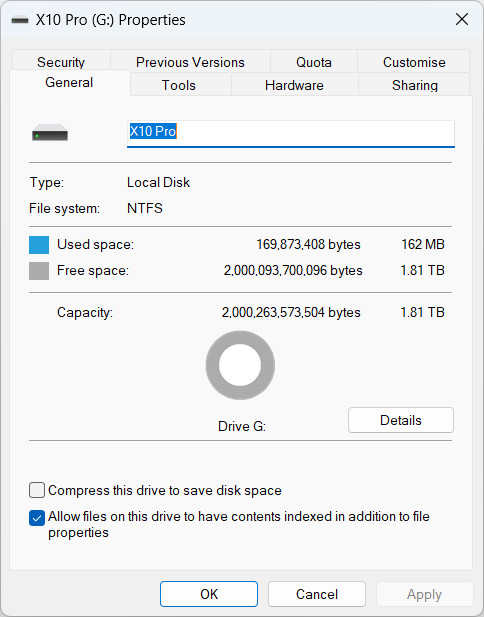
Crucial mentions that max performance should be achieved when the drive is under NTFS file format. So we formatted the drive with NTFS file format.
And performed again a quick CrystalDiskmark run, which, showed more or less similar performance with the exFAT (stock) file format.
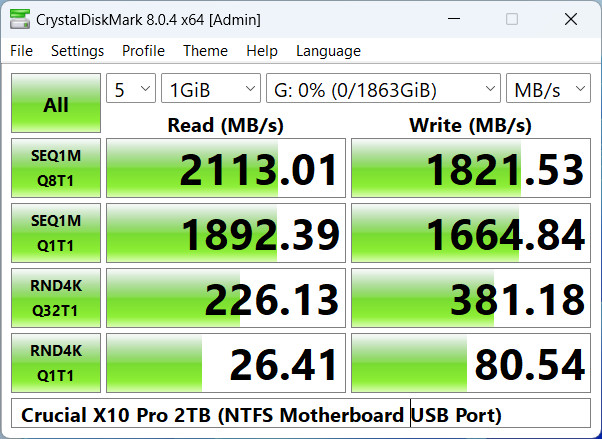
Since for most of our tests, we were using the front USB Type-C (Gen 3.2 2x2) we also moved the Crucial X10Pro to the motherboard's own Type-C Gen 3.2 2x2 port that the Asus ProArt X670E motherboard supports. In that case, we also a slight improvement in writing speeds. So if you have motherboard support at the back I/O panel, a USB TypeC Gen3.2 2x2 port, we highly suggest using it instead of the front ports.
 

Review Pages

1. Introduction
2. Retail Package
3. Installation
4. Tests
5. Conclusion


Pages

  • « first
  • ‹ previous
  • 1
  • 2
  • 3
  • 4
  • 5
  • next ›
  • last »

Crucial

Micron

Tags: Crucial Micron
Previous Post
Mountain Makalu Max
Next Post
Arctic Liquid Freezer II 360 Α-RGB

Related Posts

  • Micron in High-Volume Production of HBM4 Designed for NVIDIA Vera Rubin, PCIe Gen6 SSD and SOCAMM2

  • Micron Announces Exit from Crucial Consumer Business!!

  • Crucial P510 2TB NMVE

  • Crucial UK Black Friday SSD Deals Are Live

  • Crucial DDR5 Pro 6400 CL32

  • Micron Delivers Industry’s Highest Capacity SOCAMM2 for Low-Power DRAM in the AI Data Center

  • Crucial Unleashes Its Most Powerful Gaming Memory Yet: DDR5 Pro OC 6400 CL32

  • Crucial’s UK promos for Amazon’s Prime Day Deals 2025

Latest Reviews

Fanxiang MP83 M.2 NVMe SSD Enclosure
Enterprise & IT

Fanxiang MP83 M.2 NVMe SSD Enclosure

Ugreen CM642 USB4.0 Enclosure
PC components

Ugreen CM642 USB4.0 Enclosure

be quiet! Dark Power 14 IO
PC components

be quiet! Dark Power 14 IO

SanDisk High Endurance 512GB microSDXC
Cameras

SanDisk High Endurance 512GB microSDXC

Samsung PRO Ultimate 512GB microSDXC
Cameras

Samsung PRO Ultimate 512GB microSDXC

Popular News

MSI’s Latest AMD X870E MAX & EVO Series Motherboards

MSI’s Latest AMD X870E MAX & EVO Series Motherboards

COLORFUL Launches iGame B850M ULTRA Series Micro-ATX Motherboards

COLORFUL Launches iGame B850M ULTRA Series Micro-ATX Motherboards

COLORFUL Presents Limited Edition Chitu MAG-60 Magnetic Keyboard Inspired by the Year of the Horse

COLORFUL Presents Limited Edition Chitu MAG-60 Magnetic Keyboard Inspired by the Year of the Horse

COLORFUL Launches iGame B850I MINI OC V14 Motherboard

COLORFUL Launches iGame B850I MINI OC V14 Motherboard

COLORFUL Presents iGame Z890 ULTRA-S W and iGame Z890M ULTRA Z Motherboards

COLORFUL Presents iGame Z890 ULTRA-S W and iGame Z890M ULTRA Z Motherboards

COLORFUL Expands B850 Motherboard Lineup with New CVN, Battle-Ax, and MEOW Models

COLORFUL Expands B850 Motherboard Lineup with New CVN, Battle-Ax, and MEOW Models

ASRock Adds Support for One Sub-Channel DRAM Module on Intel DDR5 Motherboards

ASRock Adds Support for One Sub-Channel DRAM Module on Intel DDR5 Motherboards

Exceed the Infinite with New ASRock X870E Taichi White Motherboard

Exceed the Infinite with New ASRock X870E Taichi White Motherboard

Main menu

  • Home
  • News
  • Reviews
  • Essays
  • About
    • Submit News

    • Contact Us
    • Privacy

    • Promotion
    • Advertise

    • RSS Feed
  • About
  • Privacy
  • Contact Us
  • Promotional Opportunities @ CdrInfo.com
  • Advertise on out site
  • Submit your News to our site
  • RSS Feed