
Breaking News

G.SKILL Showcases DDR5-9200 1.1V 16GBx2 High-Speed CU-DIMM Memory Kit Sony Introduces BRAVIA 9 II and BRAVIA 7 II RGB TVs and the BRAVIA Theatre Trio Creative Announces Sound Blaster AE-X Acer Expands Gaming Portfolio With Predator Atlas 8 Handheld Powered by Intel COLORFUL Presents Limited Edition iGame GeForce RTX 5070 Ultra OC 12GB x 007 First Light Edition

logo

  • Share Us
    • Facebook
    • Twitter
  • Home
  • Home
  • News
  • Reviews
  • Essays
  • Forum
  • Legacy
  • About
    • Submit News

    • Contact Us
    • Privacy

    • Promotion
    • Advertise

    • RSS Feed
    • Site Map

Search form

Hercules DJ Console

Oct 20,2004 0

2. The Hardware


Review Pages

1. Introduction - Retail Package
2. The Hardware
3. Installation
4. The Software
5. USB Audio Card abilities
6. DJ Tests
7. Hardware Tests - Page 1
8. Hardware Tests - Page 2
9. Conclusion


Hercules DJ Console - Page 2

- The Hardware

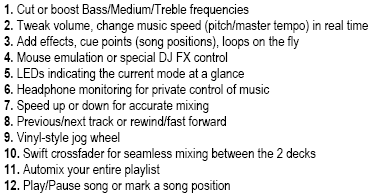
Looking at the console we notice a very orderly and organized layout but with quite a few buttons, knobs and LEDS, so it may take quite some time before you become familiar with their location and all their functions, especially for novice users:

Click To Enlarge!

The Hercules DJ Console includes:

  • 2 vinyl-style jog wheels for spinning and scratching, with finger grips for rapid, accurate song searching or speed adjustment
  • 1 crossfader for seamless mixing between the two decks
  • 6 ergonomic potentiometers and bass/medium/treble controls for creative remixing on the fly
  • 2 rotary encoders and 2 sliders for tweaking volume or changing the speed of music (pitch/master tempo) in real time
  • 28 buttons to play/pause songs, speed music up or down for accurate mixing (pitch bend), add effects, cue points (song positions) and loops on the fly, skip through tracks backwards or forwards, rewind or fast forward and more
  • A soft rubber ministick provides mouse emulation or allows for special DJ FX control

Below are more detailed views from the console:
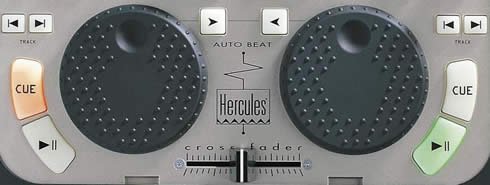
We can see the 2 vinyl-style jog wheels which are used for spinning and scratching, the crossfader slider, the cue/play/next-previous tracks and auto beat buttons. The Cue and Play/Pause buttons are backlit in orange and green, as shown int the photo above.
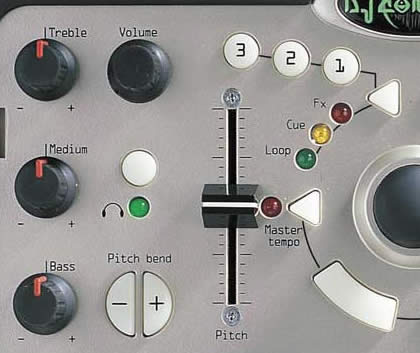
At the top of the console, we can find the treble/medium/bass and volume knobs, the pitch slider control, the FX/Cue/Loop buttons, the monitor and load buttons and the trackball joystick control.

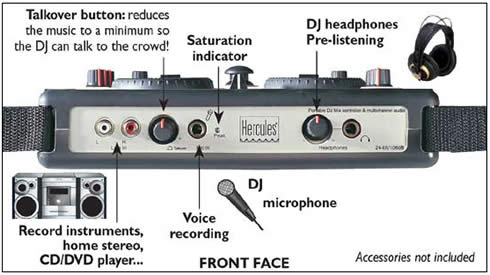
On the front side of the console we can see the stereo line input (2 RCA plugs), ¼ inch (6.35mm) stereo microphone input and ¼ inch (6.35mm) stereo headphone output.
You can very easily attach the included shoulder strap for easy transportation:

On the rear side of the unit, you will further find the digital optical/coaxial In/Out, MIDI In/Out, 5.1-channel output via minijack (3.5mm) or RCA plugs.
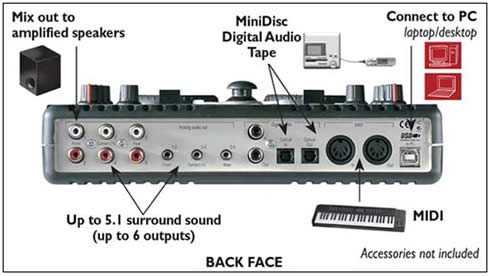
The Hercules DJ console, besides being a contoller, is also an external USB audio interface for any PC, with 16-bit, 48kHz sampling and 24-bit ADC/DAC. No external power supply is required, the device being powered by either of USB1/2 ports.


Review Pages

1. Introduction - Retail Package
2. The Hardware
3. Installation
4. The Software
5. USB Audio Card abilities
6. DJ Tests
7. Hardware Tests - Page 1
8. Hardware Tests - Page 2
9. Conclusion


Pages

  • « first
  • ‹ previous
  • 1
  • 2
  • 3
  • 4
  • 5
  • 6
  • 7
  • 8
  • 9
  • next ›
  • last »

Hercules

Tags: Hercules
Previous Post
NeuNeo HVD108 DVD Player
Next Post
Rome: Total War Review

Related Posts

  • Hercules DJ Console Mk4 for Mac and PC is Available

  • Hercules DJ Control MP3 e2

  • Hercules Puts Wireless Networking Within Reach Of The GeneralL Public

Latest Reviews

Swit NP-FZ100 Battery
Cameras

Swit NP-FZ100 Battery

The Technology Stack Behind Modern Digital Gaming Platforms
Consumer Electronics

The Technology Stack Behind Modern Digital Gaming Platforms

be quiet! Dark Rock Pro 6
Cooling Systems

be quiet! Dark Rock Pro 6

How Online Casinos Use Encryption, Verification, and Risk Controls to Build User Trust
Enterprise & IT

How Online Casinos Use Encryption, Verification, and Risk Controls to Build User Trust

Why Low-Latency Infrastructure Matters More Than Raw Specs
Enterprise & IT

Why Low-Latency Infrastructure Matters More Than Raw Specs

Popular News

TEAMGROUP Launches EXPERT P34F Find My External SSD

TEAMGROUP Launches EXPERT P34F Find My External SSD

CORSAIR announces Vanguard Pro 96 and Vanguard 96 Gaming Keyboards

CORSAIR announces Vanguard Pro 96 and Vanguard 96 Gaming Keyboards

Samsung announces Galaxy Tab S11 and Galaxy S25 FE series

Samsung announces Galaxy Tab S11 and Galaxy S25 FE series

MSI Launches FORGE GK600 TKL WIRELESS Special Edition Compact Mechanical Keyboard

MSI Launches FORGE GK600 TKL WIRELESS Special Edition Compact Mechanical Keyboard

Viltrox Showcases Upcoming Lens Lineup and New TTL Flash at IBC 2025

Viltrox Showcases Upcoming Lens Lineup and New TTL Flash at IBC 2025

Panasonic Introduces the First Ultra-Telephoto Zoom Lens in the LUMIX S Series

Panasonic Introduces the First Ultra-Telephoto Zoom Lens in the LUMIX S Series

MSI Launches DATAMAG 40Gbps Magnetic Portable SSD

MSI Launches DATAMAG 40Gbps Magnetic Portable SSD

Viltrox Joins the L-Mount Alliance, Expanding Creative Possibilities

Viltrox Joins the L-Mount Alliance, Expanding Creative Possibilities

Main menu

  • Home
  • News
  • Reviews
  • Essays
  • Forum
  • Legacy
  • About
    • Submit News

    • Contact Us
    • Privacy

    • Promotion
    • Advertise

    • RSS Feed
    • Site Map
  • About
  • Privacy
  • Contact Us
  • Promotional Opportunities @ CdrInfo.com
  • Advertise on out site
  • Submit your News to our site
  • RSS Feed
