
Breaking News

Samsung Introduces Galaxy Tab S12 Series PlayStation Plus Monthly Games for October 2026 Logitech announces Zone Vibe Pro Headset Razer Expands Sanrio Collection With Pompompurin Eared Headset And Kuromi Earbuds TerraMaster Launches Storage Upgrade Season with Up to 30% Off During Prime Big Deal Days

logo

  • Share Us
    • Facebook
    • Twitter
  • Home
  • Home
  • News
  • Reviews
  • Essays
  • About
    • Submit News

    • Contact Us
    • Privacy

    • Promotion
    • Advertise

    • RSS Feed

Search form

Hercules DJ Console

Oct 20,2004 0

6. DJ Tests


Review Pages

1. Introduction - Retail Package
2. The Hardware
3. Installation
4. The Software
5. USB Audio Card abilities
6. DJ Tests
7. Hardware Tests - Page 1
8. Hardware Tests - Page 2
9. Conclusion


Hercules DJ Console - Page 6

- DJ Tests

As we mentioned before, the bulked version of Virtual DJ is 1.08 (and with update 1.09). You can also use the newly released v2.01 Demo version, but important features will not work (like previewing next songs).

For our tests we mainly used Virtual DJ v2.00 from Atomix Productions. The full version compared with the demo, further supports:

  • Jogwheel scratch
  • Sound output from EACH of the decks in VDJ, giving you the ability to connect to external mixer
  • You can choose in VDJ setup or in VDJ skin (some support) if jogwheels are to be in nudge (speed up/down) or scratch mode

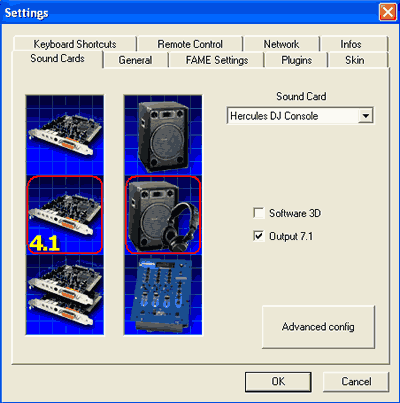
In VDJ 2.xx, to make Hercules work in one-output and headphone prelisten mode, go to the soundcard setup in VDJ, and browse all the way to the bottom of the setup images until you see the Hercules image, then choose it. Also, to get DUAL sound output, you need to select the 4.1 soundcard + external mixer image in the soundcard setup in VDJ (only available in full version, not demo).
After loading the Virtual DJ software, you'll see what should be a very familiar interface which resembles your DJ console:

We will assume you are already familiar with the basic elements of DJing, so we will simply present our thoughts after our extensive use of the VirtualDJ + Hercules DJ consoles, remebering however that we are not Pro DJs:-)

Positive

  • The VirtualDJ software corresponds very closely to the hardware. The crossfader not only moves on the hardware console, but also in the software, while the wheels are very good for scratching.
  • The Hercules DJ Console can handle almost all Virtual DJ functions, except for beatlock.
  • The cue/stop buttons on the console work much like on real CD players, which most Pro DJs will like.
  • The build quality of the console is good, although Pro users may wish for a metal instead of plastic case.
  • The sound production from the DJ Console is very good.

Negative

  • The joystick is slow and while it can even be used to browse folders, we would reccomend using a normal mouse instead.
  • The two jogwheels are too close to the play/cue buttons and the crossfader. This might cause problems with accidental scratching of tracks while crossfading. For continued use, we advise turning the jogs off.
  • The headphone output volume is weak, especially when music is very loud.


Review Pages

1. Introduction - Retail Package
2. The Hardware
3. Installation
4. The Software
5. USB Audio Card abilities
6. DJ Tests
7. Hardware Tests - Page 1
8. Hardware Tests - Page 2
9. Conclusion


Pages

  • « first
  • ‹ previous
  • 1
  • 2
  • 3
  • 4
  • 5
  • 6
  • 7
  • 8
  • 9
  • next ›
  • last »

Hercules

Tags: Hercules
Previous Post
NeuNeo HVD108 DVD Player
Next Post
Rome: Total War Review

Related Posts

  • Hercules DJ Console Mk4 for Mac and PC is Available

  • Hercules DJ Control MP3 e2

  • Hercules Puts Wireless Networking Within Reach Of The GeneralL Public

Latest Reviews

Fanxiang MP83 M.2 NVMe SSD Enclosure
Enterprise & IT

Fanxiang MP83 M.2 NVMe SSD Enclosure

Ugreen CM642 USB4.0 Enclosure
PC components

Ugreen CM642 USB4.0 Enclosure

be quiet! Dark Power 14 IO
PC components

be quiet! Dark Power 14 IO

SanDisk High Endurance 512GB microSDXC
Cameras

SanDisk High Endurance 512GB microSDXC

Samsung PRO Ultimate 512GB microSDXC
Cameras

Samsung PRO Ultimate 512GB microSDXC

Popular News

MSI’s Latest AMD X870E MAX & EVO Series Motherboards

MSI’s Latest AMD X870E MAX & EVO Series Motherboards

COLORFUL Launches iGame B850M ULTRA Series Micro-ATX Motherboards

COLORFUL Launches iGame B850M ULTRA Series Micro-ATX Motherboards

COLORFUL Presents Limited Edition Chitu MAG-60 Magnetic Keyboard Inspired by the Year of the Horse

COLORFUL Presents Limited Edition Chitu MAG-60 Magnetic Keyboard Inspired by the Year of the Horse

COLORFUL Launches iGame B850I MINI OC V14 Motherboard

COLORFUL Launches iGame B850I MINI OC V14 Motherboard

COLORFUL Presents iGame Z890 ULTRA-S W and iGame Z890M ULTRA Z Motherboards

COLORFUL Presents iGame Z890 ULTRA-S W and iGame Z890M ULTRA Z Motherboards

COLORFUL Expands B850 Motherboard Lineup with New CVN, Battle-Ax, and MEOW Models

COLORFUL Expands B850 Motherboard Lineup with New CVN, Battle-Ax, and MEOW Models

ASRock Adds Support for One Sub-Channel DRAM Module on Intel DDR5 Motherboards

ASRock Adds Support for One Sub-Channel DRAM Module on Intel DDR5 Motherboards

Exceed the Infinite with New ASRock X870E Taichi White Motherboard

Exceed the Infinite with New ASRock X870E Taichi White Motherboard

Main menu

  • Home
  • News
  • Reviews
  • Essays
  • About
    • Submit News

    • Contact Us
    • Privacy

    • Promotion
    • Advertise

    • RSS Feed
  • About
  • Privacy
  • Contact Us
  • Promotional Opportunities @ CdrInfo.com
  • Advertise on out site
  • Submit your News to our site
  • RSS Feed
