Breaking News

CORSAIR Expands Its Gaming Ecosystem at Computex 2026 with Advanced Hall Effect Technology, Stream Deck-Integrated Performance, and All-Day Audio CORSAIR Unveils the Latest Innovation in Cases, Cooling, Power Supplies and More for DIY PC Builders at COMPUTEX 2026 be quiet! unveils new power, cooling, and peripheral lineup Micron Powers AI Everywhere at COMPUTEX 2026 Delkin Devices Launches New microSD Express Cards Optimized for Nintendo Switch 2 Gaming

logo

  • Share Us
    • Facebook
    • Twitter
  • Home
  • Home
  • News
  • Reviews
  • Essays
  • Forum
  • Legacy
  • About
    • Submit News

    • Contact Us
    • Privacy

    • Promotion
    • Advertise

    • RSS Feed
    • Site Map

Search form

LiteOn EZ-DUB

Jan 3,2006 0

2. A Closer Look


Review Pages

1. Introduction
2. A Closer Look
3. EZ-DUB functions
4. Final Words


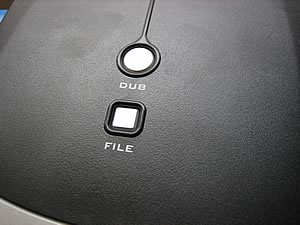
As already mentioned, on the top of the drive you will find the "File" and "Dub" buttons. As always, the CDRinfo team is curious to open the case and see how this works. Of course, doing so will void the warranty, so we strongly advise you not to do this with your drive. You can use the following pictures instead as reference.
As you can see, the main layout is like all other external drive enclosures, with one big difference. There is a small PCB which connects the EZ-DUB buttons.
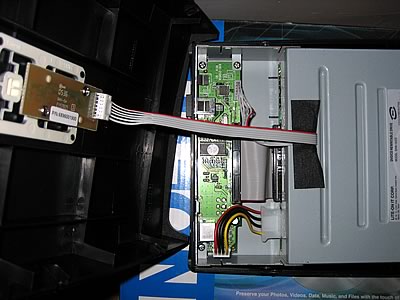
This PCB is in turn connected to the main circuitry of the drive enclosure. All the EZ-DUB functions pass through the main PCB logic and along with the USB port, allows control of the EZ-DUB functionality through software. The software in other words, controls the drive's functioning.
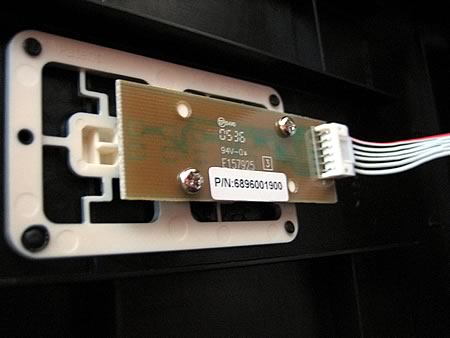
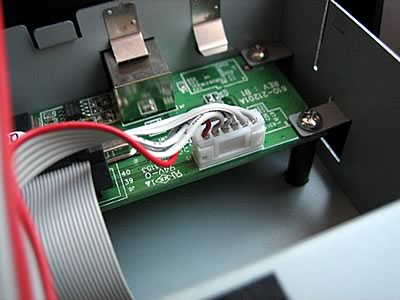
In fact, all the buttons do is simply activate the software.

The drive is indeed the LiteOn SHW-1635S burner...
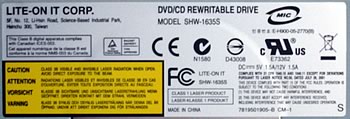
... and uses the MT1888E chipset.
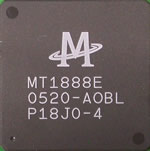
The photo below is the main circuit board in the drive itself. Clicking on the image will reveal a more detailed picture.

click to enlarge!

Since the LiteOn SHW-1635SU is the same drive as the SHW-1635S, we will not be testing this drive for writing and reading performance. Additionally, we will not do any writing quality tests. However, you can always check the previously released LiteOn SHW-1635S review if you need to see writing quality and performance of this drive, as well as comparison charts with other drives that have similar features. In this review, we will focus on the EZ-DUB functions.

We decided to go a little further with this drive, and we changed the LiteOn 1635S internal drive with another drive, to see if the EZ-DUB functions will continue to work. And they did. This was more or less expected, since the software scans the USB ports to see if there is an EZ-DUB drive available, and by "drive", we mean "drive enclosure".

 

Review Pages

1. Introduction
2. A Closer Look
3. EZ-DUB functions
4. Final Words


Pages

  • « first
  • ‹ previous
  • 1
  • 2
  • 3
  • 4
  • next ›
  • last »

LiteOn

Tags: LiteOn
Previous Post
Benchmarking update
Next Post
Mushkin XP4000 Redline

Related Posts

  • LITE-ON Technology Delays Transfer of Its Solid State Drives Business to Kioxia

  • SSSTC is Sampling the CA6 PCIe Gen 4 SSDs

  • LITE-ON Technology Approves the Transfer of its Solid State Drives Business to Toshiba Memory

  • Toshiba to Buy Lite-On Technology’s Storage Business Unit

  • LITE-ON to Release Project Denali Compliant SSDs

  • LITE-ON Unveils New SSD for Enterprise Workloads

  • Lite-On to Unveil New NVRAM Hybrid Solid-State Drive at OCP 2018

  • LITE-ON Transfers its Camera Module Business to LuxVisions

Latest Reviews

Swit NP-FZ100 Battery
Cameras

Swit NP-FZ100 Battery

The Technology Stack Behind Modern Digital Gaming Platforms
Consumer Electronics

The Technology Stack Behind Modern Digital Gaming Platforms

be quiet! Dark Rock Pro 6
Cooling Systems

be quiet! Dark Rock Pro 6

How Online Casinos Use Encryption, Verification, and Risk Controls to Build User Trust
Enterprise & IT

How Online Casinos Use Encryption, Verification, and Risk Controls to Build User Trust

Why Low-Latency Infrastructure Matters More Than Raw Specs
Enterprise & IT

Why Low-Latency Infrastructure Matters More Than Raw Specs

Popular News

TEAMGROUP Launches EXPERT P34F Find My External SSD

TEAMGROUP Launches EXPERT P34F Find My External SSD

CORSAIR announces Vanguard Pro 96 and Vanguard 96 Gaming Keyboards

CORSAIR announces Vanguard Pro 96 and Vanguard 96 Gaming Keyboards

MSI Launches FORGE GK600 TKL WIRELESS Special Edition Compact Mechanical Keyboard

MSI Launches FORGE GK600 TKL WIRELESS Special Edition Compact Mechanical Keyboard

Samsung announces Galaxy Tab S11 and Galaxy S25 FE series

Samsung announces Galaxy Tab S11 and Galaxy S25 FE series

Viltrox Showcases Upcoming Lens Lineup and New TTL Flash at IBC 2025

Viltrox Showcases Upcoming Lens Lineup and New TTL Flash at IBC 2025

Panasonic Introduces the First Ultra-Telephoto Zoom Lens in the LUMIX S Series

Panasonic Introduces the First Ultra-Telephoto Zoom Lens in the LUMIX S Series

MSI Launches DATAMAG 40Gbps Magnetic Portable SSD

MSI Launches DATAMAG 40Gbps Magnetic Portable SSD

Viltrox Joins the L-Mount Alliance, Expanding Creative Possibilities

Viltrox Joins the L-Mount Alliance, Expanding Creative Possibilities

Main menu

  • Home
  • News
  • Reviews
  • Essays
  • Forum
  • Legacy
  • About
    • Submit News

    • Contact Us
    • Privacy

    • Promotion
    • Advertise

    • RSS Feed
    • Site Map
  • About
  • Privacy
  • Contact Us
  • Promotional Opportunities @ CdrInfo.com
  • Advertise on out site
  • Submit your News to our site
  • RSS Feed