
Breaking News

Seasonic PRIME ENTERPRISE RX-1600 Becomes First ATX Power Supply to Earn 80 PLUS Ruby Certification at 115 V Apple Overhauls EU App Store Rules LG Display unveils FLiPP, achieving dream next-generation OLED technology CORSAIR Launches RMe Series Platinum Power Supplies with ThermalProtect 12V-2x6 Cable for Enhanced GPU Protection Akasa Introduces M.2 NVMe SSD to PCIe Adapter Card with Removable Tray

logo

  • Share Us
    • Facebook
    • Twitter
  • Home
  • Home
  • News
  • Reviews
  • Essays
  • About
    • Submit News

    • Contact Us
    • Privacy

    • Promotion
    • Advertise

    • RSS Feed

Search form

MacOSX86

Dec 4,2006 0

4. Just about there


Review Pages

1. The OSX-86 Project
2. Installing OSX in the box (or out of it)
3. Installation Continued
4. Just about there
5. Mac OS X on Intel
6. Benchmarks
7. Summary
8. Setting Time and Date


As we where busy taking pictures of the “Macenstein” the whole project finally was getting to an end. We were presented to the Welcome screen of the installation prompting us to choose our region. You can notice our old trusty friend G4 Quicksilver Macintosh on the left of the screen and the network cables on the right…
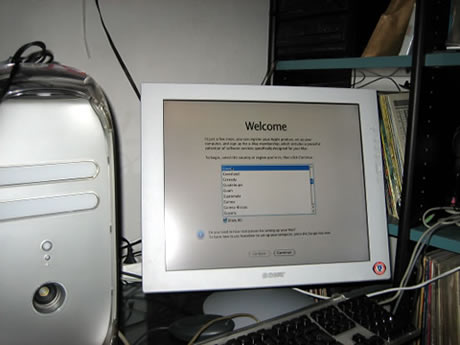
After that, several other screens follow that ask you to choose your network connection etc. Just go through them.

…and more questions, like what you need your computer for:

Finally the time zone:


Review Pages

1. The OSX-86 Project
2. Installing OSX in the box (or out of it)
3. Installation Continued
4. Just about there
5. Mac OS X on Intel
6. Benchmarks
7. Summary
8. Setting Time and Date


Pages

  • « first
  • ‹ previous
  • 1
  • 2
  • 3
  • 4
  • 5
  • 6
  • 7
  • 8
  • next ›
  • last »

Apple

Tags: Apple
Previous Post
AMD Athlon 64 X2
Next Post
Spracht Aura Mobile BT

Related Posts

  • Apple Overhauls EU App Store Rules

  • Apple introduces AirPods Max 2

  • Apple introduces the new M5 Pro/Max powered laptops and new Studio Display

  • Apple introduces iPhone 17e and new new iPad Air

  • Apple introduces new AirTag with expanded connectivity range and improved findability

  • Apple introduces Digital ID

  • Apple unleashes M5 CPU and new devices

  • Apple debuts iPhone 17, Pro, Max, Air, Watch Series 11, Watch Ultra 3, Watch SE 3, AirPods Pro 3

Latest Reviews

be quiet! Light Loop IO LCD
Cooling Systems

be quiet! Light Loop IO LCD

KIOXIA Exceria Pro G2 NVME 2TB
PC components

KIOXIA Exceria Pro G2 NVME 2TB

Online Casino Games That Offer Something Different
Consumer Electronics

Online Casino Games That Offer Something Different

SOUNDPEATS Air6 HS
Consumer Electronics

SOUNDPEATS Air6 HS

Arctic MX-7
Cooling Systems

Arctic MX-7

Popular News

CORSAIR announces Vanguard Pro 96 and Vanguard 96 Gaming Keyboards

CORSAIR announces Vanguard Pro 96 and Vanguard 96 Gaming Keyboards

MSI Launches FORGE GK600 TKL WIRELESS Special Edition Compact Mechanical Keyboard

MSI Launches FORGE GK600 TKL WIRELESS Special Edition Compact Mechanical Keyboard

TEAMGROUP Launches EXPERT P34F Find My External SSD

TEAMGROUP Launches EXPERT P34F Find My External SSD

Samsung announces Galaxy Tab S11 and Galaxy S25 FE series

Samsung announces Galaxy Tab S11 and Galaxy S25 FE series

Viltrox Showcases Upcoming Lens Lineup and New TTL Flash at IBC 2025

Viltrox Showcases Upcoming Lens Lineup and New TTL Flash at IBC 2025

Panasonic Introduces the First Ultra-Telephoto Zoom Lens in the LUMIX S Series

Panasonic Introduces the First Ultra-Telephoto Zoom Lens in the LUMIX S Series

MSI Launches DATAMAG 40Gbps Magnetic Portable SSD

MSI Launches DATAMAG 40Gbps Magnetic Portable SSD

Viltrox Joins the L-Mount Alliance, Expanding Creative Possibilities

Viltrox Joins the L-Mount Alliance, Expanding Creative Possibilities

Main menu

  • Home
  • News
  • Reviews
  • Essays
  • About
    • Submit News

    • Contact Us
    • Privacy

    • Promotion
    • Advertise

    • RSS Feed
  • About
  • Privacy
  • Contact Us
  • Promotional Opportunities @ CdrInfo.com
  • Advertise on out site
  • Submit your News to our site
  • RSS Feed

