Maxtor OneTouch II
6. Conclusion
- Conclusion
 If
you've never experienced the horror of a hard drive crash or similarly catastrophic
event that indiscriminately massacres applications and data alike, then more
than likely you probably don't bother to back up your computer regularly. If
you do perform regular backups and especially if you have large amounts of
data, you know that backing up can be a time consuming process.
And considering the limited capacities of CD-R and even DVD-R
discs compared to the capacities of most server hard disk volumes, backing
up amounts to a lot more work than it needs to be. An external hard drive
is probably the best way
to go for anyone who wants backups done quickly and reliably, and Maxtor's
One Touch II external hard drive promises to make system backups fast and easy
with little to no attention from you. You can use One Touch II to
safeguard huge quantities of information at the push of a button.
If
you've never experienced the horror of a hard drive crash or similarly catastrophic
event that indiscriminately massacres applications and data alike, then more
than likely you probably don't bother to back up your computer regularly. If
you do perform regular backups and especially if you have large amounts of
data, you know that backing up can be a time consuming process.
And considering the limited capacities of CD-R and even DVD-R
discs compared to the capacities of most server hard disk volumes, backing
up amounts to a lot more work than it needs to be. An external hard drive
is probably the best way
to go for anyone who wants backups done quickly and reliably, and Maxtor's
One Touch II external hard drive promises to make system backups fast and easy
with little to no attention from you. You can use One Touch II to
safeguard huge quantities of information at the push of a button.
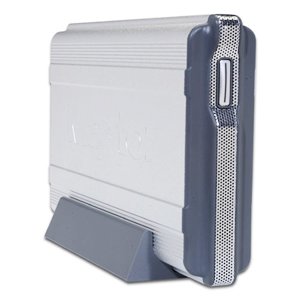
With a storage capacity of 300 GB and transfer rate of 480 MB per second, the unit is equally suited to network backups as well. And while tThe One Touch button offers automatic safeguarding of all your data, it can also be assigned to other applications as well.
The latest version offers functions such as the automatic safeguarding of data and a history of recent operations as well as an analysis of the drives status. The One Touch II is establishing itself as the safeguarding solution for the most demanding network and domestic set ups.
As a conclusion to this review, we must say that the Maxtor One Touch II drive performed extremely well in all our tests and proved a competent solution for its cost. The results we had in the benchmarks were almost identical regardless of whether the connection was with the Firewire or the USB.20 port, although the graphs we presented are those from the USB 2.0 tests. The only complaint we have is that Maxtor used the 1394a interface, possibly restricting the unit in speed throughput despite the fact that there are1394b chips readily available in the market these days. The difference is that the 1394a standard supports speeds up to 400Mbps whereas the 1394b up to 800Mbps (although it does allow for a theoretical maximum transfer rate of up to 3.2Gbps).
The Maxtor One Touch II drive is one of the best backup solutions available on the market.