Breaking News

DeepCool Launches the LT360 VISION ARGB Noctua and Asetek Announce Flagship AIO Liquid Coolers Toshiba Begins Sampling of 30-34 TB SMR Nearline Hard Disk Drives ASUS ROG Strix Laptop Lineup Returns With the Latest Intel Core Ultra 9 290HX Plus Processors EnGenius Brings AI-Powered Analytics and Sophisticated Cloud Management to Existing ONVIF Cameras

logo

  • Share Us
    • Facebook
    • Twitter
  • Home
  • Home
  • News
  • Reviews
  • Essays
  • Forum
  • Legacy
  • About
    • Submit News

    • Contact Us
    • Privacy

    • Promotion
    • Advertise

    • RSS Feed
    • Site Map

Search form

Maxtor OneTouch II

May 5,2005 0

4. Tests


Review Pages

1. Introduction
2. STEP BY STEP Installation
3. The program
4. Tests
5. Intel's IPEAK Read Tests
6. Conclusion
7. Detailed Specifications


- Tests

Our tests begin with the reading and writing benchmarks. The hard disk installed in the One Touch unit we received was the Maxtor DiamondMax 10, with 300GB capacity, Parallel ATA 133, 7200 rpm and an average seek time up to 9 msec.

In the Disk Speed Reading and Writing test graphs below, the vertical axis (Y axis) displays megabytes transferred while the horizontal axis (X axis) shows the time period in milliseconds. Hence, the graphs indicate the transfer rate in MB/s.

  • Disk Speed Reading Test

A large test file is created on the disk under test. The size of this test file is proportional to the amount of RAM available, which stops the entire file from being cached in RAM. The file is read sequentially from start to end. The amount of data read in each individual read operation is always 16KB.

  • Disk Speed Writing Test

This graph shows the MB/Sec disk write rate over the period of time required to write over 200MB to a hard drive. Cacheing allows the rate to start very high then drop off as the cache fills and the drive can't keep up. In fact, for writing large files cacheing can even cause a decrease in performance (compared to the uncached performance). The cache becomes an overhead in this case.


  • HD Tach

HD Tach tests the sequential read, random access and interface burst speeds of your attached storage device (hard drive, flash drive, removable drive, etc). All drive technologies such as SCSI, IDE/ATA, 1394, USB, SATA and RAID are supported. Test results from HD Tach can be used to confirm manufacturer specs, analyze your system for proper performance, and compare your performance with others.

This benchmark is intended to determine the maximum read or write speed on the device at various locations. Hard drives, for example, have faster read/write speeds at the inside edge (mapped to block 0) of the device, so it is useful to see the difference in speed. The maximum sustained speed (lowest speed on the device) is an important metric for real time sequential access applications. The maximum speed may be important to a power user that would like to partition the drive into a high speed partition and low speed partition.

The Maxtor gives a very stable performance graph that remains over 29 MB/s throughout its entire capacity.

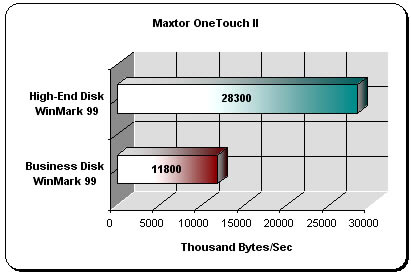
  • WinBench 99 Test Results

The High-End and Business WinMark99 tests gave us very good results. This shows the good job that Maxtor has done with the One Touch II unit.
 

Review Pages

1. Introduction
2. STEP BY STEP Installation
3. The program
4. Tests
5. Intel's IPEAK Read Tests
6. Conclusion
7. Detailed Specifications


Pages

  • « first
  • ‹ previous
  • 1
  • 2
  • 3
  • 4
  • 5
  • 6
  • 7
  • next ›
  • last »

Maxtor

Tags: Maxtor
Previous Post
Star Wars Knights of the Old Republic II
Next Post
LiteON SOHW-1673S

Related Posts

  • Maxtor Announces 1.5TB Storage Solution

  • Seagate Introduces New Maxtor Desktop and Notebook Hard Drives

  • Seagate Seen Buying Maxtor

  • New Maxtor OneTouch Solution Hits a Terabyte

  • Maxtor Intros 3Gb/S SATA II Hard Drives

  • Maxtor Bypasses PC with Home Network Drive

  • Maxtor Unveils 500GB Hard Disk

  • Maxtor won't think small after all

Latest Reviews

In the Age of AI Phishing, the Best User Experience Might Be the One That Feels Safest
Enterprise & IT

In the Age of AI Phishing, the Best User Experience Might Be the One That Feels Safest

SoundPeats C30
Consumer Electronics

SoundPeats C30

Why Streaming Live Casino Games Demands Smarter Tech
Enterprise & IT

Why Streaming Live Casino Games Demands Smarter Tech

Kioxia Exceria Plus G3 512GB microSD
Cameras

Kioxia Exceria Plus G3 512GB microSD

SoundPeats Cove Pro
Consumer Electronics

SoundPeats Cove Pro

Popular News

COLORFUL Presents CVN X870 ARK FROZEN Motherboard for AMD Ryzen 9000 CPUs

COLORFUL Presents CVN X870 ARK FROZEN Motherboard for AMD Ryzen 9000 CPUs

TEAMGROUP Launches EXPERT P34F Find My External SSD

TEAMGROUP Launches EXPERT P34F Find My External SSD

Samsung announces Galaxy Tab S11 and Galaxy S25 FE series

Samsung announces Galaxy Tab S11 and Galaxy S25 FE series

Viltrox Showcases Upcoming Lens Lineup and New TTL Flash at IBC 2025

Viltrox Showcases Upcoming Lens Lineup and New TTL Flash at IBC 2025

CORSAIR announces Vanguard Pro 96 and Vanguard 96 Gaming Keyboards

CORSAIR announces Vanguard Pro 96 and Vanguard 96 Gaming Keyboards

Panasonic Introduces the First Ultra-Telephoto Zoom Lens in the LUMIX S Series

Panasonic Introduces the First Ultra-Telephoto Zoom Lens in the LUMIX S Series

MSI Launches DATAMAG 40Gbps Magnetic Portable SSD

MSI Launches DATAMAG 40Gbps Magnetic Portable SSD

MSI Launches FORGE GK600 TKL WIRELESS Special Edition Compact Mechanical Keyboard

MSI Launches FORGE GK600 TKL WIRELESS Special Edition Compact Mechanical Keyboard

Main menu

  • Home
  • News
  • Reviews
  • Essays
  • Forum
  • Legacy
  • About
    • Submit News

    • Contact Us
    • Privacy

    • Promotion
    • Advertise

    • RSS Feed
    • Site Map
  • About
  • Privacy
  • Contact Us
  • Promotional Opportunities @ CdrInfo.com
  • Advertise on out site
  • Submit your News to our site
  • RSS Feed