
Noctua NL-LC1-36
4. Tests
- CPU: AMD Ryzen 9 7950X
- Thermal Paste: Noctua NT-H2 thermal compound
- Open Case: StreaCom BC1 V2 Bench Table
- Motherboard: Asus ProArt X670E-CREATOR WIFI with 3901 BIOS
- Memory: 2x24GB Crucial DDR5-6000 CL48 (EXPO Profile)
- PSU: be quiet! Dark Pro 13 1300Watt
- Main Storage: Samsung 980Pro 1TB
- VGA: MSI GeForce RTX 4090 SUPRIM X 24G
- Operating system: Windows 11 x64 + latest motherboard/AMD chipset drivers installed
- Software: OCCT Enterprise Edition (2 sec interval monitor)
- Ambient room temperature ~ 24 Celsius (with AC climate control) - Environment Temperature measurements: Precision Gold N09AQ Envirometer Meter
We performed four tests depending on the CPU TDP load that can be set under Bios-> AI Tweaker-> Precision Boost Overdrive->AMD Eco Mode->
- cTDP 65Watt (real 90Watt)
- cTDP 105Watt (real 145watt)
- cTDP ~ 222Watt (via PBO at auto)
while we set the following voltages for all tests.
- CPU Core Voltage: Auto
- CPU SOC Voltage: 1.25V
- CPU VDDIO / MC Voltage: Auto
- Misc Voltage: 1.10V
At the OCCT software, we performed the Stability Test->CPU Test 15mins duration with various settings to get the maximum thermal production from the AMD 7950X.
Tests Disclaimer: Despite placing CPU voltages manually, the motherboard may supply the CPU with slightly different voltages, resulting in some cases higher temperatures that also result in higher working temperatures. Our results are valid with the above test system and using other variations may result in different results. Using other stress test software may also introduce different test results.
Before each run, we clean the CPU surface with 95% isopropyl alcohol and paper roll and we apply each thermal paste with the same methodology (central dot, small X lines, and small dots) to cover the full surface of the CPU area.
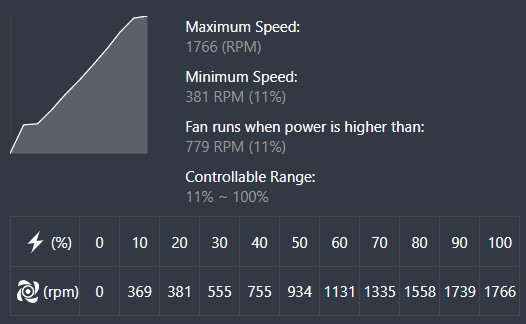
All of our tests are done with the default Asus PWM curve fan. We connected the pump to the CPU Fan header and the three 120mm Noctua fans at other Fan Header of the motherboard and with the Asus FanExpert4 we had the following fan curves
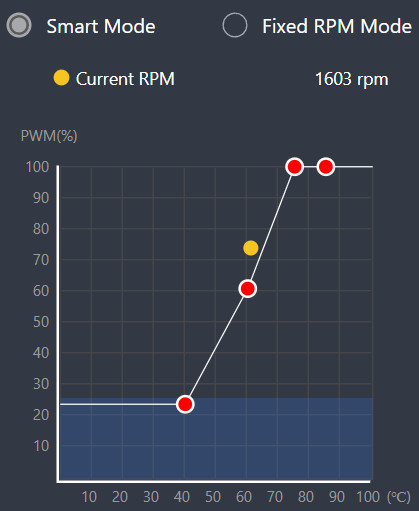
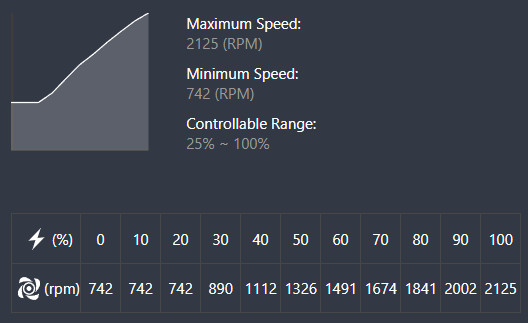
The pump can be adjusted from 742rpm up to 2125rpm (default quiet mode),
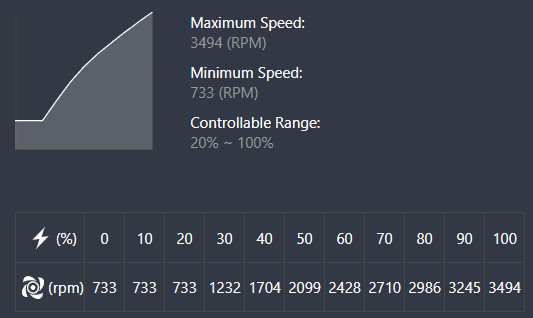
while if you decide to further boost performance can rev up to 3400rpm (manual mode).
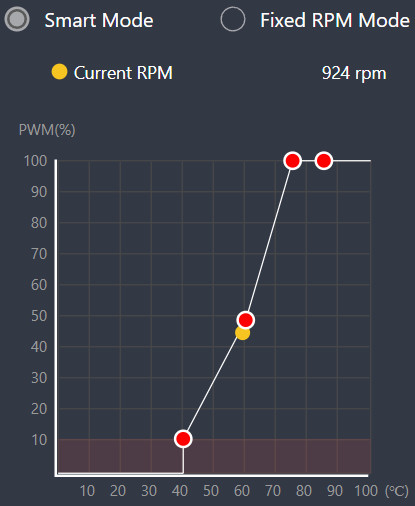
The used Noctua 120mm fans have different RPM profile, fans must not be allowed to shut off (0% PWM) unless the CPU is below 60°C, and must be set to at least 80% PWM once the CPU hits its maximum operating temperature.
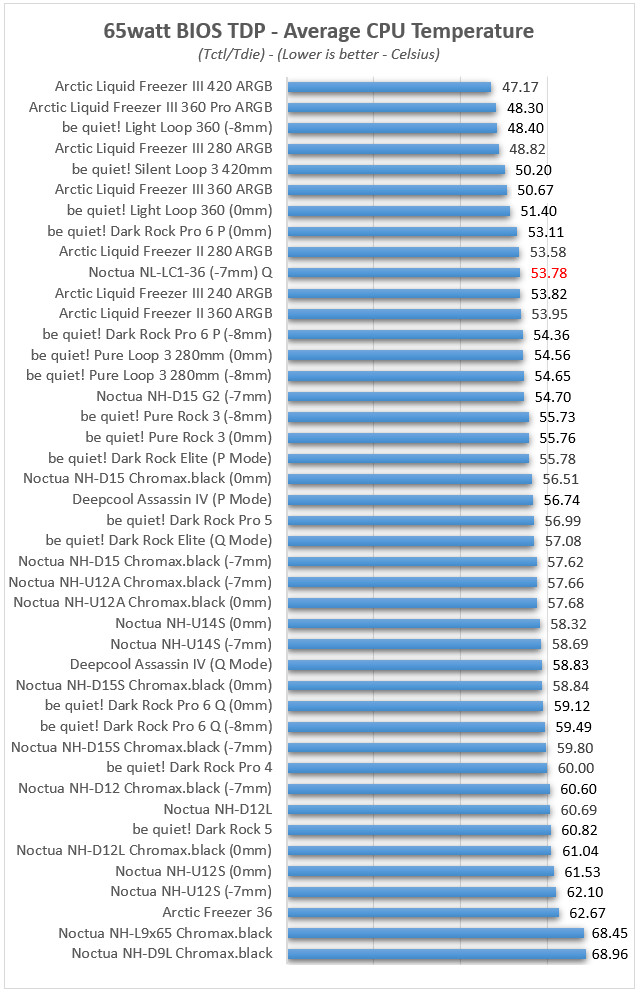
Starting from the low 65watt AMD Eco TDP, we used the following OCCT settings
- Instruction Set: Auto
- Data Set: Large
- Mode: Normal
- Load Type: Variable
- Thread Settings: Auto
At light loads, the Noctua NL-LC1-36 with the -7mm AMD mounting position scores a good 53.78°C average CPU temperature with the default Q (Quiet) pump setting. Its possible to further improve performance by adjusting fan curve (to start faster ramping up to dispass heat).
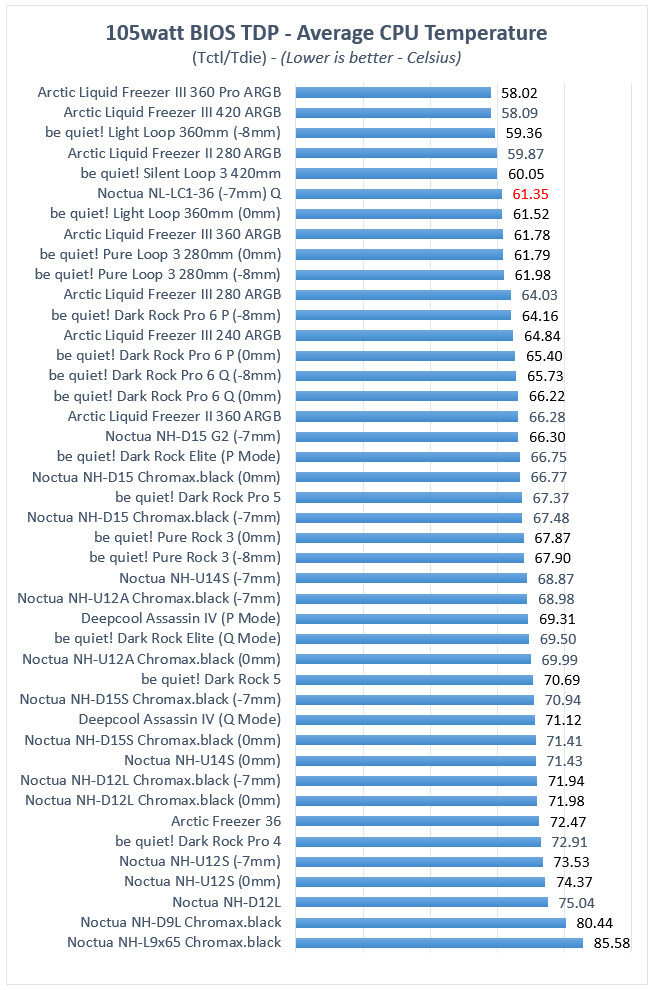
At the 105watt AMD Eco TDP setting, we used the following OCCT settings
- Instruction Set: Auto
- Data Set: Large
- Mode: Normal
- Load Type: Variable
- Thread Settings: Auto
The mid-load scenario is also without any issues for the Noctua NL-LC1-36 since scores with the −7mm AMD mounting position 61.35°C, ahead of Noctua's NH-D15 G2 series. Again the stock Q (Quiet) pump mode was used.
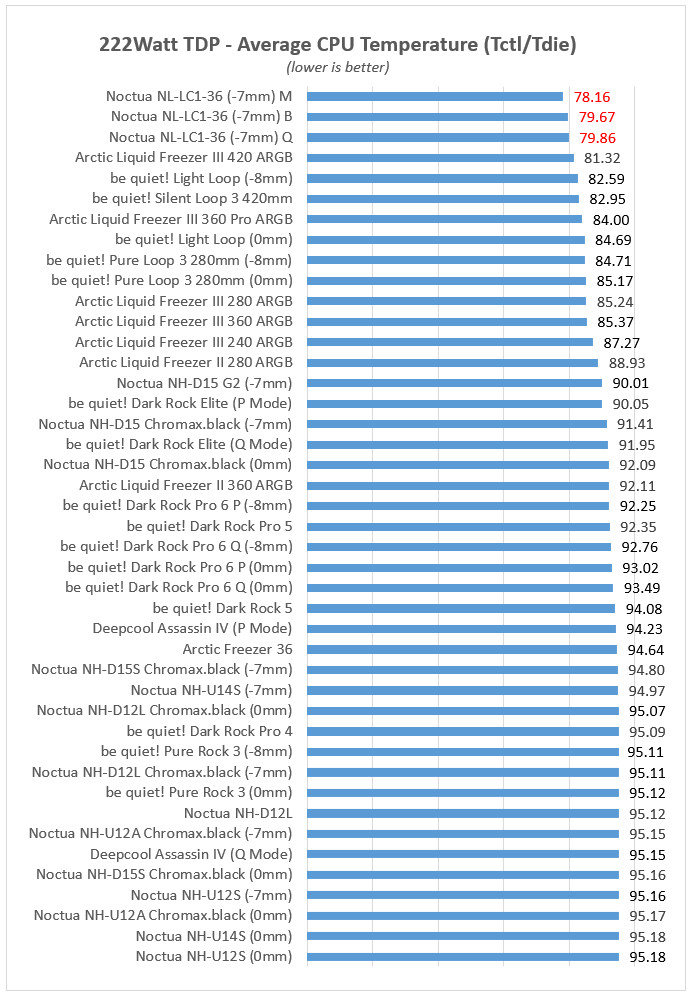
At the 222watt AMD TDP setting, we used the following OCCT settings
- Instruction Set: SSE
- Data Set: Small
- Mode: Extreme
- Load Type: Steady
- Thread Settings: Auto
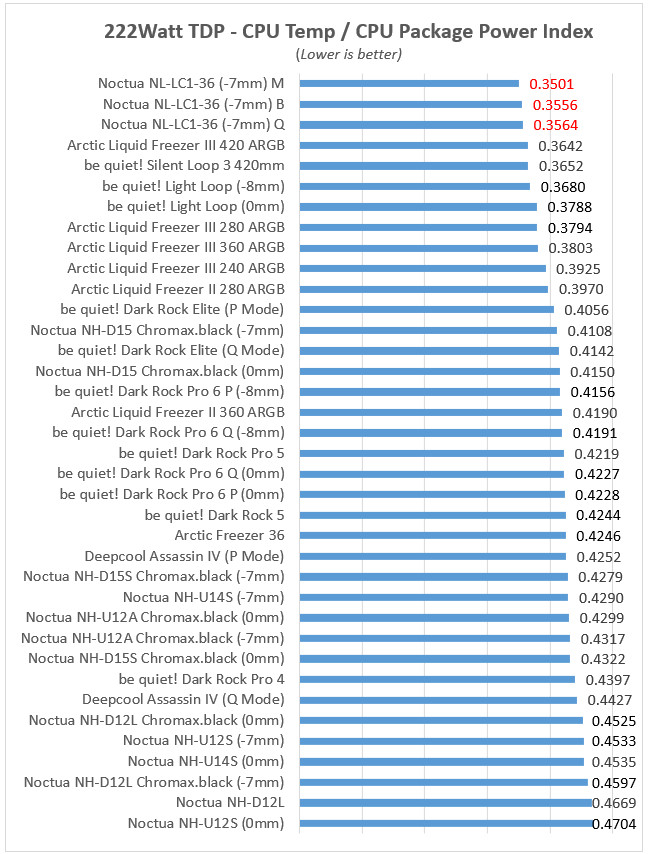
At extreme loads, is where the Noctua NL-LC1-36 with the -7mm AMD mounting position, showed its teeth and left competition wondering what exactly happened...It superpass even larger 420mm AIO from Arctic and be quiet! and now we also tested the three different Pump settings (Q/B/M) and with the M (Manual) we had the best performance with 78.16°C, placing it at the top place! The B (Balance) and stock Q (Quiet) also showed good performance so we think that the Q is the best setting for all users.
The normalized efficiency index — which accounts for actual CPU package power consumed rather than nominal TDP — tells a more nuanced story. Again the Noctua NL-LC1-36 with its top performance got the top and other AIO follow.
Noctua officially assigns the NL-LC1-36 a Noctua Standardised Performance Rating (NSPR) of 248. For comparison, the company's flagship NH-D15 G2 air cooler sits at an NSPR of 228, giving the 360 mm liquid loop an expected thermal advantage of roughly 9% over their best air cooler Real-world testing confirms these expectations, proving that the NL-LC1-36 is an absolute beast for overclocking and taming high-end, high-TDP processors. Acoustically, the design succeeds brilliantly: the multi-layered pump dampening and targeted fan speed-offsetting eliminate sudden tonal spikes, harsh mechanical whines, and low-frequency vibrations. Even though the pump can still be heard slightly at absolute maximum throttle, it is completely covered by the smooth airflow of the fans, resulting in a quiet, controlled whoosh under load.
Comparison With Other Products
| Noctua NL-LC1-36 | Arctic Liquid Freezer III Pro 360 | Lian Li Hydroshift II LCD-C 360TL | Phanteks Glacier One M25 G2 | |
|---|---|---|---|---|
| MSRP | 250 Euro | ~77 Euro | 205 Euro | 112 Euro |
| Fans included | 3× NF-A12x25 G2 (premium) | Included P14 fans | None included | Included fans |
| Display/RGB | None | None (VRM fan variant available) | LCD screen | RGB |
| Pump noise control | Dedicated 3-layer noise absorber + tuned-mass damper | Standard | Standard | Standard |
| Mounting | SecuFirm2+, steel, hotspot-offset | Standard | Standard | Standard |
| Warranty | 6 years | Typically shorter | Typically shorter | Typically shorter |
The most direct value competitor is Arctic's Liquid Freezer III Pro, which offers much lower price (around 1/3) but also "worse" performance. The Arctic Liquid Freezer III Pro also offers ARGB fans but acoustic performance is worse, since the Noctua fans are much quieter and offer better performance at similar RPM speeds. Against screen-and-RGB-focused coolers like the Lian Li Hydroshift II, the NL-LC1-36's advantage is less about raw thermal capacity and more about consistent, genuinely quiet operation.





