
Breaking News

ASUS Unveils Mac-Friendly Features on ProArt Displays to Enhance Workflows Ricoh announces GR IV Monochrome Acer ProDesigner PE320QX monitor excels at tests! MSI announces Roamii BE Pro Mesh WiFi 7 System Samsung Mobile Gaming Hub Reshapes Personalized Play

logo

  • Share Us
    • Facebook
    • Twitter
  • Home
  • Home
  • News
  • Reviews
  • Essays
  • Forum
  • Legacy
  • About
    • Submit News

    • Contact Us
    • Privacy

    • Promotion
    • Advertise

    • RSS Feed
    • Site Map

Search form

Octave Multipod

May 13,2005 0

4. Using the device - Page 2


Review Pages

1. Introduction
2. Retail package
3. Using the device - Page 1
4. Using the device - Page 2
5. Using the device - Page 3
6. Conclusion
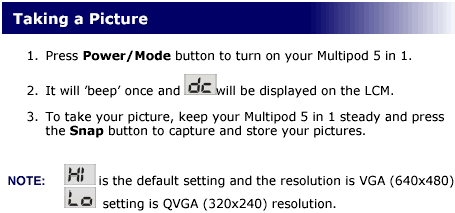
 

Setting it to Hi quality, we took several pictures, mostly with good daylight and again the image quality was average to acceptable. You can view several samples (1, 2, 3, 4, 5, 6, 7). The device produces very bad pictures during night time or with limited light, so this is something you have to consider.
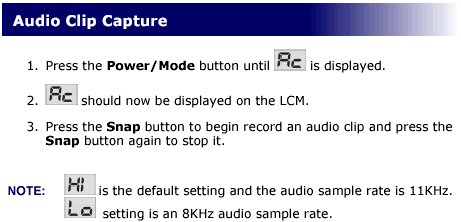
The Audio recording mode produces .WAV files (sample), with good quality, considering the low sampling rate.
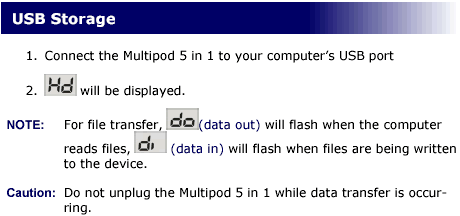
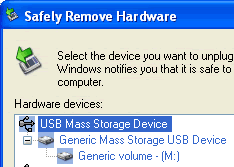
When you connect the Multipod 5 in 1 to the computer USB port, it is automatically recognized by the system (for Win98 you will have to install the included drivers).
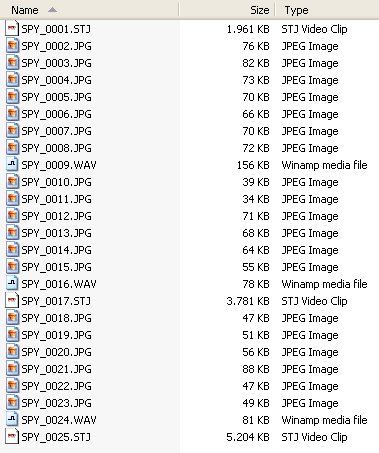
Once connected, we can browse the contents of the Multipod, view stored pictures, videos and audio clips, and of course with drag & drop, add files or store them onto the device to transferor to another PC.
 

Review Pages

1. Introduction
2. Retail package
3. Using the device - Page 1
4. Using the device - Page 2
5. Using the device - Page 3
6. Conclusion


 

Pages

  • « first
  • ‹ previous
  • 1
  • 2
  • 3
  • 4
  • 5
  • 6
  • next ›
  • last »

Octave

Tags: Octave
Previous Post
ArcticCooling - ATI Silencer5
Next Post
Interview with Mr Lawrence Chang of Kingmax

Related Posts

  • Possible Oculus Quest 2 Details Leak

  • Optical Quantum InkJet Printable Media

  • DVD Duplicators by Octave Systems, Incorporated.

  • More about the AVO-Card-Rs

Latest Reviews

The Difference Between American and European Stakes and Why It Changes How People Bet
Enterprise & IT

The Difference Between American and European Stakes and Why It Changes How People Bet

Endorfy Thock V2 Wireless Keyboard
PC components

Endorfy Thock V2 Wireless Keyboard

Noctua NH-D15 G2 Chromax.Black
Cooling Systems

Noctua NH-D15 G2 Chromax.Black

EnGenius ECW520 AP
Enterprise & IT

EnGenius ECW520 AP

Noctua NP-DM3 desk mat
Gaming

Noctua NP-DM3 desk mat

Popular News

COLORFUL Introduces CVN B850I GAMING FROZEN Motherboard

COLORFUL Introduces CVN B850I GAMING FROZEN Motherboard

COLORFUL Presents CVN X870 ARK FROZEN Motherboard for AMD Ryzen 9000 CPUs

COLORFUL Presents CVN X870 ARK FROZEN Motherboard for AMD Ryzen 9000 CPUs

COLORFUL Presents the B860 Series Motherboards

COLORFUL Presents the B860 Series Motherboards

TEAMGROUP Launches EXPERT P34F Find My External SSD

TEAMGROUP Launches EXPERT P34F Find My External SSD

ASRock AM5 Motherboards Now Fully Support AMD Ryzen 9 9950X3D & 9900X3D Processors

ASRock AM5 Motherboards Now Fully Support AMD Ryzen 9 9950X3D & 9900X3D Processors

Samsung announces Galaxy Tab S11 and Galaxy S25 FE series

Samsung announces Galaxy Tab S11 and Galaxy S25 FE series

Viltrox Showcases Upcoming Lens Lineup and New TTL Flash at IBC 2025

Viltrox Showcases Upcoming Lens Lineup and New TTL Flash at IBC 2025

CORSAIR announces Vanguard Pro 96 and Vanguard 96 Gaming Keyboards

CORSAIR announces Vanguard Pro 96 and Vanguard 96 Gaming Keyboards

Main menu

  • Home
  • News
  • Reviews
  • Essays
  • Forum
  • Legacy
  • About
    • Submit News

    • Contact Us
    • Privacy

    • Promotion
    • Advertise

    • RSS Feed
    • Site Map
  • About
  • Privacy
  • Contact Us
  • Promotional Opportunities @ CdrInfo.com
  • Advertise on out site
  • Submit your News to our site
  • RSS Feed




