Breaking News

Ricoh announces GR IV Monochrome Acer ProDesigner PE320QX monitor excels at tests! MSI announces Roamii BE Pro Mesh WiFi 7 System Samsung Mobile Gaming Hub Reshapes Personalized Play Viltrox Brings AI Autofocus to Manual Lenses with NexusFocus F1

logo

  • Share Us
    • Facebook
    • Twitter
  • Home
  • Home
  • News
  • Reviews
  • Essays
  • Forum
  • Legacy
  • About
    • Submit News

    • Contact Us
    • Privacy

    • Promotion
    • Advertise

    • RSS Feed
    • Site Map

Search form

OCZ RevoDrive 50GB PCIe SSD Review

May 3,2011 0

3. Installation


Review Pages

1. About the OCZ RevoDrive 50GB
2. A closer look
3. Installation
4. Benchmarks
5. Summary


Installing the RevoDrive is simple. In case you plan to use the RevoDrive as secondary drive, boot into Windows and install the essential driver, which can be downloaded from OCZ's web site. After installation you go to disk management and setup/format the drive. After that it's ready for usage. Since the RAID controller is per-configured (Raid 0) , there is no need to setup anything in RAID. Here is a screen shot of the BIOS :

On the other hand, if you like to have your OS installed on the drive, then in the BIOS set it to boot drive. You need to supply Windows with the appropriate drivers to recognize the controller. When Windows ask you where to install the OS, point windows to the RAID driver on the CD. After installation, the RevoDrive partition will appear as root drive.

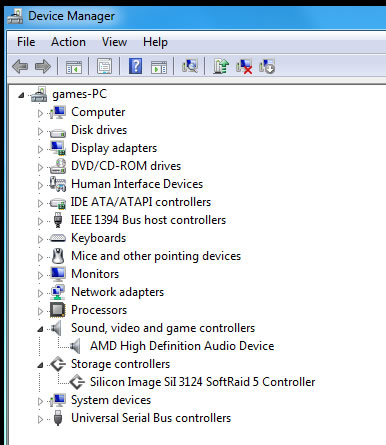
After installing the drive, the Silicon Image Sil 3124 SoftRaid 5 controller appears in Windows's Device Manager:
The firmware revision of out model is 1.20. Each part of the RAID drive is offering 25GB of capacity:


Review Pages

1. About the OCZ RevoDrive 50GB
2. A closer look
3. Installation
4. Benchmarks
5. Summary


Pages

  • « first
  • ‹ previous
  • 1
  • 2
  • 3
  • 4
  • 5
  • next ›
  • last »

OCZ Technology

Tags: OCZ Technology
Previous Post
Gainward GTX560Ti 2GB Phantom Vs Club3D HD6790 CoolStream Edition
Next Post
CPU Coolers - Noctua NH-C14 Vs Thermaltake Frio Ock

Related Posts

  • Toshiba completes acquisition of OCZ Technology Group's Assets and launches new subsidiary, OCZ Storage Solutions

  • Value-Optimized Toshiba RC100 NVMe SSDs Now Available

  • Toshiba Introduces New XS700 Series of Portable SSDs

  • Toshiba OCZ RD400 512GB M.2 PCIe SSD

  • Toshiba Introduces the Value-oriented OCZ TL100 SATA SSD Series

  • Toshiba Introduces the OCZ VX500 SATA SSD Series

  • OCZ RD400 NVMe SSD Series Released

  • OCZ Z-Drive 6000 And 6300 NVMe U.2 SSDs Released With Dual-port Functionality

Latest Reviews

The Difference Between American and European Stakes and Why It Changes How People Bet
Enterprise & IT

The Difference Between American and European Stakes and Why It Changes How People Bet

Endorfy Thock V2 Wireless Keyboard
PC components

Endorfy Thock V2 Wireless Keyboard

Noctua NH-D15 G2 Chromax.Black
Cooling Systems

Noctua NH-D15 G2 Chromax.Black

EnGenius ECW520 AP
Enterprise & IT

EnGenius ECW520 AP

Noctua NP-DM3 desk mat
Gaming

Noctua NP-DM3 desk mat

Popular News

COLORFUL Introduces CVN B850I GAMING FROZEN Motherboard

COLORFUL Introduces CVN B850I GAMING FROZEN Motherboard

COLORFUL Presents CVN X870 ARK FROZEN Motherboard for AMD Ryzen 9000 CPUs

COLORFUL Presents CVN X870 ARK FROZEN Motherboard for AMD Ryzen 9000 CPUs

COLORFUL Presents the B860 Series Motherboards

COLORFUL Presents the B860 Series Motherboards

TEAMGROUP Launches EXPERT P34F Find My External SSD

TEAMGROUP Launches EXPERT P34F Find My External SSD

ASRock AM5 Motherboards Now Fully Support AMD Ryzen 9 9950X3D & 9900X3D Processors

ASRock AM5 Motherboards Now Fully Support AMD Ryzen 9 9950X3D & 9900X3D Processors

Samsung announces Galaxy Tab S11 and Galaxy S25 FE series

Samsung announces Galaxy Tab S11 and Galaxy S25 FE series

Viltrox Showcases Upcoming Lens Lineup and New TTL Flash at IBC 2025

Viltrox Showcases Upcoming Lens Lineup and New TTL Flash at IBC 2025

CORSAIR announces Vanguard Pro 96 and Vanguard 96 Gaming Keyboards

CORSAIR announces Vanguard Pro 96 and Vanguard 96 Gaming Keyboards

Main menu

  • Home
  • News
  • Reviews
  • Essays
  • Forum
  • Legacy
  • About
    • Submit News

    • Contact Us
    • Privacy

    • Promotion
    • Advertise

    • RSS Feed
    • Site Map
  • About
  • Privacy
  • Contact Us
  • Promotional Opportunities @ CdrInfo.com
  • Advertise on out site
  • Submit your News to our site
  • RSS Feed