Breaking News

GAMEMAX Unveils NEX C53 Panoramic Chassis be quiet! announces new Power Zone 2 1200W and Pure Power 13 M 1200W Thypoch announces 21mm f/3.5 M Mount Lens ASUS showcases new AI technologies and celebrates 20 years of ROG gaming at CES Prograde Digital Announces Pro Card Caddy

logo

  • Share Us
    • Facebook
    • Twitter
  • Home
  • Home
  • News
  • Reviews
  • Essays
  • Forum
  • Legacy
  • About
    • Submit News

    • Contact Us
    • Privacy

    • Promotion
    • Advertise

    • RSS Feed
    • Site Map

Search form

ONES - Simple AudioCD guide

Oct 18,2004 0

3. Audio Compilation


Review Pages

1. The Software
2. Recording Using the Wizard
3. Audio Compilation
4. Erase RW Disc
5. Comments


ONES_AudioCD - Simple AudioCD guide - Page 3

Audio Compilation

Instead of using the wizard, you can always perform the same task manually, a process that is not overly difficult. With this method, you'll also have the oppurtunity to adjust some extra settings.
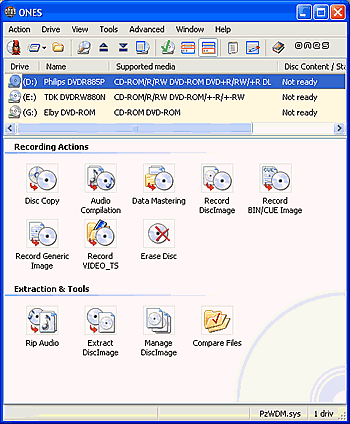
Choose this following icon from the and the applications opening screen (shown above), after which the screen shown below will be appear:


As you can see in the screenshot below, there are some extra options:
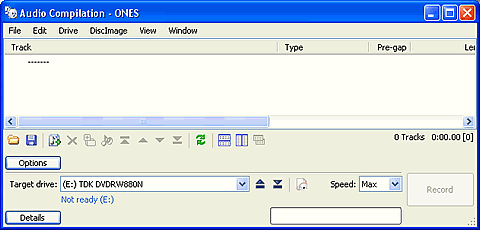
If you had previously saved a project, you can now load it. Of course, you can always save the procedure that you are currently creating and load it later.

You can choose to make a simulation before burning ( Test), Burn the CD and Verify the written data. If you select them all, the burn button label will mention all of them. Also, if the inserted disc is an RW media, you can also erase it from here.

There's also an option to set the Album's title or the Artist's name.

The text message color located under the target drive's name, will be red if the media is full, otherwise blue.
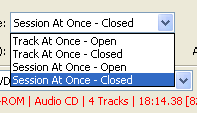
The "Recording Mode" drop down list lets you select the writing method you want and whether it will be a multisession disc or not.


You can also set what the software will do after the writing process finishes.


The files selection procedure is similar to that described in the previous page.


Review Pages

1. The Software
2. Recording Using the Wizard
3. Audio Compilation
4. Erase RW Disc
5. Comments


Pages

  • « first
  • ‹ previous
  • 1
  • 2
  • 3
  • 4
  • 5
  • next ›
  • last »

Prassi

Tags: Prassi
Previous Post
ONES - Simple DVD-Video guide
Next Post
ONES Software

Related Posts

  • ONES recording software review

  • ONES - Simple DVD-Video guide

  • ONES Software

  • January, 2003 - Prassi is back!

  • Prassi keeps "CD Rep" after the lawsuit settlement

  • Roxio settles Prassi lawsuit

  • VERITAS Software acquires Prassi Europe!

  • Hot news: Prassi USA has been acquired by ...?

Latest Reviews

The Difference Between American and European Stakes and Why It Changes How People Bet
Enterprise & IT

The Difference Between American and European Stakes and Why It Changes How People Bet

Endorfy Thock V2 Wireless Keyboard
PC components

Endorfy Thock V2 Wireless Keyboard

Noctua NH-D15 G2 Chromax.Black
Cooling Systems

Noctua NH-D15 G2 Chromax.Black

EnGenius ECW520 AP
Enterprise & IT

EnGenius ECW520 AP

Noctua NP-DM3 desk mat
Gaming

Noctua NP-DM3 desk mat

Popular News

COLORFUL Introduces CVN B850I GAMING FROZEN Motherboard

COLORFUL Introduces CVN B850I GAMING FROZEN Motherboard

COLORFUL Presents CVN X870 ARK FROZEN Motherboard for AMD Ryzen 9000 CPUs

COLORFUL Presents CVN X870 ARK FROZEN Motherboard for AMD Ryzen 9000 CPUs

COLORFUL Presents the B860 Series Motherboards

COLORFUL Presents the B860 Series Motherboards

TEAMGROUP Launches EXPERT P34F Find My External SSD

TEAMGROUP Launches EXPERT P34F Find My External SSD

ASRock AM5 Motherboards Now Fully Support AMD Ryzen 9 9950X3D & 9900X3D Processors

ASRock AM5 Motherboards Now Fully Support AMD Ryzen 9 9950X3D & 9900X3D Processors

Samsung announces Galaxy Tab S11 and Galaxy S25 FE series

Samsung announces Galaxy Tab S11 and Galaxy S25 FE series

Viltrox Showcases Upcoming Lens Lineup and New TTL Flash at IBC 2025

Viltrox Showcases Upcoming Lens Lineup and New TTL Flash at IBC 2025

CORSAIR announces Vanguard Pro 96 and Vanguard 96 Gaming Keyboards

CORSAIR announces Vanguard Pro 96 and Vanguard 96 Gaming Keyboards

Main menu

  • Home
  • News
  • Reviews
  • Essays
  • Forum
  • Legacy
  • About
    • Submit News

    • Contact Us
    • Privacy

    • Promotion
    • Advertise

    • RSS Feed
    • Site Map
  • About
  • Privacy
  • Contact Us
  • Promotional Opportunities @ CdrInfo.com
  • Advertise on out site
  • Submit your News to our site
  • RSS Feed