Breaking News

SCUF Gaming Unveils Omega, Latest Officially Licensed Pro Controller for PS5 LiberNovo Launches Revolutionary New Ergonomic Chair Lineup Noctua presents NF-A12x25 G2 chromax.black 120mm fans INNO3D AT COMPUTEX 2026 Micron Redefines AI Performance With Sampling of 256GB DDR5 Server Module

logo

  • Share Us
    • Facebook
    • Twitter
  • Home
  • Home
  • News
  • Reviews
  • Essays
  • Forum
  • Legacy
  • About
    • Submit News

    • Contact Us
    • Privacy

    • Promotion
    • Advertise

    • RSS Feed
    • Site Map

Search form

Pioneer DJS Software

Dec 20,2007 0

3. Main Features


Review Pages

1. Introduction
2. Installation
3. Main Features
4. Preferences
5. Working with the software - Conclusion


As you can see in the following screenshots, the software follows the design and philosophy of Pioneer's DJ decks and mixers. Let's summarize the basic elements of the software window as seen below.

The two Jog wheels control the spinning CDs and allows users to make adjustments onto their mixing, while they could theoretically be used for scratching effects, although this is not easy through a software application.

The cross fader slider is accurate and the user has the ability to adjust the curve of the audio channel switch, using the buttons placed just below the cross fader. This is a useful feature, and is also found in Pioneer's Pro equipment; it could make mixing easier depending on your style.

Of course, you can alternatively use the two sliders, placed in the middle of the software window, instead of using the cross fader.

Zooming in at the deck, many options and buttons are available. The playing speed can be adjusted with the big vertical slider on the right side of each deck. We did not experience any difficulties while playing some MP3 files, and the speed was accurately adjusted according to the mix.

Other buttons include the Play/Pause and CUE buttons, as well as the for/rev buttons. Both the CUE and Play/Pause buttons follow the concept found on Pioneers Pro decks.

The middle section is occupied with the mixer slider and kill frequencies buttons, and of course gain. In use, these buttons responded quite well and accurately, offering more creativity in the mix.
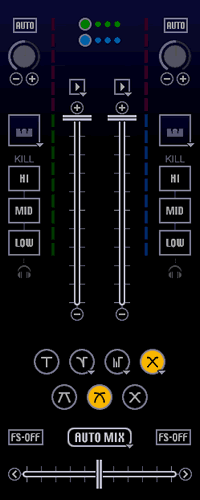
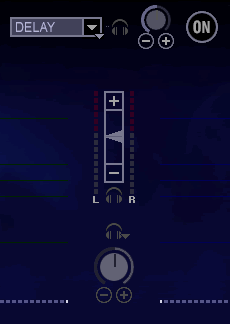
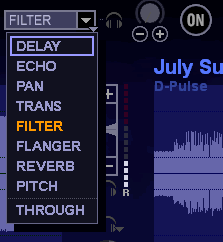
Lastly, at the top, we find the headphone volume and many effects. These effects can be triggered on the fly while mixing.
At top right, there are several buttons that open up to different areas of the software with different functions, like the Music Management window:

Click To Enlarge!
Click To Enlarge

The Ripping function, from CD-DA sources:

Click To Enlarge!
Click To Enlarge

Ripping is a somewhat easy function. When any CD is inserted, all its contents are displayed:

Click To Enlarge!
Click To Enlarge!

Then select the desired track and press rip.


Click To Enlarge!


Review Pages

1. Introduction
2. Installation
3. Main Features
4. Preferences
5. Working with the software - Conclusion


Pages

  • « first
  • ‹ previous
  • 1
  • 2
  • 3
  • 4
  • 5
  • next ›
  • last »

Pioneer

Sound

DJ

Tags: Pioneer Sound DJ
Previous Post
Gainward 8800GT
Next Post
Daemon Tools Image Drive

Related Posts

  • Pioneer announces microSD for dashcam

  • Pioneer Japan announces BDR-WX01DM for US market

  • Pioneer Japan announces new optical storage drives for JIS X6257 archive format

  • Pioneer Japan updates its CD-DVD Software utility

  • Pioneer Japan announces new BDR-X13J-X external BD Writer and BDR-WX01DM for archiving

  • Pioneer Japan releases new firmware updates for external Blu-Ray Recorders

  • Pioneer BDR-XD08UMB-S External Blu-Ray Recorder

  • Pioneer Japan updates firmware for their X13 lineup (30-01-2023)

Latest Reviews

How Online Casinos Use Encryption, Verification, and Risk Controls to Build User Trust
Enterprise & IT

How Online Casinos Use Encryption, Verification, and Risk Controls to Build User Trust

Why Low-Latency Infrastructure Matters More Than Raw Specs
Enterprise & IT

Why Low-Latency Infrastructure Matters More Than Raw Specs

In the Age of AI Phishing, the Best User Experience Might Be the One That Feels Safest
Enterprise & IT

In the Age of AI Phishing, the Best User Experience Might Be the One That Feels Safest

SoundPeats C30
Consumer Electronics

SoundPeats C30

Why Streaming Live Casino Games Demands Smarter Tech
Enterprise & IT

Why Streaming Live Casino Games Demands Smarter Tech

Popular News

TEAMGROUP Launches EXPERT P34F Find My External SSD

TEAMGROUP Launches EXPERT P34F Find My External SSD

CORSAIR announces Vanguard Pro 96 and Vanguard 96 Gaming Keyboards

CORSAIR announces Vanguard Pro 96 and Vanguard 96 Gaming Keyboards

Samsung announces Galaxy Tab S11 and Galaxy S25 FE series

Samsung announces Galaxy Tab S11 and Galaxy S25 FE series

Viltrox Showcases Upcoming Lens Lineup and New TTL Flash at IBC 2025

Viltrox Showcases Upcoming Lens Lineup and New TTL Flash at IBC 2025

MSI Launches FORGE GK600 TKL WIRELESS Special Edition Compact Mechanical Keyboard

MSI Launches FORGE GK600 TKL WIRELESS Special Edition Compact Mechanical Keyboard

Panasonic Introduces the First Ultra-Telephoto Zoom Lens in the LUMIX S Series

Panasonic Introduces the First Ultra-Telephoto Zoom Lens in the LUMIX S Series

MSI Launches DATAMAG 40Gbps Magnetic Portable SSD

MSI Launches DATAMAG 40Gbps Magnetic Portable SSD

Viltrox Joins the L-Mount Alliance, Expanding Creative Possibilities

Viltrox Joins the L-Mount Alliance, Expanding Creative Possibilities

Main menu

  • Home
  • News
  • Reviews
  • Essays
  • Forum
  • Legacy
  • About
    • Submit News

    • Contact Us
    • Privacy

    • Promotion
    • Advertise

    • RSS Feed
    • Site Map
  • About
  • Privacy
  • Contact Us
  • Promotional Opportunities @ CdrInfo.com
  • Advertise on out site
  • Submit your News to our site
  • RSS Feed