PlayStation VR2 players can access games on PC with adapter starting on August 7
the PlayStation VR2 PC adapter is available globally starting today. Check out our launch video and details on everything you’ll need to get started below, as well as our tutorial articles here: playstation.com/psvr2-pc-usage/
For details on compatible Bluetooth adapters, please visit: https://www.playstation.com/support/hardware/pc-ps-vr2-bluetooth/
When PlayStation VR2 launched last year, we were thrilled to introduce PS5 players to a new generation of VR games with innovative gameplay and immersive sensory features. Inspired by our passion to bring gamers even more content options, we’ve been working to enable access to additional games on PC, complementing the diverse PS VR2 games lineup available on PS5. Today, we’re happy to share that we’ll be rolling out this support on August 7.
Players will have access to buy and play Steam’s expansive library of thousands of VR games, including fan favorites like Half-Life: Alyx, Fallout 4 VR, and War Thunder.
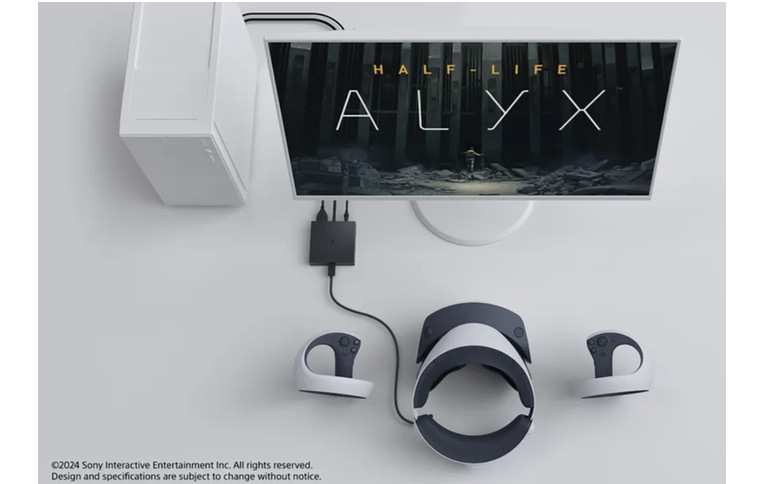
To start, players will need to purchase a PlayStation VR2 PC adapter, which will be available for an estimated retail price of $59.99 / €59.99 / £49.99 at select retailers and direct.playstation.com where available. Players will also need a commercially available DisplayPort cable (sold separately) that is compatible with DisplayPort 1.4, as well as a Steam account and a PC that meets the minimum requirements below.*
Minimum PC requirements
Here are the minimum requirements for PS VR2 gameplay on PC:
| Operating system | Windows 10 64-bit / Windows 11 64-bit |
| Processor | Intel Core i5-7600 / AMD Ryzen 3 3100 (Zen 2 or later architecture is required) |
| RAM / memory | 8 GB or more |
| GPU / graphics card | -NVIDIA GeForce GTX 1650 or later (Turing or later architecture is required) -NVIDIA RTX series -AMD Radeon RX 5500XT or later / AMD Radeon RX 6500XT or later (For the best performance, we recommend that you use an NVIDIA GeForce RTX 3060 or later or AMD Radeon RX 6600XT or latergraphics card) |
| DisplayPort | DisplayPort 1.4 (must have a standard DisplayPort or Mini DisplayPort output port) |
| USB | Direct connection only |
| Bluetooth | Bluetooth 4.0 or later** |
Setup is easy: simply connect PlayStation VR2 to your PC using the PS VR2 PC adapter and the DisplayPort 1.4 cable. Then, download the PlayStation VR2 App and the SteamVR App from Steam. This will allow you to set up PS VR2 on your PC, customize your settings and play area, and start purchasing and playing games in SteamVR.
As with all PC gaming technology, performance may vary depending on your PC setup, including system compatibility and the quality of your DisplayPort 1.4 cable. Please ensure your setup meets the minimum requirements. SteamVR titles also have individual system requirements, so please refer to the game information on Steam.
Feature differences with PS VR2 on PS5
PS VR2 was designed from the ground up specifically for PS5 – so you’ll notice that some key features, like HDR, headset feedback, eye tracking, adaptive triggers, and haptic feedback (other than rumble), are not available when playing on PC. However, other high-fidelity and sensory immersion features of PS VR2 are supported, including 4K visuals (2000 x 2040 per eye), 110-degree field of view, finger touch detection, and see-through view, as well as foveated rendering (without eye tracking) and 3D Audio in supported games.***
While the most immersive way to experience PS VR2 gaming remains on PS5, we hope players will enjoy the ability to play an expanded lineup of VR games on PC using the same headset. You can check out Steam’s huge library of multiplayer open worlds, survival horror and stealth action games, sports sims, puzzlers, and free-to-play fan favorites on the Steam Store.
Additionally, as part of our Days of Play celebration, gamers in select regions can get $100 off PS VR2 and the PS VR2 Horizon Call of the Mountain Bundle (for PS5) until June 12. Be sure to check direct.playstation.com (available in select markets) and participating local retailers, as offers and promotion dates may vary by region.
Let us know which games you’re excited to try!
*While DisplayPort 1.4 is a common standard, be sure to check that your PC supports it before purchasing a cable.
**Some Bluetooth adapters may not work due to Bluetooth adapter compatibility. We will share more details closer to launch.
***The 3D Audio experience uses SteamVR’s audio technology instead of Tempest 3D AudioTech, which is only supported on PS5.