
Primera Bravo Disc Publisher
7. Finishing publishing job - Prassi PrimoDVD2.0
Review Pages
2. Identifying the parts
3. Hardware and Software Installation
4. Overview of operation
5. Creating a publishing job
6. Printer driver-settings
7. Finishing publishing job - Prassi PrimoDVD2.0
8. Performance
9. Conclusion
PRIMERA BRAVO OPTICAL PUBLISHING SYSTEM - Page 7
Finishing the publishing job - Prassi PrimoDVD2.0
 Prassi
PrimoDVD2.0 is a professional mastering software designed for DVD-R and DVD-RW
and CD-R/RW Recorders, as well as for autoloaders, such as the Bravo Disc Publisher.
The software offers many recording features such as direct disc copy, disc imaging
to file, ISO/UDF/Joliet mastering, and Audio disc compilation from Wave or MP3
files.
Prassi
PrimoDVD2.0 is a professional mastering software designed for DVD-R and DVD-RW
and CD-R/RW Recorders, as well as for autoloaders, such as the Bravo Disc Publisher.
The software offers many recording features such as direct disc copy, disc imaging
to file, ISO/UDF/Joliet mastering, and Audio disc compilation from Wave or MP3
files.
Several recording jobs can be prepared and run simultaneously, or queued and
run in sequence. If the autoloader is equipped with a printer, this application
takes care of handling the disc printing as well.
An activity log, full error code return, support for fast computers equipped
with several SCSI boards and many recorders (up to 16), make this application
a very powerful tool for the professional in disc mastering and replication.
Prassi PrimoDVD2.0 Build 2.0.837, that came with the Bravo Publisher, allows
a user to test the robotics system of the attached Publisher / Disc printer.
By choosing Robotics-Options/Services on the top task bar of the software, the
following window appears.
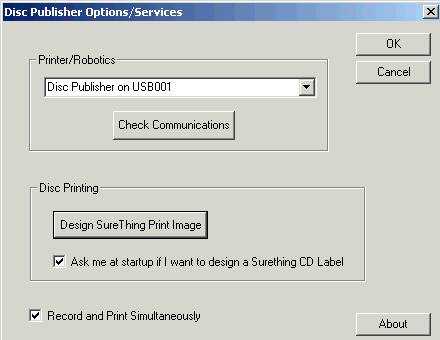
The user can check the communication between the PC and the attached Printer/
Publisher and choose to record and print simultaneously when a multiple disc
print/recording job is selected. This saves time, but at a possible extra load
on the resources consumed by the PC.
Another robotic test through software is the Manual Movement option. The following
window appears, and the unit is ready to perform a complete movement test of
the robotics. By clicking the Start Test button, the robotic arm will move through
its entire sequence automatically. If you specified more than one disc, it will
continue until the number you specified is completed or it runs out of discs.

These tests can be used to assure the smooth operation of the Publisher. We
are now ready to write some data on a disc and print it. As we said, Prassi
PrimoDVD2.0 supports all the basic recording operations. User can create a data
CD/DVD, an audio CD, copy a CD/DVD and many more. In each case, the user can
choose to print a desirable design on the disc surface, even after burning.
Let's see an example of the above in the case of an audio CD. Apart from choosing
the files to be recorded in a specific recorder, checking the writing speed,
enabling the Buffer Under Run option etc, we choose the number of copies to
be made, and check the box labeled Print (printer installed). In the right box
we select the path on our hard disk where we have saved our design. There are
two types of design files supported:
*.prn files we've previously created using almost any Windows graphics application
and
*.std files created using SureThing CD labeler.
In the drop down box to the right of the Print checkbox, we can select any recently
used *.prn or *.std files. Note that print files labeled as *.PXF created by
Disc Face Editor are not compatible with the Publisher. Disc Face Creator is
a very limited graphics program built in Prassi PrimoDVD 2.0.

Review Pages
2. Identifying the parts
3. Hardware and Software Installation
4. Overview of operation
5. Creating a publishing job
6. Printer driver-settings
7. Finishing publishing job - Prassi PrimoDVD2.0
8. Performance
9. Conclusion





