Breaking News

LG Display launches 24.5-inch 720Hz Gaming OLED Panel Razer Unveils the Mako Desktop Gaming Speakers TerraMaster Launches 725 Series Xeon Rackmount NAS Viltrox Brings Its Full-Frame Air Series to L-Mount with Four Compact Prime Lenses CORSAIR Deploys the WARTHOG Airflow Mid-Tower PC Case

logo

  • Share Us
    • Facebook
    • Twitter
  • Home
  • Home
  • News
  • Reviews
  • Essays
  • About
    • Submit News

    • Contact Us
    • Privacy

    • Promotion
    • Advertise

    • RSS Feed

Search form

Shuttle DH310S mini PC review

Oct 16,2019 0

7. Summary


Review Pages

1. About the Shuttle DH310S
2. Opening the box
3. Installing the components, BIOS settings
4. CPU tests
5. GPU tests
6. Audio and video tests
7. Summary


The Shuttle DH310S is an interesting small factor PC that can be used to power your daily office computing needs, or your digital signage. As a barebone, its performance highly depends on the components you will install to it -memory, CPU and storage. The compact device is ready to accept the latest Intel processors, as long as their TDP does not exceed 65 Watts.

The essentials for a good PC setup are here. The DH310S provides plenty of connectivity options, including USB2.0/USB3.0 ports and of course HDMI/DisplayPort outputs. An SD card slot is also present, along with a very cool USB-C port placed at the front of the device. You can also add Shuttle's optional Wifi/BT modules, of choose among the VGA, VESA Monitor Holder or Vertical Stand accessories, with some extra cost.

Depending the used CPU you will get good or very high performance for office use. In every case the thermal system of the Shuttle DH310S is capable to withstand high performance loads and doesn't throttle the main CPU. For gaming use, this box is not a good solution, at least for hardcore users who much look at much bigger boxes with standalone graphics card.
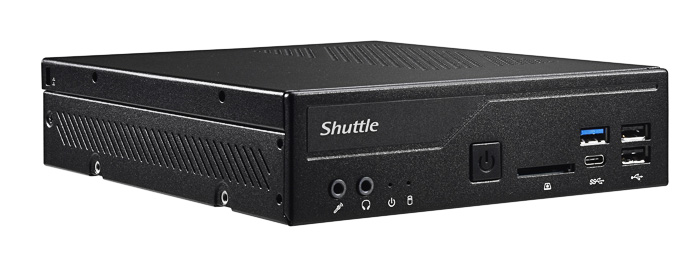
The components we equipped with the barebone with were picked up in order to keep the overall budget low. We installed the affordable Intel Pentium Gold G5400 processor, paired with 2x4GB Crucial Ballistix Sport LT 8GB Kit (2 x 4GB) DDR4-2666 SODIMM kit and of a Crucial BX500 SATA 2.5-inch SSD. Installing the various components and OS is straightforward and easy, and Shuttle provides detailed guides for that.

Despite the limited overall budget, the Shuttle DH310S proved to be a perfect media player box. Combined with the LibreELEC or KODI, it supported playback of HD Audio (7.1) and up to 4K video. Due to the latest Intel chipset 10bit files are also supported. On the other hand, the available HDMI 1.4b output rules out support for HDR and 4K @ 60Hz.

The barebone's design also helped the system's temperatures to stay overall in adequate levels under heavy testing and prolonged benchmarking, and no obvious thermal throttling issues were noticed, as the least with the Intel Pentium Gold G5400 processor.

Overall, the Shuttle DH310S, despite its limitations mainly due to its compact size, is a complete PC for office, home or digital signage applications. With a smart choice in the components you will install to it in order to get it up and running, you may keep your overall budget relatively low, although Shuttle could further help here with a bit lower retail price.

We liked

  • Complete retail package
  • Supports up to 65Watt Intel 8th and 9th Generation CPUs
  • Compact size
  • Uses the 3xx Intel Chipset
  • Supports up to 32GB memory
  • SD card with boot support
  • Many I/O ports (USB2.0, USB3.0, HDMI, DisplayPort, GBit Lan, USB-C)
  • M.2-2280M SSD slot and M.2-2230E slot for WLAN cards
  • Included thermal solution proved very efficient with Intel Pentium Gold G5400
  • HD Audio passthrough (up to 7.1)
  • Kodi 18.4 works
  • great

We didn't like

  • Included HDMI port is v1.4 (4K @ 24Hz) and not 2.0 (4K @ 60Hz + HDR)
  • Retail price could be lower since no cpu, memory, SSD and OS are included
  • WLan+Bt adapter and VESA mount add to the overall cost


Review Pages

1. About the Shuttle DH310S
2. Opening the box
3. Installing the components, BIOS settings
4. CPU tests
5. GPU tests
6. Audio and video tests
7. Summary


Pages

  • « first
  • ‹ previous
  • 1
  • 2
  • 3
  • 4
  • 5
  • 6
  • 7

Shuttle

barebones

Mini PCs

Tags: Shuttle barebones Mini PCs
Previous Post
Samsung 970 PRO 512GB SSD review
Next Post
Rapoo MT550 Multi-Mode Wireless Mouse

Related Posts

  • Shuttle Launches the XZ890G2

  • Shuttle Introduces SPCNV03 Ultra-Compact Edge AI Computer

  • Shuttle announces DN11H at InfoComm 2025

  • Shuttle announces NA10H - NT10H

  • Flat Mini-PC Barebones for the latest LGA1700 processors from Shuttle

  • Shuttle announces Xeon-compatible Mini-PC Barebone with 4x LAN and ECC RAM support

  • Shuttle announces Mini-PC Barebone in a 4.7-litre format for two PCI Express cards

  • Shuttle Announces DH32 Mini-PC

Latest Reviews

Fanxiang MP83 M.2 NVMe SSD Enclosure
Enterprise & IT

Fanxiang MP83 M.2 NVMe SSD Enclosure

Ugreen CM642 USB4.0 Enclosure
PC components

Ugreen CM642 USB4.0 Enclosure

be quiet! Dark Power 14 IO
PC components

be quiet! Dark Power 14 IO

SanDisk High Endurance 512GB microSDXC
Cameras

SanDisk High Endurance 512GB microSDXC

Samsung PRO Ultimate 512GB microSDXC
Cameras

Samsung PRO Ultimate 512GB microSDXC

Popular News

CORSAIR announces Vanguard Pro 96 and Vanguard 96 Gaming Keyboards

CORSAIR announces Vanguard Pro 96 and Vanguard 96 Gaming Keyboards

MSI’s Latest AMD X870E MAX & EVO Series Motherboards

MSI’s Latest AMD X870E MAX & EVO Series Motherboards

Panasonic Introduces the First Ultra-Telephoto Zoom Lens in the LUMIX S Series

Panasonic Introduces the First Ultra-Telephoto Zoom Lens in the LUMIX S Series

COLORFUL Launches iGame B850M ULTRA Series Micro-ATX Motherboards

COLORFUL Launches iGame B850M ULTRA Series Micro-ATX Motherboards

COLORFUL Presents Limited Edition Chitu MAG-60 Magnetic Keyboard Inspired by the Year of the Horse

COLORFUL Presents Limited Edition Chitu MAG-60 Magnetic Keyboard Inspired by the Year of the Horse

COLORFUL Presents iGame Z890 ULTRA-S W and iGame Z890M ULTRA Z Motherboards

COLORFUL Presents iGame Z890 ULTRA-S W and iGame Z890M ULTRA Z Motherboards

COLORFUL Launches iGame B850I MINI OC V14 Motherboard

COLORFUL Launches iGame B850I MINI OC V14 Motherboard

COLORFUL Expands B850 Motherboard Lineup with New CVN, Battle-Ax, and MEOW Models

COLORFUL Expands B850 Motherboard Lineup with New CVN, Battle-Ax, and MEOW Models

Main menu

  • Home
  • News
  • Reviews
  • Essays
  • About
    • Submit News

    • Contact Us
    • Privacy

    • Promotion
    • Advertise

    • RSS Feed
  • About
  • Privacy
  • Contact Us
  • Promotional Opportunities @ CdrInfo.com
  • Advertise on out site
  • Submit your News to our site
  • RSS Feed