Breaking News

Sony Introduces New Colour to INZONE H9 II Headset and INZONE E9 In-ear Headphones Club 3D announces new products for October 2026 Razer Unveils All-New Wolverine V4 Line ASUS Republic of Gamers Ships ROG Rapture GT-BN98 Router GMK Unveils TriggerKey, a New Mechanical Key System for Greater Precision and Comfort

logo

  • Share Us
    • Facebook
    • Twitter
  • Home
  • Home
  • News
  • Reviews
  • Essays
  • About
    • Submit News

    • Contact Us
    • Privacy

    • Promotion
    • Advertise

    • RSS Feed

Search form

Shuttle SP-45H7

Jul 6,2009 0

6. Installation, testbed


Review Pages

1. Features, specifications
2. The package
3. Opening the case
4. Installing the components
5. BIOS settings
6. Installation, testbed
7. Benchmarks - page 1
8. Benchmarks - page 2
9. Summary


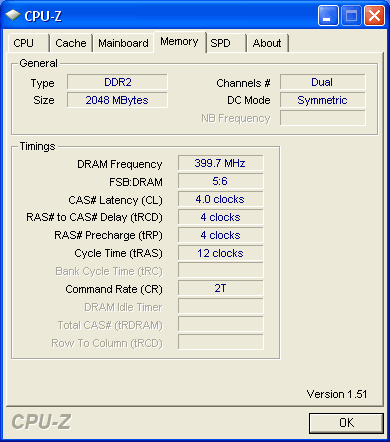
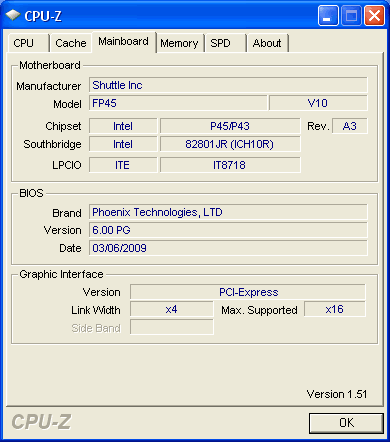
We have everything up and running. The Everest Ultimate Edition provides the basic information about the system:

Let's now see how our CPU was identified using the CPU-Z utility:

- Test Configuration

In the following page we compare the performance of the Shuttle SP-45H7 with some other motherboards. For all the tests, we used the same components:

DDR2 Memory Testbed

  • CPU: Retail Intel Q9300
  • CPU Cooler: Shuttle stock
  • Memory: 2x1GB OCZ PC2-8500 (800MHz @ 4-4-4-12-2.25V)
  • VGA: Asus 9600GT Top with latest driver pack
  • HDD: Seagate 7200.12 500GB
  • Operating system: Windows XP SP3 with all latest updates installed
  • Operating system: Windows VISTA SP1 with all latest updates installed

Since the Shuttle SP-45H7 doesn't support our passive cooled MSI 7600GT graphics card, we had to replace that with a newly designed Asus 9600GT Top model.


Review Pages

1. Features, specifications
2. The package
3. Opening the case
4. Installing the components
5. BIOS settings
6. Installation, testbed
7. Benchmarks - page 1
8. Benchmarks - page 2
9. Summary


Pages

  • « first
  • ‹ previous
  • 1
  • 2
  • 3
  • 4
  • 5
  • 6
  • 7
  • 8
  • 9
  • next ›
  • last »

Shuttle

Tags: Shuttle
Previous Post
Lite-On iHAS324
Next Post
OCZ Vertex 60GB SSD

Related Posts

  • Shuttle Launches the XZ890G2

  • Shuttle Introduces SPCNV03 Ultra-Compact Edge AI Computer

  • Shuttle announces DN11H at InfoComm 2025

  • Shuttle announces NA10H - NT10H

  • Flat Mini-PC Barebones for the latest LGA1700 processors from Shuttle

  • Shuttle announces Xeon-compatible Mini-PC Barebone with 4x LAN and ECC RAM support

  • Shuttle announces Mini-PC Barebone in a 4.7-litre format for two PCI Express cards

  • Shuttle Announces DH32 Mini-PC

Latest Reviews

Fanxiang MP83 M.2 NVMe SSD Enclosure
Enterprise & IT

Fanxiang MP83 M.2 NVMe SSD Enclosure

Ugreen CM642 USB4.0 Enclosure
PC components

Ugreen CM642 USB4.0 Enclosure

be quiet! Dark Power 14 IO
PC components

be quiet! Dark Power 14 IO

SanDisk High Endurance 512GB microSDXC
Cameras

SanDisk High Endurance 512GB microSDXC

Samsung PRO Ultimate 512GB microSDXC
Cameras

Samsung PRO Ultimate 512GB microSDXC

Popular News

MSI’s Latest AMD X870E MAX & EVO Series Motherboards

MSI’s Latest AMD X870E MAX & EVO Series Motherboards

COLORFUL Launches iGame B850M ULTRA Series Micro-ATX Motherboards

COLORFUL Launches iGame B850M ULTRA Series Micro-ATX Motherboards

COLORFUL Presents Limited Edition Chitu MAG-60 Magnetic Keyboard Inspired by the Year of the Horse

COLORFUL Presents Limited Edition Chitu MAG-60 Magnetic Keyboard Inspired by the Year of the Horse

COLORFUL Launches iGame B850I MINI OC V14 Motherboard

COLORFUL Launches iGame B850I MINI OC V14 Motherboard

COLORFUL Presents iGame Z890 ULTRA-S W and iGame Z890M ULTRA Z Motherboards

COLORFUL Presents iGame Z890 ULTRA-S W and iGame Z890M ULTRA Z Motherboards

COLORFUL Launches the iGame X870E VULCAN W OC Motherboard

COLORFUL Launches the iGame X870E VULCAN W OC Motherboard

COLORFUL Expands B850 Motherboard Lineup with New CVN, Battle-Ax, and MEOW Models

COLORFUL Expands B850 Motherboard Lineup with New CVN, Battle-Ax, and MEOW Models

ASRock Adds Support for One Sub-Channel DRAM Module on Intel DDR5 Motherboards

ASRock Adds Support for One Sub-Channel DRAM Module on Intel DDR5 Motherboards

Main menu

  • Home
  • News
  • Reviews
  • Essays
  • About
    • Submit News

    • Contact Us
    • Privacy

    • Promotion
    • Advertise

    • RSS Feed
  • About
  • Privacy
  • Contact Us
  • Promotional Opportunities @ CdrInfo.com
  • Advertise on out site
  • Submit your News to our site
  • RSS Feed