Breaking News

G.SKILL Demo New Memory Solutions for Gaming, Server, AI, Workstation Applications at Computex 2026 LIAN LI Launches HydroShift II OLED Curved 360 AIO LIAN LI Unveils O11 VISION-M CORSAIR PRO launches AI Workstations and Servers ASUS Announces T1 GeForce RTX 5070 and RTX 5060 Ti Graphics Cards

logo

  • Share Us
    • Facebook
    • Twitter
  • Home
  • Home
  • News
  • Reviews
  • Essays
  • Forum
  • Legacy
  • About
    • Submit News

    • Contact Us
    • Privacy

    • Promotion
    • Advertise

    • RSS Feed
    • Site Map

Search form

Stellar Data Recovery For Mac

May 19,2025 0

3. Menus - GUI


Review Pages

1. Introduction
2. Installation
3. Menus - GUI
4. Conclusion


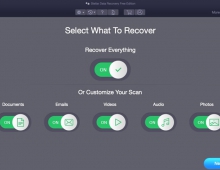
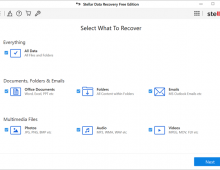
The overall GUI is the same as the version we saw for the Windows operating system, to recover files, there is also option to select "Recover Everything". The software supports 4K/2K sectors in the drive and many filesystems (APFS, HFS+, FAT32, NTFS, ExFAT, EXT2, EXT3, EXT4, CDFS, UDF). The Technician edition of the software supports Virtual Machine Recovery (VMDK, VDI, VHD, and VHDX), while data can be extracted from desktop/laptop hard drives, external hard drives, pen drives, memory cards, SSD drives, SD cards, etc. Mac-based systems do have extra protection, and the software supports data recovery from systems with T2 security chips and both Intel/M1, M2, M3, and M4 chips. 

Users also have a drive monitor software available.

Which can report the disk status, SMART, and other useful information about your internal/external HDD/SSDs.

Proceeding with the Recover From tab, we can select Volumes either internal or external.

The third option is to recover data from a nonbooting Mac.

You can also resume recovery, provided that you have already run a scan before.

Disk images also can be created for internal/external volumes/disks.

Under preferences, several options are present.

While there is a huge list of supported file types/names for almost all files you can imagine. Of course, users can add their file types if needed or tweak the existing ones.

macOS users have also more tools available with the Stellar Data Recovery software, like SpeedUp their system.

You need to assign full disk access for this function to work properly.

There are three different types of Speedup, Clean junk files, Privacy scan, or Speed optimizations.

Scanning our system, the software found several things that can be removed safely.

This function is only available for the retail builds of the Stellar Data Recovery and not for the Demo version.

Going back to the first tab, let's recover files from our system.

The software recommends disabling System Integrity Protection (SIP) to give even better results.

Instructions are given on how to achieve this.

After some time, our HDD was scanned and many files were found that could be recovered. The amount of time the software needs to scan your drive depends upon many factors, capacity, drive speed, file number, etc..

Files can be either in folders with corresponding categories (App, Video, Photo, Docs, Txt, etc)

Inside each folder, you can view the filename and file type.

The same applies also for photos

Users can also preview the deleted files that were found and can be recovered.

Files bigger than 1GB are not possible to recover, you need the full version, but up to that limit, the DEMO build will work just fine.


Review Pages

1. Introduction
2. Installation
3. Menus - GUI
4. Conclusion


Pages

  • « first
  • ‹ previous
  • 1
  • 2
  • 3
  • 4
  • next ›
  • last »

Stellar Data Recovery

Stellar

Tags: Stellar Data Recovery Stellar
Previous Post
EnGenius Wi-Fi 7
Next Post
Addlink P30 1TB Portable SSD

Related Posts

  • Stellar Data Recovery For Windows

  • Stellar SpeedUp Mac Software Review

  • Stellar Data Recovery MAC Edition

  • Stellar Data Recovery (Windows Edition)

Latest Reviews

Swit NP-FZ100 Battery
Cameras

Swit NP-FZ100 Battery

The Technology Stack Behind Modern Digital Gaming Platforms
Consumer Electronics

The Technology Stack Behind Modern Digital Gaming Platforms

be quiet! Dark Rock Pro 6
Cooling Systems

be quiet! Dark Rock Pro 6

How Online Casinos Use Encryption, Verification, and Risk Controls to Build User Trust
Enterprise & IT

How Online Casinos Use Encryption, Verification, and Risk Controls to Build User Trust

Why Low-Latency Infrastructure Matters More Than Raw Specs
Enterprise & IT

Why Low-Latency Infrastructure Matters More Than Raw Specs

Popular News

TEAMGROUP Launches EXPERT P34F Find My External SSD

TEAMGROUP Launches EXPERT P34F Find My External SSD

CORSAIR announces Vanguard Pro 96 and Vanguard 96 Gaming Keyboards

CORSAIR announces Vanguard Pro 96 and Vanguard 96 Gaming Keyboards

Samsung announces Galaxy Tab S11 and Galaxy S25 FE series

Samsung announces Galaxy Tab S11 and Galaxy S25 FE series

Viltrox Showcases Upcoming Lens Lineup and New TTL Flash at IBC 2025

Viltrox Showcases Upcoming Lens Lineup and New TTL Flash at IBC 2025

MSI Launches FORGE GK600 TKL WIRELESS Special Edition Compact Mechanical Keyboard

MSI Launches FORGE GK600 TKL WIRELESS Special Edition Compact Mechanical Keyboard

Panasonic Introduces the First Ultra-Telephoto Zoom Lens in the LUMIX S Series

Panasonic Introduces the First Ultra-Telephoto Zoom Lens in the LUMIX S Series

MSI Launches DATAMAG 40Gbps Magnetic Portable SSD

MSI Launches DATAMAG 40Gbps Magnetic Portable SSD

Viltrox Joins the L-Mount Alliance, Expanding Creative Possibilities

Viltrox Joins the L-Mount Alliance, Expanding Creative Possibilities

Main menu

  • Home
  • News
  • Reviews
  • Essays
  • Forum
  • Legacy
  • About
    • Submit News

    • Contact Us
    • Privacy

    • Promotion
    • Advertise

    • RSS Feed
    • Site Map
  • About
  • Privacy
  • Contact Us
  • Promotional Opportunities @ CdrInfo.com
  • Advertise on out site
  • Submit your News to our site
  • RSS Feed