Breaking News

ASUS Announces T1 GeForce RTX 5070 and RTX 5060 Ti Graphics Cards COLORFUL Launches iGame B850M ULTRA Series Micro-ATX Motherboards Sony Unveils 1000X THE COLLEXION Samsung Launches Next-Gen Odyssey, ViewFinity and The Movingstyle Essential Monitors LG Electronics Introduces World’s First Native 1000Hz Full HD Gaming Monitor

logo

  • Share Us
    • Facebook
    • Twitter
  • Home
  • Home
  • News
  • Reviews
  • Essays
  • Forum
  • Legacy
  • About
    • Submit News

    • Contact Us
    • Privacy

    • Promotion
    • Advertise

    • RSS Feed
    • Site Map

Search form

Teac MP-400 MP3 Player

Nov 28,2005 0

5. Tests


Review Pages

1. Introduction
2. A Closer Look
3. The Menus
4. Setting Up
5. Tests
6. Conclusion


Since the TEAC MP-400 player supports MP4 video files, we tried to encode some of our own clips to the MP4 format using Nero Digital. We tried all possible encoding profiles, but unfortunately, Nero's MP4 format is not supported. We also tried several other programs with the appropriate MP4 codecs installed, but again, we could not create an appropriate file to play on the MP-400. Of course, TEAC provides a very simple to use video converter on the installation disc and we used it to convert some files to a supported MP4 format. Only the MP4 files that we created with TEAC's converter could be played on the player.

When used as a photo viewer, only JPEG files could be shown on the LCD screen. No other file type is supported. A good thing to remember is that the MP-400 can open practically any JPEG file. We tried small sized files (4~10kb ) but also huge files (50~60MB). All JPEG files could be shown on the LCD screen, but large files took ages to open.

The following table shows the audio formats that we tested with the MP-400 player.

Compression Type Compression Settings Recognize/Play
MP3 CBR 20kBit 11025Hz Mono Yes
CBR 20kBit 11025Hz Stereo
CBR 32kBit 11025Hz Stereo
CBR 32kBit 22050Hz Mono
CBR 40kBit 22050Hz Stereo
CBR 48kBit 22050Hz Stereo
CBR 48kBit 44100Hz Mono
CBR 56kBit 22050Hz Mono
CBR 56kBit 44100Hz Mono
CBR 64kBit 22050Hz Stereo
CBR 96kBit 44100Hz Mono
CBR 96kBit 44100Hz Stereo
CBR 112kBit 44100Hz Stereo
CBR 128kBit 44100Hz Mono
CBR 128kBit 44100Hz Stereo
CBR 160kBit 44100Hz Stereo
CBR 192kBit 44100Hz Stereo
CBR 224kBit 44100Hz Stereo
CBR 256kBit 44100Hz Stereo
CBR 320kBit 44100Hz Stereo
VBR - High compression
VBR - Highest compression
VBR - Low compression
VBR - Lowest compression
VBR - Medium compression
WMA CBR 48kbps
CBR 64kbps
CBR 96kbps
CBR 128kbps
CBR 160kbps
CBR 192kbps
VBR any bitrate
OGG

CBR (45~500Kbit)

VBR (25~100 Quality)
WAV
WAV
Not supported

As you can see, there is a wide range of formats that can be played with the TEAC MP-400 player.
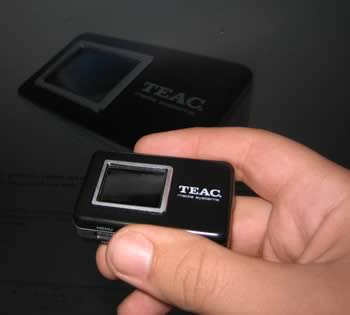
TEAC suggests that it will take approximately 14 hours to discharge a full charged battery. It took us 20 hours of mp3 playback to fully drain the battery or 8 hours of MP4 video playback. We didn't even try to test how much time a fully charged battery will take to drain with the radio, since we imagine it will take days (if not weeks). In other words, excellent battery life and low power consumption .


Review Pages

1. Introduction
2. A Closer Look
3. The Menus
4. Setting Up
5. Tests
6. Conclusion


Pages

  • « first
  • ‹ previous
  • 1
  • 2
  • 3
  • 4
  • 5
  • 6
  • next ›
  • last »

TEAC

Tags: TEAC
Previous Post
DVDFab Decrypter
Next Post
Arctic-Cooling Freezer 64 PRO

Related Posts

  • New TEAC AX-505 Amplifier Looks Retro But Packs Power

  • New TEAC Power Amplifier Offers a Sonic Impact From a Tiny Box

  • TEAC Announces new High Performance Integrated Amplifier

  • TEAC TN-4D Turntable Coming This Quarter

  • TASCAM Introduces New DR-X Series Digital Audio Recorder and USB Audio Interface

  • Teac LP-R560K Supports Recording of Vinyl Records and Cassette Tapes on CDs

  • Teac Sees No Impact from Gibson Brands Filling for Bankruptcy

  • TEAC Releases New Reference Series Hi-Res Audio Models

Latest Reviews

The Technology Stack Behind Modern Digital Gaming Platforms
Consumer Electronics

The Technology Stack Behind Modern Digital Gaming Platforms

be quiet! Dark Rock Pro 6
Cooling Systems

be quiet! Dark Rock Pro 6

How Online Casinos Use Encryption, Verification, and Risk Controls to Build User Trust
Enterprise & IT

How Online Casinos Use Encryption, Verification, and Risk Controls to Build User Trust

Why Low-Latency Infrastructure Matters More Than Raw Specs
Enterprise & IT

Why Low-Latency Infrastructure Matters More Than Raw Specs

In the Age of AI Phishing, the Best User Experience Might Be the One That Feels Safest
Enterprise & IT

In the Age of AI Phishing, the Best User Experience Might Be the One That Feels Safest

Popular News

TEAMGROUP Launches EXPERT P34F Find My External SSD

TEAMGROUP Launches EXPERT P34F Find My External SSD

CORSAIR announces Vanguard Pro 96 and Vanguard 96 Gaming Keyboards

CORSAIR announces Vanguard Pro 96 and Vanguard 96 Gaming Keyboards

Samsung announces Galaxy Tab S11 and Galaxy S25 FE series

Samsung announces Galaxy Tab S11 and Galaxy S25 FE series

Viltrox Showcases Upcoming Lens Lineup and New TTL Flash at IBC 2025

Viltrox Showcases Upcoming Lens Lineup and New TTL Flash at IBC 2025

MSI Launches FORGE GK600 TKL WIRELESS Special Edition Compact Mechanical Keyboard

MSI Launches FORGE GK600 TKL WIRELESS Special Edition Compact Mechanical Keyboard

Panasonic Introduces the First Ultra-Telephoto Zoom Lens in the LUMIX S Series

Panasonic Introduces the First Ultra-Telephoto Zoom Lens in the LUMIX S Series

MSI Launches DATAMAG 40Gbps Magnetic Portable SSD

MSI Launches DATAMAG 40Gbps Magnetic Portable SSD

Viltrox Joins the L-Mount Alliance, Expanding Creative Possibilities

Viltrox Joins the L-Mount Alliance, Expanding Creative Possibilities

Main menu

  • Home
  • News
  • Reviews
  • Essays
  • Forum
  • Legacy
  • About
    • Submit News

    • Contact Us
    • Privacy

    • Promotion
    • Advertise

    • RSS Feed
    • Site Map
  • About
  • Privacy
  • Contact Us
  • Promotional Opportunities @ CdrInfo.com
  • Advertise on out site
  • Submit your News to our site
  • RSS Feed