Breaking News

LIAN LI Announces Edge Platinum V2, Edge Gold V2, and GPU Cable Thermal Monitoring via Edge Hub ADV Razer Unveils the Huntsman V3 Pro Mini 8KHz ASRock DeskSlim Series Delivers RTX PRO Blackwell Performance in a Compact 5L Workstation Samsung Introduces Galaxy Tab S12 Series PlayStation Plus Monthly Games for October 2026

logo

  • Share Us
    • Facebook
    • Twitter
  • Home
  • Home
  • News
  • Reviews
  • Essays
  • About
    • Submit News

    • Contact Us
    • Privacy

    • Promotion
    • Advertise

    • RSS Feed

Search form

Tuniq Propeller 120 review

Jun 9,2010 0

4. Results


Review Pages

1. Features, specifications
2. A closer look, installation
3. How we test
4. Results
5. Final words


Let's move on to the actual tests with the Tuniq Propeller 120. It's unique design heatsink with top fan placement makes it more interesting and we are eager to see how efficient this design is.

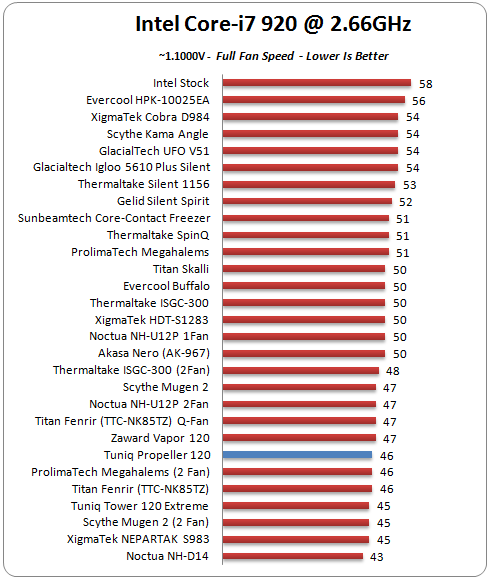
We start with our Intel Core i7-920 processor running at stock voltage and speed. The Tuniq Propeller 120 did it well here and kept the CPU's temperature at 46 degrees Celsius. That's a good score that matches the performance of some other heatsinks, such as the Prolimatech Megahalems (2-fan) and the Titan Fenrin. It seems that the small size and the aircraft carrier design of the heatsink is an efficient combination, at least with the CPU running at stock speed:
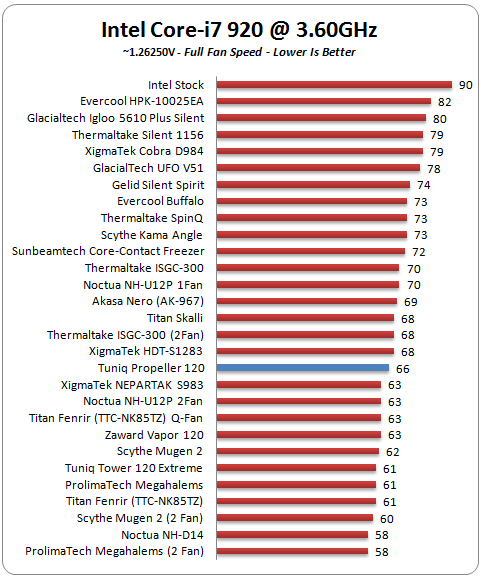
Let's make things a little bit harder for the heatsink. We overclocked the Intel Core-i7 920 to 3.60GHz. The Tuniq Propeller 120 kept the temperature of the CPU down to 66 degrees Celsius. We expected more from this heatsink but it seems that using a single fan on the top side of the heatsink offers a more compact footprint but makes things more difficult for the heatsink to handle excessive temperatures. Also have in mind that we use an open box test bed for testing the heatsinks. These temperatures would be even higher inside a closed PC box:
Spinning at full speed, the fan of the Tuniq Propeller 120 heatsink makes a lot of noise. We measured about 52dB of noise coming out from the Tuniq Propeller 120, which is really annoying. Tuniq is offering a PCI cpu fan controller with the heatsink to make things more quiet:

Below you can a price comparison among the heatsinks we have tested so far. The Tuniq Propeller 120 costs around $50. The price would be easily acceptable if we had seen a better performance from the specific cooler. However, there are many other solutions out there that would cost you less and offer probably the same or even more, at least in terms of cooling efficiency:


Review Pages

1. Features, specifications
2. A closer look, installation
3. How we test
4. Results
5. Final words


Pages

  • « first
  • ‹ previous
  • 1
  • 2
  • 3
  • 4
  • 5
  • next ›
  • last »

Tuniq

Tags: Tuniq
Previous Post
Gainward GTX 465 GOOD Edition review
Next Post
Spire Thermal Eclipse II review

Related Posts

  • New Tuniq TX-4 Thermal Grease Promises Greater Performance

  • Tuniq Tower 120 Extreme

  • Sunbeamtech - Tuniq Release Latest CPU Cooler

  • Tuniq Potency 750W PSU

Latest Reviews

Fanxiang MP83 M.2 NVMe SSD Enclosure
Enterprise & IT

Fanxiang MP83 M.2 NVMe SSD Enclosure

Ugreen CM642 USB4.0 Enclosure
PC components

Ugreen CM642 USB4.0 Enclosure

be quiet! Dark Power 14 IO
PC components

be quiet! Dark Power 14 IO

SanDisk High Endurance 512GB microSDXC
Cameras

SanDisk High Endurance 512GB microSDXC

Samsung PRO Ultimate 512GB microSDXC
Cameras

Samsung PRO Ultimate 512GB microSDXC

Popular News

MSI’s Latest AMD X870E MAX & EVO Series Motherboards

MSI’s Latest AMD X870E MAX & EVO Series Motherboards

COLORFUL Launches iGame B850M ULTRA Series Micro-ATX Motherboards

COLORFUL Launches iGame B850M ULTRA Series Micro-ATX Motherboards

COLORFUL Presents Limited Edition Chitu MAG-60 Magnetic Keyboard Inspired by the Year of the Horse

COLORFUL Presents Limited Edition Chitu MAG-60 Magnetic Keyboard Inspired by the Year of the Horse

COLORFUL Launches iGame B850I MINI OC V14 Motherboard

COLORFUL Launches iGame B850I MINI OC V14 Motherboard

COLORFUL Presents iGame Z890 ULTRA-S W and iGame Z890M ULTRA Z Motherboards

COLORFUL Presents iGame Z890 ULTRA-S W and iGame Z890M ULTRA Z Motherboards

COLORFUL Expands B850 Motherboard Lineup with New CVN, Battle-Ax, and MEOW Models

COLORFUL Expands B850 Motherboard Lineup with New CVN, Battle-Ax, and MEOW Models

ASRock Adds Support for One Sub-Channel DRAM Module on Intel DDR5 Motherboards

ASRock Adds Support for One Sub-Channel DRAM Module on Intel DDR5 Motherboards

COLORFUL Launches the iGame X870E VULCAN W OC Motherboard

COLORFUL Launches the iGame X870E VULCAN W OC Motherboard

Main menu

  • Home
  • News
  • Reviews
  • Essays
  • About
    • Submit News

    • Contact Us
    • Privacy

    • Promotion
    • Advertise

    • RSS Feed
  • About
  • Privacy
  • Contact Us
  • Promotional Opportunities @ CdrInfo.com
  • Advertise on out site
  • Submit your News to our site
  • RSS Feed