Breaking News

Samsung Introduces Galaxy Tab S12 Series PlayStation Plus Monthly Games for October 2026 Logitech announces Zone Vibe Pro Headset Razer Expands Sanrio Collection With Pompompurin Eared Headset And Kuromi Earbuds TerraMaster Launches Storage Upgrade Season with Up to 30% Off During Prime Big Deal Days

logo

  • Share Us
    • Facebook
    • Twitter
  • Home
  • Home
  • News
  • Reviews
  • Essays
  • About
    • Submit News

    • Contact Us
    • Privacy

    • Promotion
    • Advertise

    • RSS Feed

Search form

Withings Thermo Wi-Fi-connected temporal thermometer

Apr 15,2022 0

5. Testing


Review Pages

1. Introduction
2. Retail Package
3. Withings Health Mate App
4. How to take measurements
5. Testing
6. Conclusion


So how the product works? Well the measurement is pretty fast, you just swipe the Withings Thermo through your forehead in a straight line and when measurement finishes it just vibrates. After that it displays the measurement at the dot matrix screen with a LED (Green for normal, Orange for elevated, and Red for high temperature levels so you have view it.
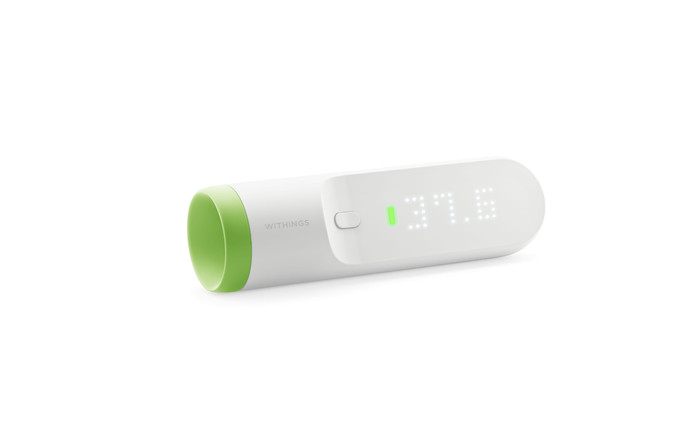
The measurements can be specified up to 8 persons (provided that they have been already registered at the app) with a simple swipe up at the right of the device.
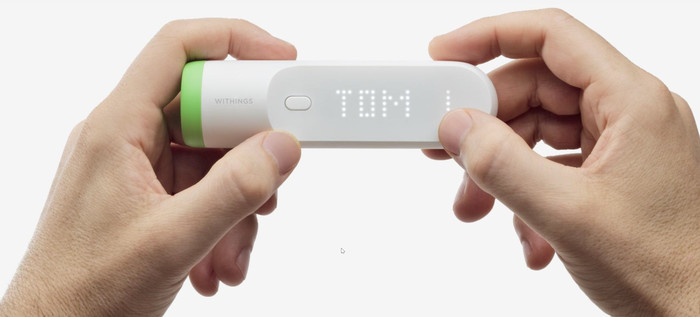
Of course measurements are also available via the Withings Health mate App

Under the Thermo settings you can add/remove Wi-Fi networks and check for updates

The device runs up two AAA (LR03) batteries. When the battery level is getting low, it is time to change the batteries. To do so, perform the following steps:

  • Lift the magnetic cover of the battery compartment of your Thermo to open it.
  • Remove the old batteries and dispose of them in accordance with local regulations.
  • Place two new AAA (LR03) batteries in the compartment.
  • Make sure you follow the polarity markings when placing the batteries.
  • Place the battery cover back.
  • Advice: To easily remove the battery cover from the Thermo, lightly press in on the cover near the top with your thumb. Then, slowly slide your thumb down to the bottom of the cover where it curves. As it presses against the curve of the battery case, it will slightly open the cover near the notch at the top. You will then be able to easily the cover by sliding your fingernail into the notch and pulling it out.


Review Pages

1. Introduction
2. Retail Package
3. Withings Health Mate App
4. How to take measurements
5. Testing
6. Conclusion


Pages

  • « first
  • ‹ previous
  • 1
  • 2
  • 3
  • 4
  • 5
  • 6
  • next ›
  • last »

Withings

Tags: Withings
Previous Post
Withings Body Plus Scale
Next Post
Withings Sleep Analyzer

Related Posts

  • Withings Envisions The Future of Health Unveiling the OMNIA Health Conceptual Product

  • Withings Unveils ScanWatch Nova Brilliant Edition

  • Withings Unveils ScanWatch Nova: Where Clinical Precision Meets Luxury Design

  • Withings Scan Watch 2

  • Withings reveals its 2023 Black Friday deals on its range of connected health devices

  • Withings Announces the UK availability of the all new White Body Scan, Connected Health Station

  • Get in Prime Condition with Withings on this year’s Amazon Prime Big Deal Days

  • WITHINGS LAUNCHES ITS NEXT-GENERATION SCANWATCH WITH ENHANCED SENSORS TO MONITOR ADDITIONAL HEALTH METRICS 24/7

Latest Reviews

Fanxiang MP83 M.2 NVMe SSD Enclosure
Enterprise & IT

Fanxiang MP83 M.2 NVMe SSD Enclosure

Ugreen CM642 USB4.0 Enclosure
PC components

Ugreen CM642 USB4.0 Enclosure

be quiet! Dark Power 14 IO
PC components

be quiet! Dark Power 14 IO

SanDisk High Endurance 512GB microSDXC
Cameras

SanDisk High Endurance 512GB microSDXC

Samsung PRO Ultimate 512GB microSDXC
Cameras

Samsung PRO Ultimate 512GB microSDXC

Popular News

MSI’s Latest AMD X870E MAX & EVO Series Motherboards

MSI’s Latest AMD X870E MAX & EVO Series Motherboards

COLORFUL Launches iGame B850M ULTRA Series Micro-ATX Motherboards

COLORFUL Launches iGame B850M ULTRA Series Micro-ATX Motherboards

COLORFUL Presents Limited Edition Chitu MAG-60 Magnetic Keyboard Inspired by the Year of the Horse

COLORFUL Presents Limited Edition Chitu MAG-60 Magnetic Keyboard Inspired by the Year of the Horse

COLORFUL Launches iGame B850I MINI OC V14 Motherboard

COLORFUL Launches iGame B850I MINI OC V14 Motherboard

COLORFUL Presents iGame Z890 ULTRA-S W and iGame Z890M ULTRA Z Motherboards

COLORFUL Presents iGame Z890 ULTRA-S W and iGame Z890M ULTRA Z Motherboards

COLORFUL Expands B850 Motherboard Lineup with New CVN, Battle-Ax, and MEOW Models

COLORFUL Expands B850 Motherboard Lineup with New CVN, Battle-Ax, and MEOW Models

ASRock Adds Support for One Sub-Channel DRAM Module on Intel DDR5 Motherboards

ASRock Adds Support for One Sub-Channel DRAM Module on Intel DDR5 Motherboards

Exceed the Infinite with New ASRock X870E Taichi White Motherboard

Exceed the Infinite with New ASRock X870E Taichi White Motherboard

Main menu

  • Home
  • News
  • Reviews
  • Essays
  • About
    • Submit News

    • Contact Us
    • Privacy

    • Promotion
    • Advertise

    • RSS Feed
  • About
  • Privacy
  • Contact Us
  • Promotional Opportunities @ CdrInfo.com
  • Advertise on out site
  • Submit your News to our site
  • RSS Feed