Breaking News

ASUS Unveils Mac-Friendly Features on ProArt Displays to Enhance Workflows Ricoh announces GR IV Monochrome Acer ProDesigner PE320QX monitor excels at tests! MSI announces Roamii BE Pro Mesh WiFi 7 System Samsung Mobile Gaming Hub Reshapes Personalized Play

logo

  • Share Us
    • Facebook
    • Twitter
  • Home
  • Home
  • News
  • Reviews
  • Essays
  • Forum
  • Legacy
  • About
    • Submit News

    • Contact Us
    • Privacy

    • Promotion
    • Advertise

    • RSS Feed
    • Site Map

Search form

Real-time Overclocking With Asus EAH3850 OC GEAR

Real-time Overclocking With Asus EAH3850 OC GEAR

GPUs Feb 22,2008 0

Asus has introduced a hardware based real-time overclocking device for graphics cards - the OC GEAR, this time bundled with AMD graphics cards in the form of the ASUS EAH3850 OC GEAR/HTDI/512M. This new version of the OC Gear will allow users to overclock both the memory clock and GPU clock for greater graphical enhancements. Additionally, the ASUS EAH3850 OC GEAR incorporates the fastest DDR3 0.8ns memory modules, and as such, will provide users with over 12% enhanced overclocking performance and gaming experiences. The graphics card also utilizes the latest thermal solution - the Glaciator Fansink; that utilizes a unique fansink design to keep GPU temperatures cool.
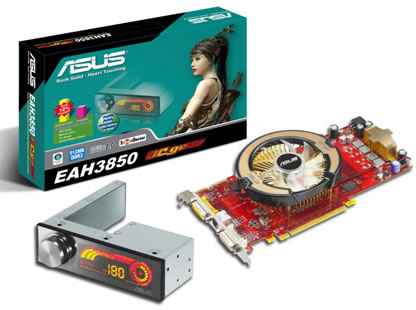


With a mirror LED display, the OC GEAR displays real-time graphics card information that includes the GPU temperature and current FPS (Frames Per Second). In addition, the knob allows timely adjustments for the user to switch menu options that include volume, GPU clock, memory clock, and fan speeds to suit different game requirements. Installing the OC GEAR is also hassle-free. Users simply need to install the OC GEAR into the chassis through an internal 4-pin USB connector to convey power and information to the motherboard.

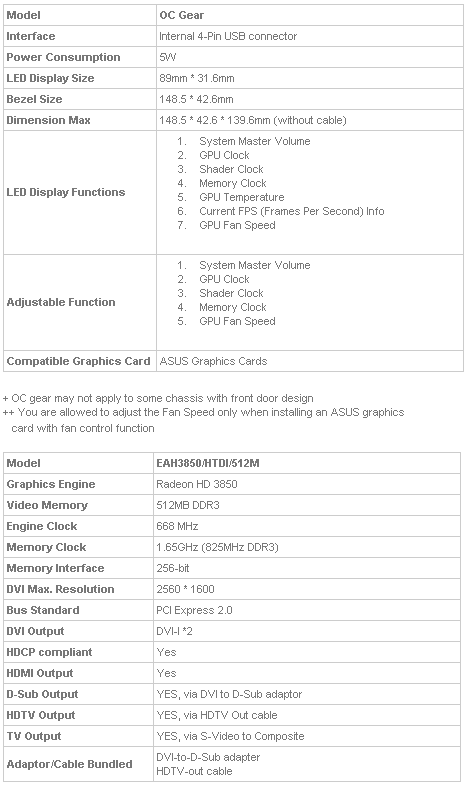
Specifications:
Tags: ASUS
Previous Post
Get a Free Palm Z22 When Buying a Palm TX
Next Post
Singulus Mastering Chooses DaTARIUS' Solutions For in-house Quality Control

Related Posts

  • ASUS Unveils Mac-Friendly Features on ProArt Displays to Enhance Workflows

  • Asus at CES 2026

  • ASUS Announces ProArt PF120 Case Fan

  • ASUS Announces Prime AP303 Compact Mid-Tower ATX Case

  • ASUS TUF Gaming Unveils Call of Duty Black Ops 7 Edition AMD Radeon RX 9070 XT

  • ASUS Announces October Availability of ProArt Display 8K PA32KCX

  • ASUS Unveils ProArt PA401, PA602 Wood Edition PC Cases with Retro Colors

  • ASUS Announces ExpertCenter PN54-S1 Mini PC

Latest News

ASUS Unveils Mac-Friendly Features on ProArt Displays to Enhance Workflows
Enterprise & IT

ASUS Unveils Mac-Friendly Features on ProArt Displays to Enhance Workflows

Ricoh announces GR IV Monochrome
Cameras

Ricoh announces GR IV Monochrome

Acer ProDesigner PE320QX monitor excels at tests!
GPUs

Acer ProDesigner PE320QX monitor excels at tests!

MSI announces Roamii BE Pro Mesh WiFi 7 System
Enterprise & IT

MSI announces Roamii BE Pro Mesh WiFi 7 System

Samsung Mobile Gaming Hub Reshapes Personalized Play
Smartphones

Samsung Mobile Gaming Hub Reshapes Personalized Play

Popular Reviews

be quiet! Dark Mount Keyboard

be quiet! Dark Mount Keyboard

Terramaster F8-SSD

Terramaster F8-SSD

be quiet! Light Mount Keyboard

be quiet! Light Mount Keyboard

Soundpeats Pop Clip

Soundpeats Pop Clip

Akaso 360 Action camera

Akaso 360 Action camera

Dragon Touch Digital Calendar

Dragon Touch Digital Calendar

be quiet! Pure Loop 3 280mm

be quiet! Pure Loop 3 280mm

Noctua NF-A12x25 G2 fans

Noctua NF-A12x25 G2 fans

Main menu

  • Home
  • News
  • Reviews
  • Essays
  • Forum
  • Legacy
  • About
    • Submit News

    • Contact Us
    • Privacy

    • Promotion
    • Advertise

    • RSS Feed
    • Site Map
  • About
  • Privacy
  • Contact Us
  • Promotional Opportunities @ CdrInfo.com
  • Advertise on out site
  • Submit your News to our site
  • RSS Feed