
Breaking News

LG Display launches 24.5-inch 720Hz Gaming OLED Panel Razer Unveils the Mako Desktop Gaming Speakers TerraMaster Launches 725 Series Xeon Rackmount NAS Viltrox Brings Its Full-Frame Air Series to L-Mount with Four Compact Prime Lenses CORSAIR Deploys the WARTHOG Airflow Mid-Tower PC Case

logo

  • Share Us
    • Facebook
    • Twitter
  • Home
  • Home
  • News
  • Reviews
  • Essays
  • About
    • Submit News

    • Contact Us
    • Privacy

    • Promotion
    • Advertise

    • RSS Feed

Search form

Firefox Brings DNS Over HTTPS by Default for US Users

Firefox Brings DNS Over HTTPS by Default for US Users

Enterprise & IT Feb 25,2020 0

Today, Firefox began the rollout of encrypted DNS over HTTPS (DoH) by default for US-based users.

The rollout will continue over the next few weeks to confirm no major issues are discovered as this new protocol is enabled for Firefox’s US-based users.

A little over two years ago, Mozilla began work to help update and secure one of the oldest parts of the internet, the Domain Name System (DNS). DNS is a database that links a human-friendly name, such as www.mozilla.org, to a computer-friendly series of numbers, called an IP address (e.g. 192.0.2.1). By performing a “lookup” in this database, your web browser is able to find websites on your behalf. Because of how DNS was originally designed decades ago, browsers doing DNS lookups for websites — even encrypted https:// sites — had to perform these lookups without encryption.

"Because there is no encryption, other devices along the way might collect (or even block or change) this data too. DNS lookups are sent to servers that can spy on your website browsing history without either informing you or publishing a policy about what they do with that information," according to Mozilla.

Mozilla's Firefox is performing DNS lookups in an encrypted HTTPS connection. This helps hide your browsing history from attackers on the network, helps prevent data collection by third parties on the network that ties your computer to websites you visit.

Mozilla is enabling DoH by default only in the US. If you’re outside of the US and would like to enable DoH, you can do so by going to Settings, then General, then scroll down to Networking Settings and click the Settings button on the right. Here you can enable DNS over HTTPS by clicking, and a checkbox will appear. By default, this change will send your encrypted DNS requests to Cloudflare.
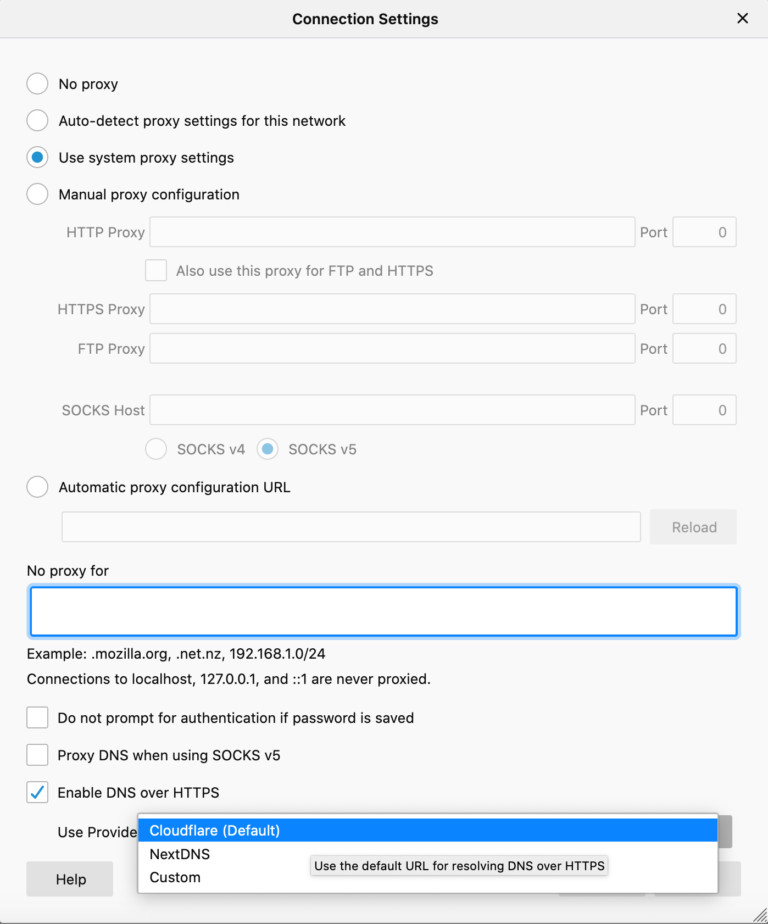
You have the option to choose between two providers — Cloudflare and NextDNS. Go to Settings, then General, then scroll down to Network Settings and click the Settings button on the right. From there, go to Enable DNS over HTTPS, then use the pull down menu to select the provider as your resolver.

Tags: FirefoxMozillaprivacy
Previous Post
Huawei Released 5G Microwave 50 Gbps Solution for Easy 5G Transport Network Deployment
Next Post
SAPPHIRE Announces New AMD Ryzen Embedded Processor Based Motherboards

Related Posts

  • EU Privacy Watchdog Accused of Delaying Probe Procedures Against Facebook

  • Facebook Users Accept $550 Million Privacy Deal Over Facebook's “Tag Suggestions”

  • Latest Firefox Helps You Keep Your Passwords Safe

  • Xiaomi Updates Its Browsers After Alleged Privacy Vulnerabilities

  • Xiaomi Says Articles About its Data Collection Policy are Inaccurate

  • Germany to Support Apple and Google Approach to Smartphone Contact Tracing

  • Australia Announces the COVIDSafe Contact-Tracing App

  • Verizon's “View Time Optimization” Tool Tells Advertisers When You’re Looking at Your Email Inbox

Latest News

LG Display launches 24.5-inch 720Hz Gaming OLED Panel
Gaming

LG Display launches 24.5-inch 720Hz Gaming OLED Panel

Razer Unveils the Mako Desktop Gaming Speakers
Consumer Electronics

Razer Unveils the Mako Desktop Gaming Speakers

TerraMaster Launches 725 Series Xeon Rackmount NAS
Enterprise & IT

TerraMaster Launches 725 Series Xeon Rackmount NAS

Viltrox Brings Its Full-Frame Air Series to L-Mount with Four Compact Prime Lenses
Cameras

Viltrox Brings Its Full-Frame Air Series to L-Mount with Four Compact Prime Lenses

CORSAIR Deploys the WARTHOG Airflow Mid-Tower PC Case
Cooling Systems

CORSAIR Deploys the WARTHOG Airflow Mid-Tower PC Case

Popular Reviews

Endorfy Thock V2 Wireless Keyboard

Endorfy Thock V2 Wireless Keyboard

The Quiet Technology Behind the Spin

The Quiet Technology Behind the Spin

SoundPeats Cove Pro

SoundPeats Cove Pro

Akaso Brave 8 Lite

Akaso Brave 8 Lite

Kioxia Exceria Plus G3 512GB microSD

Kioxia Exceria Plus G3 512GB microSD

SoundPeats C30

SoundPeats C30

be quiet! Dark Perk Mice

be quiet! Dark Perk Mice

XbotGo Chamaleon

XbotGo Chamaleon

Main menu

  • Home
  • News
  • Reviews
  • Essays
  • About
    • Submit News

    • Contact Us
    • Privacy

    • Promotion
    • Advertise

    • RSS Feed
  • About
  • Privacy
  • Contact Us
  • Promotional Opportunities @ CdrInfo.com
  • Advertise on out site
  • Submit your News to our site
  • RSS Feed