Crucial DDR5 48GB 6000CL48
2. Tests
For our tests, we used the following test system
- CPU: AMD Ryzen 9 7950X
- Thermal compound: Noctua NH-T1
- Case: SteamCom BC1 V2 Bench Table
- CPU Cooler: Noctua NH-U12A Chromax.Black + 2x120mm Stock Noctua fans
- Motherboard: Asus ProArt X670E-CREATOR WIFI with 1802 BIOS
- PSU: be quiet! Dark Pro 13 1300Watt
- Main Storage: Samsung 980Pro 1TB
- VGA: MSI GeForce RTX 4090 SUPRIM X 24G
- Dell S2721QS 4K Monitor @ 60Hz
- Operating system: Windows 11 x64 + latest motherboard/AMD chipset drivers installed (DirectStorage enabled drive)
- Software: OCCT Enterprise Edition (2 sec interval monitor)
- Ambient room temperature ~ 23 Celsius (with AC climate control) - Environment Temperature measurements: Precision Gold N09AQ Envirometer Meter
- Test Stability:
- quick testing OCCT v12 Memory Test (30min)
- stable testing Testmem5 absolute(01102021)@anta777.cfg (3 cycles)
Both modules were installed at the B2/B4 channels suggested by the motherboard vendor. We had to manually perform ClearCMOS to get everything started and the memory training for the DDR5 platform with the Asus motherboard isn't long, the first boot came around 20 seconds, and the first power up. After that point, the system is much faster at boot.
After getting the first boot, the Asus motherboard recognized and set the memory initially at DDR5-5600, without enabling any EXPO/XMP profiles. In order to get the higher DDR5-6000 memory speeds, you need to enable the included XMP/EXPO profile.

Getting into Windows 11, we get more information about our memory kit from the CPU-Z software. The DDR5-5600 memory kit was manufactured in 38 week of 2023 and has both EXPO/XMP profiles running at 5600/6000MHz at 1.10V.

Then we used the free latest version of the Thaiphoon Burner which includes more information about the used modules.
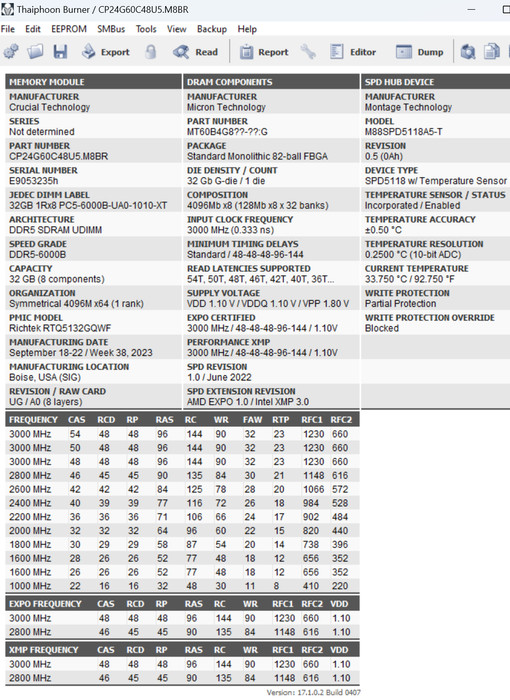
The default running speed of the Crucial Pro DDR5-6000 is DDR5-5600

Enabling the XMP/EXPO profile (under BIOS) will get you higher running speeds than the advertised DDR5-6000 speeds.

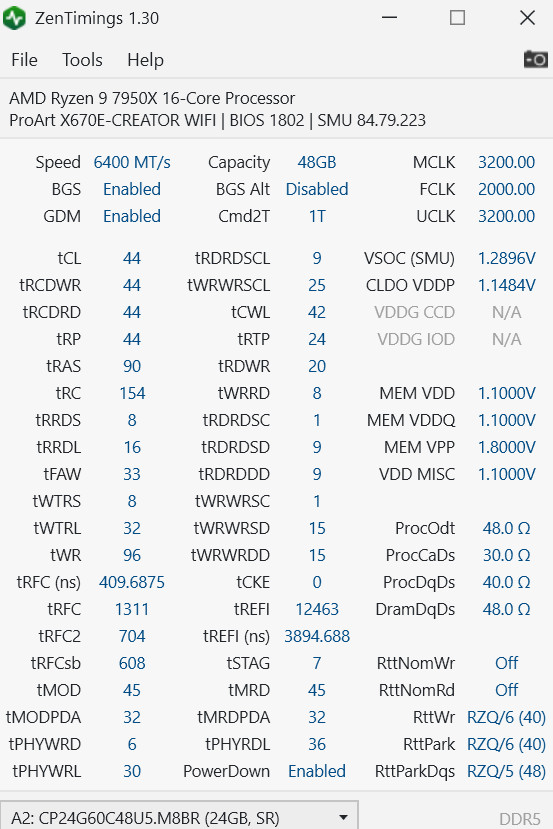
You can "boost" the Crucial DDR5-6000 up to 6400MHz, using the same CL46 memory timings and 1.10V as memory voltage.

We did try getting 6600MHz, however, even after pumping up the voltage, the system was not able to post or be stable. After several tries, we did manage to get the 6400MHz with CL44 timings as follows:
Lets now see what our benchmarks showed:
AIDA64 Cache And Memory Benchmark (v6.92.6600)

As was expected, the higher memory performance comes from the 6400CL44 with only 1.10V! Due to relaxed timings, the Cache latency isn't low and gets improved with the 6400CL44 setting, while the "stock" 6000 CL46 does have to highest cache latency of all three speeds.

MemoryMark (Performance Test 10.2 Suite)
This test gives an overall score for the installed memory and we can see that the 6400CL44 has the highest memory mark score with 3749 points.

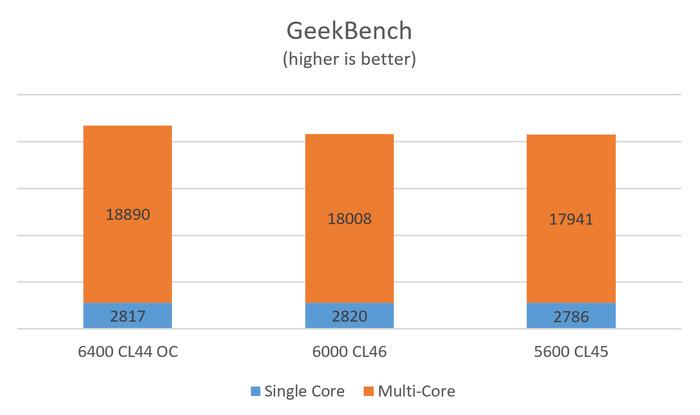
Passing to the well-known GeekBench, this software tests the performance either in single or total cores, and as we can see there is a performance difference in both single/multi-core index scores as memory frequency rises.
We used the latest version of the well-known PCMark10 and we saw some performance differences in the total overall score, after setting the various memory frequencies of the tested memory. There seems to be a difference between the 6000MHz CL 48 and the 5600CL 46, while the 6400MHz CL44 does have a slight impact on the final score.

What are the working temperatures of the modules of the Crucial memory? We measured the highest OC mode (6400MHz0 and with stock voltage (1.1V), we saw up to 57 Celsius (open testbed), at a closed case, temps would be lower since there will be some airflow towards the memory modules.