Breaking News

CORSAIR Launches the RM1200e Power Supply with Built-in PinProtect GPU Overcurrent Protection and Platinum-certified Efficiency CORSAIR Changes the Game with PureVector, a Science-Based Personalized Aiming Technology, Launching Exclusively in the SABRE v3 PRO PureVector Mouse Series AMD FSR Upscaling 4.1 Boosts Frames and Image Quality on More Devices TerraMaster TerraSync Update COLORFUL Launches iGame X870E ULTRA-S V14 Motherboard

logo

  • Share Us
    • Facebook
    • Twitter
  • Home
  • Home
  • News
  • Reviews
  • Essays
  • About
    • Submit News

    • Contact Us
    • Privacy

    • Promotion
    • Advertise

    • RSS Feed

Search form

MSI NX-7600GT

Sep 19,2006 0

7. Overclocking


Review Pages

1. Introduction
2. Retail package
3. Tests - 3DMARK
4. Tests - FEAR
5. Tests - PREY
6. Tests - Splinter Cell
7. Overclocking
8. Conclusion


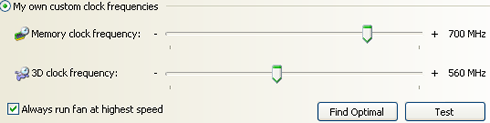
Like most enthusiasts, we were very curious to find out how well MSI's 7600GT would overclock, especially since it uses passive cooling. With the default settings, the 7600GT runs at 560MHz core and 700MHz memory clocks.
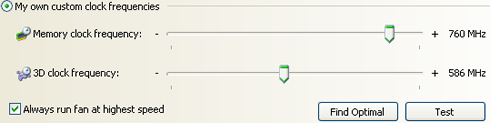
Using coolbits registry "hack", we enabled the overclocking features with Nvidia's control panel, and by using the auto "find optimal" function, we got up to 586 MHz core and 760 MHz memory.
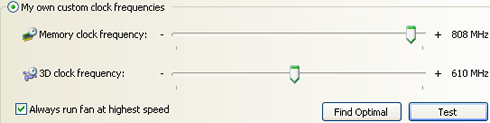
Next step, was to use the usual trial and error procedure, where we gradually raised the frequency, ran 3D Mark 06 to stress test the VGA card until we reached the highest usable frequency. Our best effort reached 610 MHz core and 808 MHz memory, a 15.43% (core) and 8.92% (memory) improvement, not as good as we had hoped.
By surfing around the net, we saw that the fan cooled version of this card, reached 650/810, not much better than what we had achieved. Obviously, you cannot call this card an overclocking champion.

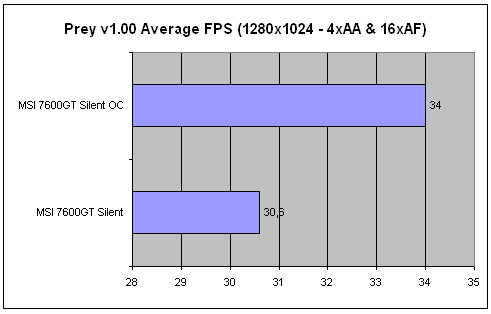
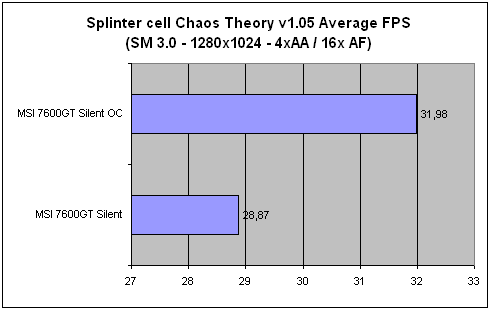
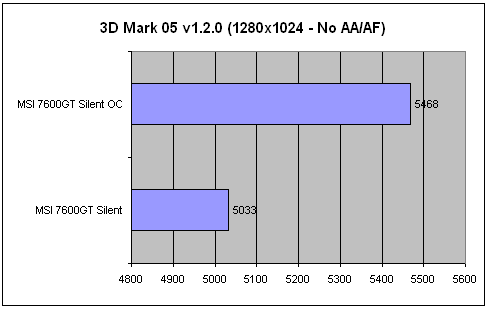
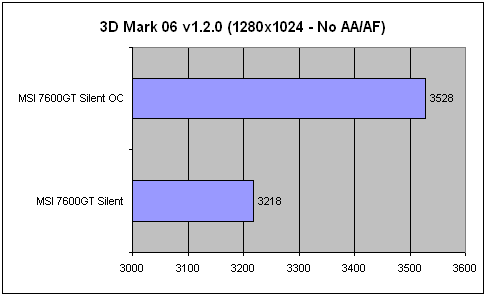
Usually, such small overclocking doesn't affect gaming experience, but we had to find out, so we ran one more round with all benchmarks and monitored any performance differences:
s

Looking at the results, we are not convinced that overclocking is worth the effort, with very little differences, especially in games. 3D Mark 05 and 3D Mark 06 are easily affected by overclocking, but we prefer to have less heat and better stability from our system. If you are that keen on overclocking, you could add a fan cooling solution to help boost overclocking levels.

As a last note, the GPU core works at 65° C (idle) and climbs up to 78° C at full load load (ambient temperature is around 25° C).


Review Pages

1. Introduction
2. Retail package
3. Tests - 3DMARK
4. Tests - FEAR
5. Tests - PREY
6. Tests - Splinter Cell
7. Overclocking
8. Conclusion


Pages

  • « first
  • ‹ previous
  • 1
  • 2
  • 3
  • 4
  • 5
  • 6
  • 7
  • 8
  • next ›
  • last »

MSI

DDR3

graphics cards

Nvidia

Tags: MSI DDR3 graphics cards Nvidia
Previous Post
Two Excellent Headsets from Mr Handsfree
Next Post
Evermore DL-200BT

Related Posts

  • NVIDIA and Microsoft Reinvent Windows PCs for the Age of Personal AI

  • MSI Strengthens Strategic Partnership with Samsung Display

  • MSI announces Roamii BE Pro Mesh WiFi 7 System

  • NVIDIA introduces DLSS 4.5, Path Tracing and G-SYNC Pulsar Supercharge Gameplay

  • MSI Unveils the GeForce RTX 5090 32G LIGHTNING Z

  • MSI announces new MEG X and MPG 341CQR QD-OLED X36 monitors

  • MSI announces new 32-inch 4K QD-OLED monitors

  • MSI’s Latest AMD X870E MAX & EVO Series Motherboards

Latest Reviews

Why Intelligent Firmware Matters More Than Peak Throughput in NAS Systems
Enterprise & IT

Why Intelligent Firmware Matters More Than Peak Throughput in NAS Systems

Fanxiang MP83 M.2 NVMe SSD Enclosure
Enterprise & IT

Fanxiang MP83 M.2 NVMe SSD Enclosure

Ugreen CM642 USB4.0 Enclosure
PC components

Ugreen CM642 USB4.0 Enclosure

be quiet! Dark Power 14 IO
PC components

be quiet! Dark Power 14 IO

SanDisk High Endurance 512GB microSDXC
Cameras

SanDisk High Endurance 512GB microSDXC

Popular News

MSI’s Latest AMD X870E MAX & EVO Series Motherboards

MSI’s Latest AMD X870E MAX & EVO Series Motherboards

COLORFUL Launches iGame B850M ULTRA Series Micro-ATX Motherboards

COLORFUL Launches iGame B850M ULTRA Series Micro-ATX Motherboards

COLORFUL Presents Limited Edition Chitu MAG-60 Magnetic Keyboard Inspired by the Year of the Horse

COLORFUL Presents Limited Edition Chitu MAG-60 Magnetic Keyboard Inspired by the Year of the Horse

COLORFUL Launches iGame B850I MINI OC V14 Motherboard

COLORFUL Launches iGame B850I MINI OC V14 Motherboard

COLORFUL Launches the iGame X870E VULCAN W OC Motherboard

COLORFUL Launches the iGame X870E VULCAN W OC Motherboard

COLORFUL Presents iGame Z890 ULTRA-S W and iGame Z890M ULTRA Z Motherboards

COLORFUL Presents iGame Z890 ULTRA-S W and iGame Z890M ULTRA Z Motherboards

COLORFUL Expands B850 Motherboard Lineup with New CVN, Battle-Ax, and MEOW Models

COLORFUL Expands B850 Motherboard Lineup with New CVN, Battle-Ax, and MEOW Models

ASRock Adds Support for One Sub-Channel DRAM Module on Intel DDR5 Motherboards

ASRock Adds Support for One Sub-Channel DRAM Module on Intel DDR5 Motherboards

Main menu

  • Home
  • News
  • Reviews
  • Essays
  • About
    • Submit News

    • Contact Us
    • Privacy

    • Promotion
    • Advertise

    • RSS Feed
  • About
  • Privacy
  • Contact Us
  • Promotional Opportunities @ CdrInfo.com
  • Advertise on out site
  • Submit your News to our site
  • RSS Feed