
Breaking News

SAMA Introduces the S32 WOOD, a Compact M-ATX Case Bundled with an 80 PLUS Gold PSU Thypoch Completes Simera-C Cine Prime Lineup with New 100mm T1.9 Lens CORSAIR Launches the RM1200e Power Supply with Built-in PinProtect GPU Overcurrent Protection and Platinum-certified Efficiency CORSAIR Changes the Game with PureVector, a Science-Based Personalized Aiming Technology, Launching Exclusively in the SABRE v3 PRO PureVector Mouse Series AMD FSR Upscaling 4.1 Boosts Frames and Image Quality on More Devices

logo

  • Share Us
    • Facebook
    • Twitter
  • Home
  • Home
  • News
  • Reviews
  • Essays
  • About
    • Submit News

    • Contact Us
    • Privacy

    • Promotion
    • Advertise

    • RSS Feed

Search form

Xtreamer Pro Media Player Review

Oct 21,2010 0

3. A closer look


Review Pages

1. Features
2. Specifications
3. A closer look
4. Powering up the player, Firmware update
5. Installing a HDD
6. Settings
7. Playing Media files
8. Internet services
9. Jukebox
10. Wireless LAN Setup
11. Final words


The Xtremer Pro is listed at Xtremer's web site for €149 and the WiFi-enabled version is available for &euro169. Its price is higher than other media players we have tested at CDRinfo.com, such as the AC Ryan PlayOnHD! and the Patriot Memory Box Office. We hope that the device will worth the extra cash.

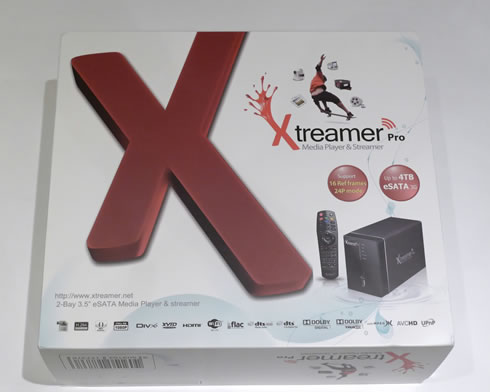
What you see below is the player's retail box. At a first glance it looks cool and includes all the necessary information about the device's capabilities, including certification logos for various supported audio and video formats:
The contents of the box are secured using protective foam packaging:

Here is what there is inside the package:

- 1x Xtreamer Pro
- 1x Remote Control
- 2x AAA Battery
- 1x 1.5m HDMI cable
- 1x e-SATA cable
- 1x USB Slave cable
- 1x Composite A/V Cable
- 1x Back panel e-SATA adapter for PC
- 1x USB extended cable for Wireless USB module
- 1x AC Adaptor
- 1x Power Cord
- 1x Quick Installation Guide

It is obvious that the provided cables should cover most of our connectivity needs. We liked the fact that there is a USB cable extension for the Wifi module, useful as you will be setting up your WiFi Lan and seek for the best reception signal.

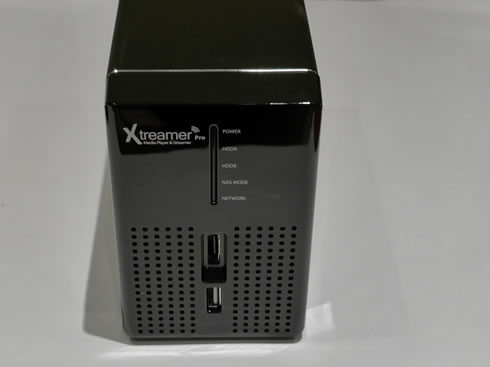
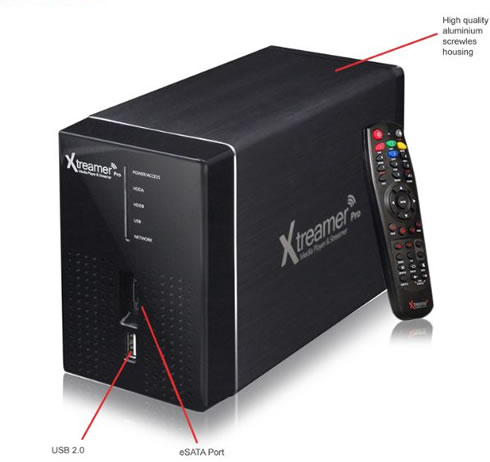
The player is compact in size at 175 x 120 x 82mm and its weight is around 1.0kg. Its housing is made out of aluminum, except from the front plastic panel. As you can see in the picture below, the front panel is simple and includes five LEDs indicating the product's operation mode (network, NES, POWER etc.), a USB and an e-SATA port:
 

The rear panel includes the connectivity ports (USB 2.0, LAN, Digital audio Optical stereo - Dolby 5.1 DTS, Analog audio & video RCA ports, HDMI 1.3a with 7.1 CH pass through)

We would like to have an 1GBit lan port, instead of the included 10/100. Also an additional USB port would be welcomed as well, in case you need to install an external device such as a USB optical disc drive.

We also show you the bottom side of the device since there is the switch that can be accessed in order to remove the front panel of the device and install your HDDs:

Bundled with the player is a remote control, which is small in size for convenient handling and has a well-designed layout, with easy to press buttons positioned at the right place. Of course, it may take you some time to familiarize yourself with colored buttons (see below), which are used while you are navigating across the player's menu:


Review Pages

1. Features
2. Specifications
3. A closer look
4. Powering up the player, Firmware update
5. Installing a HDD
6. Settings
7. Playing Media files
8. Internet services
9. Jukebox
10. Wireless LAN Setup
11. Final words


Pages

  • « first
  • ‹ previous
  • 1
  • 2
  • 3
  • 4
  • 5
  • 6
  • 7
  • 8
  • 9
  • …
  • next ›
  • last »

Xtreamer

Tags: Xtreamer
Previous Post
Optiarc AD 7260S review
Next Post
Thermaltake Massive 23 LX Notebook cooler

Related Posts

Latest Reviews

Why Intelligent Firmware Matters More Than Peak Throughput in NAS Systems
Enterprise & IT

Why Intelligent Firmware Matters More Than Peak Throughput in NAS Systems

Fanxiang MP83 M.2 NVMe SSD Enclosure
Enterprise & IT

Fanxiang MP83 M.2 NVMe SSD Enclosure

Ugreen CM642 USB4.0 Enclosure
PC components

Ugreen CM642 USB4.0 Enclosure

be quiet! Dark Power 14 IO
PC components

be quiet! Dark Power 14 IO

SanDisk High Endurance 512GB microSDXC
Cameras

SanDisk High Endurance 512GB microSDXC

Popular News

MSI’s Latest AMD X870E MAX & EVO Series Motherboards

MSI’s Latest AMD X870E MAX & EVO Series Motherboards

COLORFUL Launches iGame B850M ULTRA Series Micro-ATX Motherboards

COLORFUL Launches iGame B850M ULTRA Series Micro-ATX Motherboards

COLORFUL Presents Limited Edition Chitu MAG-60 Magnetic Keyboard Inspired by the Year of the Horse

COLORFUL Presents Limited Edition Chitu MAG-60 Magnetic Keyboard Inspired by the Year of the Horse

COLORFUL Launches iGame B850I MINI OC V14 Motherboard

COLORFUL Launches iGame B850I MINI OC V14 Motherboard

COLORFUL Launches the iGame X870E VULCAN W OC Motherboard

COLORFUL Launches the iGame X870E VULCAN W OC Motherboard

COLORFUL Presents iGame Z890 ULTRA-S W and iGame Z890M ULTRA Z Motherboards

COLORFUL Presents iGame Z890 ULTRA-S W and iGame Z890M ULTRA Z Motherboards

COLORFUL Expands B850 Motherboard Lineup with New CVN, Battle-Ax, and MEOW Models

COLORFUL Expands B850 Motherboard Lineup with New CVN, Battle-Ax, and MEOW Models

ASRock Adds Support for One Sub-Channel DRAM Module on Intel DDR5 Motherboards

ASRock Adds Support for One Sub-Channel DRAM Module on Intel DDR5 Motherboards

Main menu

  • Home
  • News
  • Reviews
  • Essays
  • About
    • Submit News

    • Contact Us
    • Privacy

    • Promotion
    • Advertise

    • RSS Feed
  • About
  • Privacy
  • Contact Us
  • Promotional Opportunities @ CdrInfo.com
  • Advertise on out site
  • Submit your News to our site
  • RSS Feed