Breaking News

Western Digital Accelerates Storage Innovation for AI Era Leica LUX Case for the iPhone 17 Pro/Pro Max ASUS Announces ROG Strix Aiolos Viltrox Launches AF 16mm F1.8 L for Full Frame Casio to Release G-SHOCK with Minimalist Metal Design and Even Better Fit

logo

  • Share Us
    • Facebook
    • Twitter
  • Home
  • Home
  • News
  • Reviews
  • Essays
  • Forum
  • Legacy
  • About
    • Submit News

    • Contact Us
    • Privacy

    • Promotion
    • Advertise

    • RSS Feed
    • Site Map

Search form

Arctic Liquid Freezer II 280 RGB

Mar 6,2023 0

3. Installation


Review Pages

1. Introduction
2. Retail Package
3. Installation
4. Performance
5. Conclusion


Installing the CPU cooler requires several steps and mostly we advise you to read the Arctic online guide for installing the product either for Intel or AMD platforms. For sure your life would be easier if screws and parts were separated and had some kind of indication. For our tests with an AMD AM4 (AMD Ryzen 5600X), you have to first remove the included stock brackets and use spacers and screws to secure the mounting mechanism as follows. There are two parts, you just need to place the rounded edges part at the TOP

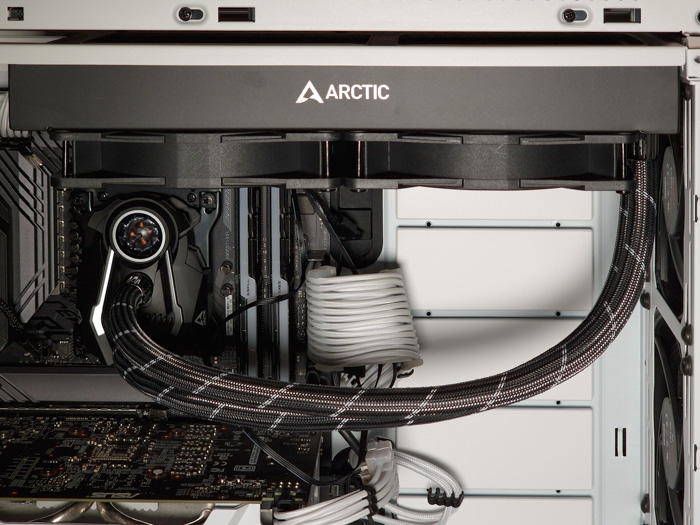
After that point, you have to screw the two mounting plates of the pump with two screws and after that point, you need to place thermal paste at the CPU and by using the four Philips-type thumb screws secure the pump at the CPU area. The radiator can be installed either at the top of the case or at the front area, depending on your case. For our test, we installed the radiator at the top of the be quiet! Silent Base 802 midi tower case.

Depending on your system you can use the included RGB controller, in our case we simply used a 3pin header at the Asus motherboard and the CPU fan as the main source for powering our AIO cooler.

 

Review Pages

1. Introduction
2. Retail Package
3. Installation
4. Performance
5. Conclusion


Pages

  • « first
  • ‹ previous
  • 1
  • 2
  • 3
  • 4
  • 5
  • next ›
  • last »

Arctic Cooling

Arctic

Tags: Arctic Cooling Arctic
Previous Post
Akaso Brave 7 Action Camera
Next Post
8 Analysis Tools for Stock Traders

Related Posts

  • Arctic announces MX-7 – ULTIMATE Performance Thermal Paste

  • Arctic announces Xtender PC case

  • Arctic announces New Liquid Freezer III Pro 280 and Pro 420

  • Arctic Liquid Freezer III 360 Pro Argb

  • ARCTIC announces Liquid Freezer III Pro – Cooling Performance Redefined

  • Arctic Screwdriver Tools

  • Arctic Liquid Freezer III 240 ARGB

  • Arctic announces Screwdriver Sets

Latest Reviews

Akaso Brave 8 Lite
Cameras

Akaso Brave 8 Lite

Soundpeats Air 5
Consumer Electronics

Soundpeats Air 5

XbotGo Chamaleon
Consumer Electronics

XbotGo Chamaleon

be quiet! Dark Perk Mice
Gaming

be quiet! Dark Perk Mice

Acemagic W1
PC components

Acemagic W1

Popular News

COLORFUL Introduces CVN B850I GAMING FROZEN Motherboard

COLORFUL Introduces CVN B850I GAMING FROZEN Motherboard

COLORFUL Presents CVN X870 ARK FROZEN Motherboard for AMD Ryzen 9000 CPUs

COLORFUL Presents CVN X870 ARK FROZEN Motherboard for AMD Ryzen 9000 CPUs

TEAMGROUP Launches EXPERT P34F Find My External SSD

TEAMGROUP Launches EXPERT P34F Find My External SSD

ASRock AM5 Motherboards Now Fully Support AMD Ryzen 9 9950X3D & 9900X3D Processors

ASRock AM5 Motherboards Now Fully Support AMD Ryzen 9 9950X3D & 9900X3D Processors

Samsung announces Galaxy Tab S11 and Galaxy S25 FE series

Samsung announces Galaxy Tab S11 and Galaxy S25 FE series

Viltrox Showcases Upcoming Lens Lineup and New TTL Flash at IBC 2025

Viltrox Showcases Upcoming Lens Lineup and New TTL Flash at IBC 2025

CORSAIR announces Vanguard Pro 96 and Vanguard 96 Gaming Keyboards

CORSAIR announces Vanguard Pro 96 and Vanguard 96 Gaming Keyboards

Panasonic Introduces the First Ultra-Telephoto Zoom Lens in the LUMIX S Series

Panasonic Introduces the First Ultra-Telephoto Zoom Lens in the LUMIX S Series

Main menu

  • Home
  • News
  • Reviews
  • Essays
  • Forum
  • Legacy
  • About
    • Submit News

    • Contact Us
    • Privacy

    • Promotion
    • Advertise

    • RSS Feed
    • Site Map
  • About
  • Privacy
  • Contact Us
  • Promotional Opportunities @ CdrInfo.com
  • Advertise on out site
  • Submit your News to our site
  • RSS Feed