Breaking News

Apple introduces AirPods Max 2 COLORFUL Launches the iGame GeForce RTX 50 Ultra Series Creative Launches Sound Blaster Audigy FX Pro Toshiba to Showcase High-Performance AI and Petabyte-Scale Storage Solutions at Cloudfest 2026 The SAMA V62 brings panoramic design to modern PC builds

logo

  • Share Us
    • Facebook
    • Twitter
  • Home
  • Home
  • News
  • Reviews
  • Essays
  • Forum
  • Legacy
  • About
    • Submit News

    • Contact Us
    • Privacy

    • Promotion
    • Advertise

    • RSS Feed
    • Site Map

Search form

BenQ DW1655

Jan 25,2006 0

22. Booktype Support


Review Pages

1. Introduction
2. Reading Tests
3. CD Error Correction
4. DVD Error Correction
5. Protected Discs
6. CD Writing Tests
7. CD Writing Quality - Plextools
8. CD Writing Quality - Clover System
9. DVD Writing Tests
10. DVD Writing Quality - Page 1
11. DVD Writing Quality - Page 2
12. DVD Writing Quality - Page 3
13. DVD Writing Quality - Page 4
14. DVD Writing Quality - Page 5
15. DVD Writing Quality - Almedio
16. DVDR DL - Page 1
17. DVDR DL - Page 2
18. DW1655 vs SA300 - Page 1
19. DW1655 vs SA300 - Page 2
20. DW1655 vs SA300 - Page 3
21. DW1655 vs SA300 - Page 4
22. Booktype Support
23. QSuite Utility
24. LightScribe Feature
25. Firmware upgrade - BCDB
26. Conclusion


The booktype setting enables a drive to change the booktype of media (+R, +RW, +RDL only) prior to burning, in order to maximize its compatibility with stand alone players. This is one of the advanced features that most of the current market drives have as a standard. This procedure differs from drive to drive. With the BenQ drive, the Booktype setting change can be achieved with the accompanying Q-Suite utility, which among other things, enables the user to set the booktype of media.

The procedure is simple and does not need to be repeated every time, as the changes made with the Q-Suite utility are stored and used as defaults with every burn the user makes.

1. After installing the Q-Suite software, we ran it and chose the Book Type tab.

2. The first window (see above) provides possible changes we can make to the drive. By default, as one can see here, the DVD+R and DVD+R DL media will be changed to DVD-ROM after the burn has commenced. If you choose to change booktype for DVD+R media for example, (by pressing the "Set to DVD+R Type"), you get the following message.

As is clearly stated in the warning message, changes will apply to NEW media only, and further booktype modification is not possible once the media is burned.

3. If we press OK, the next time we write a DVD+R media, the Booktype will be set to DVD+R.
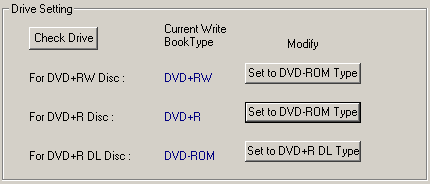
A very useful and easy to use feature, available with the Q-Suite utility.


Review Pages

1. Introduction
2. Reading Tests
3. CD Error Correction
4. DVD Error Correction
5. Protected Discs
6. CD Writing Tests
7. CD Writing Quality - Plextools
8. CD Writing Quality - Clover System
9. DVD Writing Tests
10. DVD Writing Quality - Page 1
11. DVD Writing Quality - Page 2
12. DVD Writing Quality - Page 3
13. DVD Writing Quality - Page 4
14. DVD Writing Quality - Page 5
15. DVD Writing Quality - Almedio
16. DVDR DL - Page 1
17. DVDR DL - Page 2
18. DW1655 vs SA300 - Page 1
19. DW1655 vs SA300 - Page 2
20. DW1655 vs SA300 - Page 3
21. DW1655 vs SA300 - Page 4
22. Booktype Support
23. QSuite Utility
24. LightScribe Feature
25. Firmware upgrade - BCDB
26. Conclusion
 

Pages

  • « first
  • ‹ previous
  • …
  • 18
  • 19
  • 20
  • 21
  • 22
  • 23
  • 24
  • 25
  • 26
  • next ›
  • last »

Benq

Tags: Benq
Previous Post
Toshiba MK1032GAX
Next Post
Club3D X1800XT

Related Posts

  • BenQ Releases True 4K HDR Smart Home Projectors Powered by Google

  • BenQ Debuts HDR Console Gaming Projector With High Brightness

  • BenQ Expands 4K UHD HDR Home Cinema Lineup With Midrange Projector

  • BenQ's True 4K UHD HDR Home Cinema Projector Debuts at Less Than $2000

  • BenQ Professional Designer Monitor Promises Individually Factory-Calibrated Color Precision

  • New BenQ SW320 Flagship Photographer Monitor Released

  • New BenQ Projector Supports 5-GHz WHDI Technology

  • BenQ to Showcase 3D-Ready Home Cinema Projectors, Mini Projectors, and Gaming Monitors at CES 2012

Latest Reviews

Why Streaming Live Casino Games Demands Smarter Tech
Enterprise & IT

Why Streaming Live Casino Games Demands Smarter Tech

Kioxia Exceria Plus G3 512GB microSD
Cameras

Kioxia Exceria Plus G3 512GB microSD

SoundPeats Cove Pro
Consumer Electronics

SoundPeats Cove Pro

Asustor AS5404T 4-Bay NAS System
Enterprise & IT

Asustor AS5404T 4-Bay NAS System

be quiet! Pure Power 13M 1200W
PC components

be quiet! Pure Power 13M 1200W

Popular News

COLORFUL Presents CVN X870 ARK FROZEN Motherboard for AMD Ryzen 9000 CPUs

COLORFUL Presents CVN X870 ARK FROZEN Motherboard for AMD Ryzen 9000 CPUs

TEAMGROUP Launches EXPERT P34F Find My External SSD

TEAMGROUP Launches EXPERT P34F Find My External SSD

Samsung announces Galaxy Tab S11 and Galaxy S25 FE series

Samsung announces Galaxy Tab S11 and Galaxy S25 FE series

Viltrox Showcases Upcoming Lens Lineup and New TTL Flash at IBC 2025

Viltrox Showcases Upcoming Lens Lineup and New TTL Flash at IBC 2025

CORSAIR announces Vanguard Pro 96 and Vanguard 96 Gaming Keyboards

CORSAIR announces Vanguard Pro 96 and Vanguard 96 Gaming Keyboards

Panasonic Introduces the First Ultra-Telephoto Zoom Lens in the LUMIX S Series

Panasonic Introduces the First Ultra-Telephoto Zoom Lens in the LUMIX S Series

MSI Launches DATAMAG 40Gbps Magnetic Portable SSD

MSI Launches DATAMAG 40Gbps Magnetic Portable SSD

MSI Launches FORGE GK600 TKL WIRELESS Special Edition Compact Mechanical Keyboard

MSI Launches FORGE GK600 TKL WIRELESS Special Edition Compact Mechanical Keyboard

Main menu

  • Home
  • News
  • Reviews
  • Essays
  • Forum
  • Legacy
  • About
    • Submit News

    • Contact Us
    • Privacy

    • Promotion
    • Advertise

    • RSS Feed
    • Site Map
  • About
  • Privacy
  • Contact Us
  • Promotional Opportunities @ CdrInfo.com
  • Advertise on out site
  • Submit your News to our site
  • RSS Feed