Breaking News

CORSAIR Launches the RM1200e Power Supply with Built-in PinProtect GPU Overcurrent Protection and Platinum-certified Efficiency CORSAIR Changes the Game with PureVector, a Science-Based Personalized Aiming Technology, Launching Exclusively in the SABRE v3 PRO PureVector Mouse Series AMD FSR Upscaling 4.1 Boosts Frames and Image Quality on More Devices TerraMaster TerraSync Update COLORFUL Launches iGame X870E ULTRA-S V14 Motherboard

logo

  • Share Us
    • Facebook
    • Twitter
  • Home
  • Home
  • News
  • Reviews
  • Essays
  • About
    • Submit News

    • Contact Us
    • Privacy

    • Promotion
    • Advertise

    • RSS Feed

Search form

Epomaker P75

Dec 29,2024 0

4. Conclusion


Review Pages

1. Introduction
2. Retail Package
3. Software
4. Conclusion


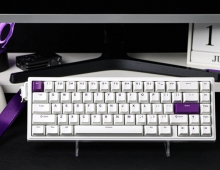
The EPOMAKER P75 is a minimally designed 75% keyboard with gamers mostly in mind. The build quality is top notch and the keyboard won't flex in any case. All buttons are hot-swappable and as with all EPOMAKER keyboards, the used keycaps are made out of PBT, so the surface should be somewhat more resistant to turning shiny from skin oils, compared to ABS. Typing with this keyboard, especially with the tested version (White, Zebra Linear) is a nice experience with a thock that you should expect from a mechanical keyboard. The sound that comes from each keypress is neither too low nor too high and is something that can be used in an office environment as well. EPOMAKER sells three (3) different versions of the P75 for users who wish to have choices and color variation.
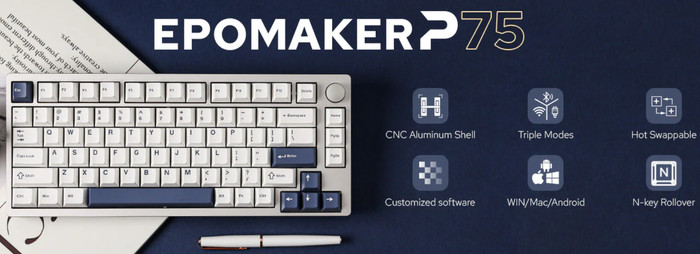
As with most EPOMAKER keyboards, there is a real metal volume knob that can be used to control the sound, is very practical and easy to use, even though we would like it to be somewhat bigger. The keyboard supports three connection modes, cable/2.4GHz or BT, we didn't notice high lag so gaming would be great. There is an LED backlight present that is pale and works. On the negative side, we would like to have bottom feet to further raise the keyboard. Because all letters are printed onto the keycaps, in total darkness you might have some problem looking at keys and identifying what key is for what use. The metal volume knob is tight but this may change over time. The 75% layout does need some time to get used to since the DEL key is placed next to the metal volume knob when in full-size keyboards, is above the Arrow Up key. Lastly, the keyboard can be customized mainly via the web, even if we don't like much this approach, we would prefer open-source (VIA) software.

Overall we find the EPOMAKER P75 a proper solution if you are looking for a well-built 75% keyboard with many features and steady gaming operation. The retail price is under $100 for all three color variations with three different Epomaker switches.

 

Review Pages

1. Introduction
2. Retail Package
3. Software
4. Conclusion


Pages

  • « first
  • ‹ previous
  • 1
  • 2
  • 3
  • 4

EPOMAKER

Tags: EPOMAKER
Previous Post
Epomaker HE 75 Mag
Next Post
Epomaker Galaxy 100

Related Posts

  • Epomaker Magcore 87

  • Epomaker Carbon 60

  • Epomaker HE 68

  • Epomaker Click

  • Epomaker Alice 66

  • Epomaker Split 65

  • EPOMAKER RT100

  • Epomaker HE 75 Mag

Latest Reviews

Why Intelligent Firmware Matters More Than Peak Throughput in NAS Systems
Enterprise & IT

Why Intelligent Firmware Matters More Than Peak Throughput in NAS Systems

Fanxiang MP83 M.2 NVMe SSD Enclosure
Enterprise & IT

Fanxiang MP83 M.2 NVMe SSD Enclosure

Ugreen CM642 USB4.0 Enclosure
PC components

Ugreen CM642 USB4.0 Enclosure

be quiet! Dark Power 14 IO
PC components

be quiet! Dark Power 14 IO

SanDisk High Endurance 512GB microSDXC
Cameras

SanDisk High Endurance 512GB microSDXC

Popular News

MSI’s Latest AMD X870E MAX & EVO Series Motherboards

MSI’s Latest AMD X870E MAX & EVO Series Motherboards

COLORFUL Launches iGame B850M ULTRA Series Micro-ATX Motherboards

COLORFUL Launches iGame B850M ULTRA Series Micro-ATX Motherboards

COLORFUL Presents Limited Edition Chitu MAG-60 Magnetic Keyboard Inspired by the Year of the Horse

COLORFUL Presents Limited Edition Chitu MAG-60 Magnetic Keyboard Inspired by the Year of the Horse

COLORFUL Launches iGame B850I MINI OC V14 Motherboard

COLORFUL Launches iGame B850I MINI OC V14 Motherboard

COLORFUL Launches the iGame X870E VULCAN W OC Motherboard

COLORFUL Launches the iGame X870E VULCAN W OC Motherboard

COLORFUL Presents iGame Z890 ULTRA-S W and iGame Z890M ULTRA Z Motherboards

COLORFUL Presents iGame Z890 ULTRA-S W and iGame Z890M ULTRA Z Motherboards

COLORFUL Expands B850 Motherboard Lineup with New CVN, Battle-Ax, and MEOW Models

COLORFUL Expands B850 Motherboard Lineup with New CVN, Battle-Ax, and MEOW Models

ASRock Adds Support for One Sub-Channel DRAM Module on Intel DDR5 Motherboards

ASRock Adds Support for One Sub-Channel DRAM Module on Intel DDR5 Motherboards

Main menu

  • Home
  • News
  • Reviews
  • Essays
  • About
    • Submit News

    • Contact Us
    • Privacy

    • Promotion
    • Advertise

    • RSS Feed
  • About
  • Privacy
  • Contact Us
  • Promotional Opportunities @ CdrInfo.com
  • Advertise on out site
  • Submit your News to our site
  • RSS Feed