Breaking News

ZOTAC GAMING Launches GeForce RTX 5080 SOLID CORE OC 20th Anniversary Edition Google Unveils Pixel 11 Series, Pixel 11 Pro Fold, Pixel Watch 5, and Pixel Tag Insta360 Expands Its Content Creation Ecosystem with Flagship X6 8K 360 Camera and Next-Generation Audio Solutions Razer Unveils the Artisan Keycap – Triple-Headed Snake Edition Razer Unveils the Naga V3 Pro

logo

  • Share Us
    • Facebook
    • Twitter
  • Home
  • Home
  • News
  • Reviews
  • Essays
  • About
    • Submit News

    • Contact Us
    • Privacy

    • Promotion
    • Advertise

    • RSS Feed

Search form

Google Adds One-tap, Suggested Options to Google Photos

Google Adds One-tap, Suggested Options to Google Photos

Enterprise & IT May 8,2018 0

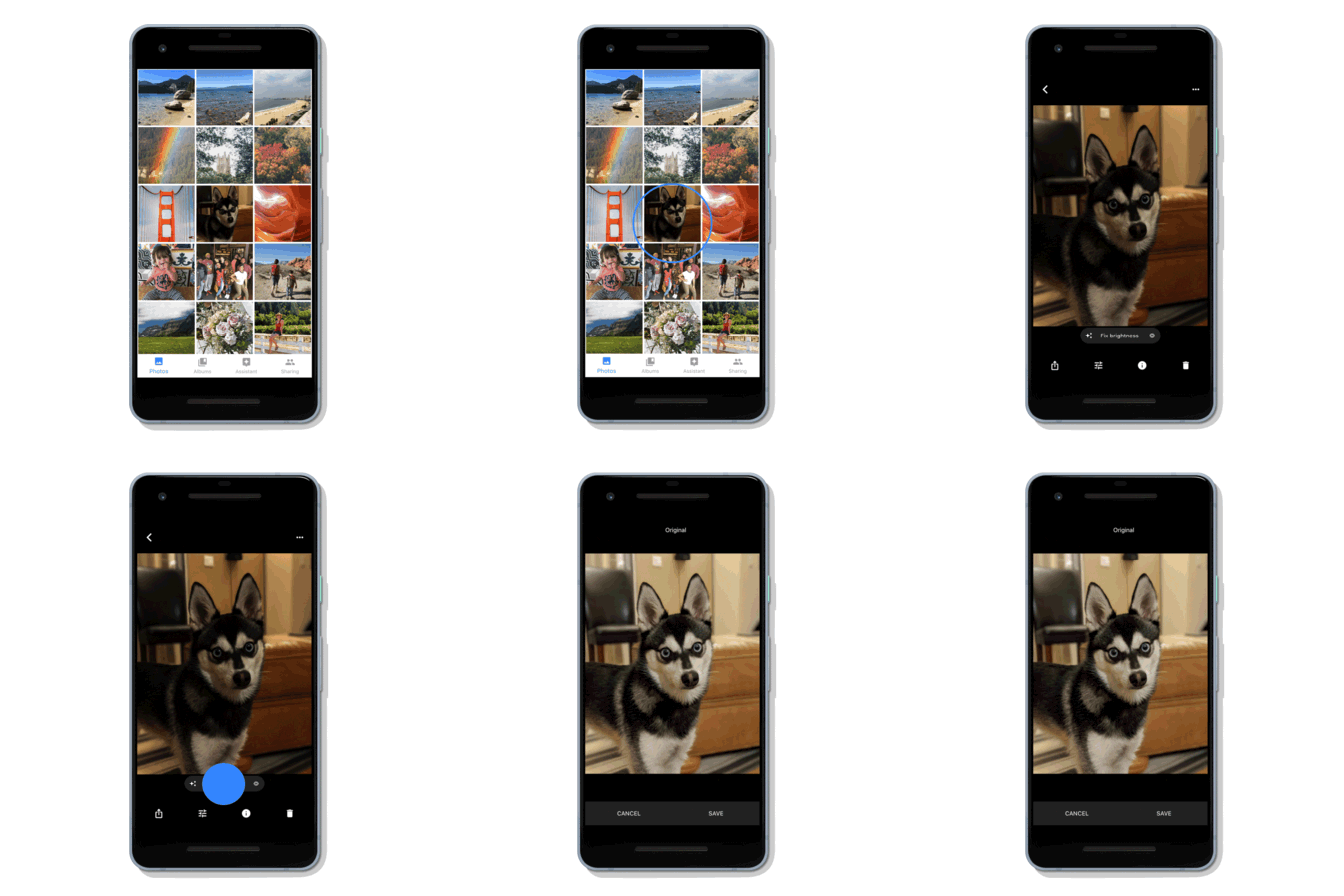
In Google Photos, you will soon start seeing a range of suggested actions on your photos right as you're viewing them, such as the option to brighten, share, rotate or archive a picture.

Announced today at Google I/O, these suggested actions are powered by machine learning, which means you only see them on relevant photos. You can tap the suggestions to complete the action.

Starting today, you may see a new photo creation that plays with pops of color. In these creations, Google use AI to detect the subject of your photo and leave them in color-including their clothing and whatever they're holding-while the background is set to black and white. You'll see these AI-powered creations in the Assistant tab of Google Photos.

Google is also working on the ability for you to change black-and-white shots into color in just a tap.
Google is also introducing a new Google Photos partner program that gives developers the tools to support Google Photos in their products, so people can choose to access their photos whenever they need them. Look for apps and devices that work with Google Photos in the coming months.

Tags: google photos
Previous Post
Google Releases Android P Beta, Previews Features at I/O
Next Post
Updated Google News is Powered by AI

Related Posts

  • Updated Google Photos Let You Relive Your Memories

  • Google Stops Syncing Google Drive With Google Photos

Latest News

ZOTAC GAMING Launches GeForce RTX 5080 SOLID CORE OC 20th Anniversary Edition
GPUs

ZOTAC GAMING Launches GeForce RTX 5080 SOLID CORE OC 20th Anniversary Edition

Google Unveils Pixel 11 Series, Pixel 11 Pro Fold, Pixel Watch 5, and Pixel Tag
Smartphones

Google Unveils Pixel 11 Series, Pixel 11 Pro Fold, Pixel Watch 5, and Pixel Tag

Insta360 Expands Its Content Creation Ecosystem with Flagship X6 8K 360 Camera and Next-Generation Audio Solutions
Cameras

Insta360 Expands Its Content Creation Ecosystem with Flagship X6 8K 360 Camera and Next-Generation Audio Solutions

Razer Unveils the Artisan Keycap – Triple-Headed Snake Edition
Gaming

Razer Unveils the Artisan Keycap – Triple-Headed Snake Edition

Razer Unveils the Naga V3 Pro
Gaming

Razer Unveils the Naga V3 Pro

Popular Reviews

Endorfy Thock V2 Wireless Keyboard

Endorfy Thock V2 Wireless Keyboard

Dragon Touch Digital Calendar

Dragon Touch Digital Calendar

be quiet! Pure Loop 3 280mm

be quiet! Pure Loop 3 280mm

Soft2bet and the unseen hardware that makes instant play possible

Soft2bet and the unseen hardware that makes instant play possible

The Quiet Technology Behind the Spin

The Quiet Technology Behind the Spin

SoundPeats Cove Pro

SoundPeats Cove Pro

Akaso Brave 8 Lite

Akaso Brave 8 Lite

Kioxia Exceria Plus G3 512GB microSD

Kioxia Exceria Plus G3 512GB microSD

Main menu

  • Home
  • News
  • Reviews
  • Essays
  • About
    • Submit News

    • Contact Us
    • Privacy

    • Promotion
    • Advertise

    • RSS Feed
  • About
  • Privacy
  • Contact Us
  • Promotional Opportunities @ CdrInfo.com
  • Advertise on out site
  • Submit your News to our site
  • RSS Feed