Breaking News

G.SKILL Demo New Memory Solutions for Gaming, Server, AI, Workstation Applications at Computex 2026 LIAN LI Launches HydroShift II OLED Curved 360 AIO LIAN LI Unveils O11 VISION-M CORSAIR PRO launches AI Workstations and Servers ASUS Announces T1 GeForce RTX 5070 and RTX 5060 Ti Graphics Cards

logo

  • Share Us
    • Facebook
    • Twitter
  • Home
  • Home
  • News
  • Reviews
  • Essays
  • Forum
  • Legacy
  • About
    • Submit News

    • Contact Us
    • Privacy

    • Promotion
    • Advertise

    • RSS Feed
    • Site Map

Search form

Opera Launches New Opera Touch Mobile Browser

Opera Launches New Opera Touch Mobile Browser

Smartphones Apr 25,2018 0

Opera is releasing the new Opera Touch Android web browser today, designed to fit the way people actually use the web: on the move. The new mobile browser also connects with the updated Opera PC browser without the need of establishing a password or login.

"We have moved the browser's key functions within your thumb's reach", said Maciej Kocemba, product manager at Opera. "This means that, unlike in most other browsers, you can more easily browse and search the web when on the move".

The Opera Touch starts in search mode and is ready to find things on the web. The keyboard is up and the address bar cursor is blinking. Opera Touch doesn't require the user to make any additional moves or taps before they can start searching.
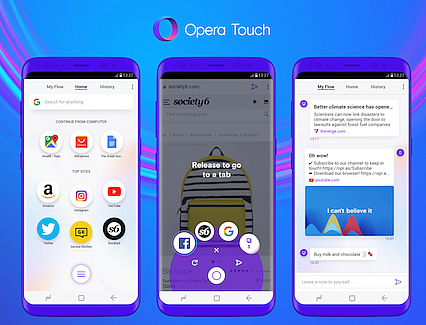
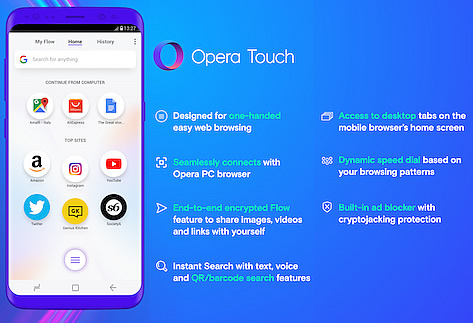
Opera Touch also supports voice search and lets you scan QR and barcodes. These additions to search make the browser useful on the go when, for example, you see a product at a shop and want to check its reviews, tutorials or prices online.

The browser also features a Fast Action Button at the bottom of the screen to accomplish the one-handed browsing experience. The designed feature is always available on the browser screen and provides direct access to the most recent tabs and a search feature. It also allows the user to navigate through all of the browser's features with just their thumb.

"In Opera Touch, setting up the connection between your smartphone and your desktop browser takes only one step," said Maciej Kocemba.

This one step, which consists of scanning a QR code displayed in the Opera computer browser with Opera Touch, establishes Flow, Opera's way of allowing the user to share links, images, videos or notes with themselves. Flow is a stream of things that one shares with oneself. It is available both in Opera Touch and in the updated version of the Opera PC browser. And it doesn't require any logins or passwords.
Whenever an item, such as a scan of medical results or a website with top restaurants to check out, is added to the Flow on one device, the other one instantly receives it. Flow is end-to-end encrypted, and works independently of operating systems and manufacturers.

New version of Opera for computer
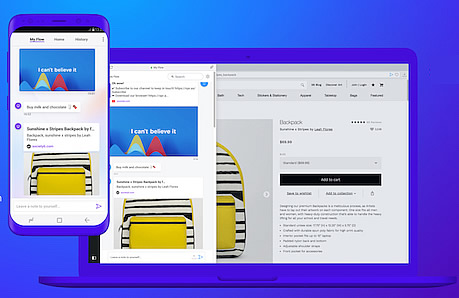
Opera has also updated the Opera browser for computers. The new version of the PC browser has been designed to work together with Opera Touch through the Flow feature. It also includes Instant Search, a new feature which lets users quickly search the web and their open tabs. J

Opera Touch is a free application available for Android on Google Play and will be coming to iOS soon. To make full use of the Flow feature, download the latest Opera browser on your Windows, Mac or Linux PC.

Tags: Opera
Previous Post
Nokia Launches Edge Cloud Data Center Solution for the 5G Era
Next Post
Twitter Increases User Base, Ad Revenue

Related Posts

  • Opera Adds Built-in Instagram to Desktop Browser

  • New Opera for Android Offers More Data Savings, New Blockchain-browsing Features

  • Opera Lets US Users Buy Crypto With Apple Pay or Debit Card

  • Opera R2020 Browser is Here With New Features and Support for DoH

  • Opera Brings Opera GX Gaming Browser to macOS

  • Opera Browser for Android Offers Ten New Colors to Choose From, Supports Bitcoin

  • Opera Opens Access to Gaming Browser, Opera GX

  • Opera Announces the Opera GX Gaming Browser

Latest News

G.SKILL Demo New Memory Solutions for Gaming, Server, AI, Workstation Applications at Computex 2026
PC components

G.SKILL Demo New Memory Solutions for Gaming, Server, AI, Workstation Applications at Computex 2026

LIAN LI Launches HydroShift II OLED Curved 360 AIO
Cooling Systems

LIAN LI Launches HydroShift II OLED Curved 360 AIO

LIAN LI Unveils O11 VISION-M
Cooling Systems

LIAN LI Unveils O11 VISION-M

CORSAIR PRO launches AI Workstations and Servers
Cooling Systems

CORSAIR PRO launches AI Workstations and Servers

ASUS Announces T1 GeForce RTX 5070 and RTX 5060 Ti Graphics Cards
GPUs

ASUS Announces T1 GeForce RTX 5070 and RTX 5060 Ti Graphics Cards

Popular Reviews

Akaso 360 Action camera

Akaso 360 Action camera

Dragon Touch Digital Calendar

Dragon Touch Digital Calendar

be quiet! Pure Loop 3 280mm

be quiet! Pure Loop 3 280mm

Noctua NF-A12x25 G2 fans

Noctua NF-A12x25 G2 fans

Endorfy Thock V2 Wireless Keyboard

Endorfy Thock V2 Wireless Keyboard

Soft2bet and the unseen hardware that makes instant play possible

Soft2bet and the unseen hardware that makes instant play possible

Crucial T710 2TB NVME SSD

Crucial T710 2TB NVME SSD

JSAUX 65Wh Rog Ally Battery

JSAUX 65Wh Rog Ally Battery

Main menu

  • Home
  • News
  • Reviews
  • Essays
  • Forum
  • Legacy
  • About
    • Submit News

    • Contact Us
    • Privacy

    • Promotion
    • Advertise

    • RSS Feed
    • Site Map
  • About
  • Privacy
  • Contact Us
  • Promotional Opportunities @ CdrInfo.com
  • Advertise on out site
  • Submit your News to our site
  • RSS Feed