
Optorite DD0405
6. Protected Disc Tests
Review Pages
2. Data CD Reading Tests
3. CD Error Correction Tests
4. DVD reading tests
5. DVD Error Correction Tests
6. Protected Disc Tests
7. DAE Tests
8. CD Recording Tests
9. Writing quality - 3T Jitter Tests
10. C1 / C2 Error Measurements
11. HD-BURN tests
12. DVD Recording Tests
13. KProbe PI/PO quality tests
14. Conclusion
OPTORITE DVD RW DD0405 - Page 6
- Reading Tests
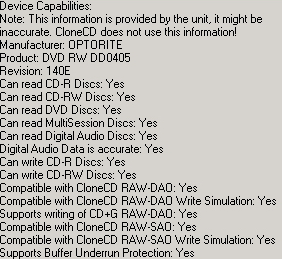
To create an image of the various protected titles onto a hard disk, we used CloneCD v.4.3.1.9 software and the appropriate settings, depending on the protection type of the inserted discs. Below are summarized the capabilities of the Optorite drive, according to CloneCD software. Notice that the drive supports writing of CD+G under RAW DAO:
The game titles we used for each protection scheme are given in the table below:
Game Title
|
Protection Scheme
|
PSX "NBA
Jam Extreme"
|
Lybcrypt
|
Serious Sam The Second Encounter v1.07
|
SafeDisc v.2.60.052
|
VRally II
|
SecuROM v.2
|
PSX Pressed Media
SafeDisc v.2
SecuROM v.2
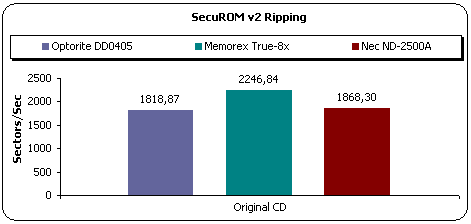
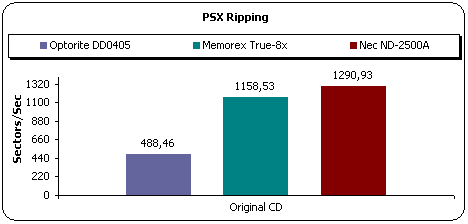
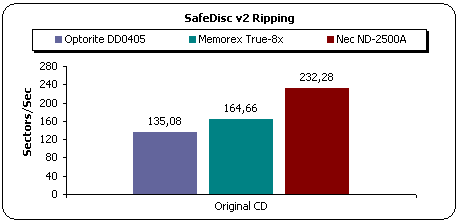
The Optorite DD0405 managed to make images of all tested games. The above graphs show that the drive was the fastest image making device among the three.
The Optorite DD0405 supports the DAO-RAW writing mode. For checking the drive's EFM correction status, we used 3 different game titles with different SafeDisc 2 versions with the latest software patches installed. After making the images of the various titles to the hard disk, we burned them (maximum speed) with CloneCD. Two different discs were created for each title; one with the "Amplify Weak Sectors" enabled and one more with the function disabled.
The table below shows the results of the attempted backups and whether they ran (game installed / played normally), or not.
|
Drive |
Game Title |
SD2 Build |
Settings |
|
|
Amplify Weak Sectors On |
Amplify Weak Sectors Off |
|||
|
Optorite DD0405 |
Max Payne |
v2.51.020 |
Yes |
No |
|
Serious Sam - The Second Encounter
v1.07
|
v.2.60.052 |
No |
No |
|
The Sims Unleashed |
v.2.8 |
No
|
No
|
|
The Sims Superstar |
v2.9 |
No |
No |
|
As we expetced, the DD0405 is not a good backup solution. The drive made a valid image only with on one game protection scheme. The earlier version of Safedisc result to a working backup but only when the Amplify Weak Sectors option was enabled. The same game didn't work when we burned it without the Amplify option enabled. With all other games, the drive failed to produce a working backup.
Review Pages
2. Data CD Reading Tests
3. CD Error Correction Tests
4. DVD reading tests
5. DVD Error Correction Tests
6. Protected Disc Tests
7. DAE Tests
8. CD Recording Tests
9. Writing quality - 3T Jitter Tests
10. C1 / C2 Error Measurements
11. HD-BURN tests
12. DVD Recording Tests
13. KProbe PI/PO quality tests
14. Conclusion





