Breaking News

ASUS Announces Intel Core Ultra 200S Plus Series Support on W880, Z890, Q870, B860 and H810 Motherboards G.SKILL DDR5 Memory Kits Confirmed as Intel XMP 3.0 'Ready' for Intel Core Ultra 200S Plus Series Processors ASUS Unveils Complete Portfolio Support for Intel Core 200S Series Samsung Brings AirDrop Support to Quick Share with Galaxy S26 Series TerraMaster Spring Sale 2026 Upgraded Up To 30%

logo

  • Share Us
    • Facebook
    • Twitter
  • Home
  • Home
  • News
  • Reviews
  • Essays
  • Forum
  • Legacy
  • About
    • Submit News

    • Contact Us
    • Privacy

    • Promotion
    • Advertise

    • RSS Feed
    • Site Map

Search form

Pioneer DVR-320-s DVD Recorder

Sep 29,2004 0

15. Advanced Features - Page 2


Review Pages

1. Introduction
2. Packaging & Interior Look
3. Control Menu
4. The Tuner menu
5. The Video In/Out Menu
6. The Audio Out menu
7. The Language menu
8. The Recording menu
9. The Playback menu
10. Reading Tests
11. Compressed Audio Performance
12. Making a recording
13. Recording Options
14. Advanced Features - Page 1
15. Advanced Features - Page 2
16. Editing and Finalizing a DVD-Video Disc
17. Writing Quality Tests
18. Error Correction Tests
19. Conclusion


Pioneer DVR-320-S DVD Recorder

Advanced Features Contd.

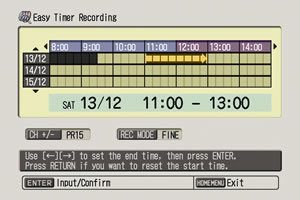
The Timer Recording is used to program the DVR-320-S to record up to 32 recordings up to a month in advance. The timer can be set to record just once, every day, or every week.
When a DVD-R/DVD+RW disc is inserted containing previously recorded video, the Disc Navigator is used to edit the video and the structure it contains. As stated before, in VR mode we are more flexible. This can be seen from the following screenshots.

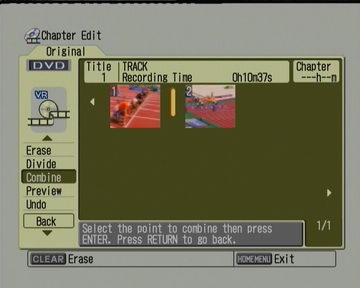


We can open a recording from the DVD, and logically divide it into chapters, or combine two recordings into one.

This is how we can lock recordings within a disc, to avoid accidental deletion. The DVR-320-S will not permit the user to erase this recording unless it is unlocked first.

The above screenshots, as you can see, are for the VR format. On the next page we will show the same process for the Video format, as it is a little different.


Review Pages

1. Introduction
2. Packaging & Interior Look
3. Control Menu
4. The Tuner menu
5. The Video In/Out Menu
6. The Audio Out menu
7. The Language menu
8. The Recording menu
9. The Playback menu
10. Reading Tests
11. Compressed Audio Performance
12. Making a recording
13. Recording Options
14. Advanced Features - Page 1
15. Advanced Features - Page 2
16. Editing and Finalizing a DVD-Video Disc
17. Writing Quality Tests
18. Error Correction Tests
19. Conclusion

 

Pages

  • « first
  • ‹ previous
  • …
  • 11
  • 12
  • 13
  • 14
  • 15
  • 16
  • 17
  • 18
  • 19
  • next ›
  • last »

Pioneer

Tags: Pioneer
Previous Post
Doom 3
Next Post
Rocket Division Software Grab&Burn

Related Posts

  • Pioneer announces microSD for dashcam

  • Pioneer Japan announces BDR-WX01DM for US market

  • Pioneer Japan announces new optical storage drives for JIS X6257 archive format

  • Pioneer Japan updates its CD-DVD Software utility

  • Pioneer Japan announces new BDR-X13J-X external BD Writer and BDR-WX01DM for archiving

  • Pioneer Japan releases new firmware updates for external Blu-Ray Recorders

  • Pioneer BDR-XD08UMB-S External Blu-Ray Recorder

  • Pioneer Japan updates firmware for their X13 lineup (30-01-2023)

Latest Reviews

Why Streaming Live Casino Games Demands Smarter Tech
Enterprise & IT

Why Streaming Live Casino Games Demands Smarter Tech

Kioxia Exceria Plus G3 512GB microSD
Cameras

Kioxia Exceria Plus G3 512GB microSD

SoundPeats Cove Pro
Consumer Electronics

SoundPeats Cove Pro

Asustor AS5404T 4-Bay NAS System
Enterprise & IT

Asustor AS5404T 4-Bay NAS System

be quiet! Pure Power 13M 1200W
PC components

be quiet! Pure Power 13M 1200W

Popular News

COLORFUL Presents CVN X870 ARK FROZEN Motherboard for AMD Ryzen 9000 CPUs

COLORFUL Presents CVN X870 ARK FROZEN Motherboard for AMD Ryzen 9000 CPUs

TEAMGROUP Launches EXPERT P34F Find My External SSD

TEAMGROUP Launches EXPERT P34F Find My External SSD

Samsung announces Galaxy Tab S11 and Galaxy S25 FE series

Samsung announces Galaxy Tab S11 and Galaxy S25 FE series

Viltrox Showcases Upcoming Lens Lineup and New TTL Flash at IBC 2025

Viltrox Showcases Upcoming Lens Lineup and New TTL Flash at IBC 2025

CORSAIR announces Vanguard Pro 96 and Vanguard 96 Gaming Keyboards

CORSAIR announces Vanguard Pro 96 and Vanguard 96 Gaming Keyboards

Panasonic Introduces the First Ultra-Telephoto Zoom Lens in the LUMIX S Series

Panasonic Introduces the First Ultra-Telephoto Zoom Lens in the LUMIX S Series

MSI Launches DATAMAG 40Gbps Magnetic Portable SSD

MSI Launches DATAMAG 40Gbps Magnetic Portable SSD

MSI Launches FORGE GK600 TKL WIRELESS Special Edition Compact Mechanical Keyboard

MSI Launches FORGE GK600 TKL WIRELESS Special Edition Compact Mechanical Keyboard

Main menu

  • Home
  • News
  • Reviews
  • Essays
  • Forum
  • Legacy
  • About
    • Submit News

    • Contact Us
    • Privacy

    • Promotion
    • Advertise

    • RSS Feed
    • Site Map
  • About
  • Privacy
  • Contact Us
  • Promotional Opportunities @ CdrInfo.com
  • Advertise on out site
  • Submit your News to our site
  • RSS Feed