Breaking News

COLORFUL Launches iGame Guard G114 140W GaN Multi-Port Charger INNO3D TOWER WORKSTATION AWS-511Z-R1 Thermal Grizzly and Noctua introduce WireView Pro II Noctua Edition GPU monitoring device Nikon releases the Z5IIC full-frame mirrorless camera Announcing the New ASUS Googlebook 14

logo

  • Share Us
    • Facebook
    • Twitter
  • Home
  • Home
  • News
  • Reviews
  • Essays
  • About
    • Submit News

    • Contact Us
    • Privacy

    • Promotion
    • Advertise

    • RSS Feed

Search form

Ricoh MP5316DA

Jan 4,2005 0

19. DVD+R DL - Page 1


Review Pages

1. Introduction
2. Transfer Rate Reading Tests
3. CD Error Correction Tests
4. DVD Error Correction Tests
5. Protected Disc Tests
6. DAE Tests
7. Protected AudioCDs
8. CD Recording Tests
9. Writing Quality Tests - 3T Jitter Tests
10. Writing Quality Tests - C1 / C2 Error Measurements
11. DVD Recording Tests
12. CDSpeed/PlexTools Scans - Page 1
13. CDSpeed/PlexTools Scans - Page 2
14. CDSpeed/PlexTools Scans - Page 3
15. CDSpeed/PlexTools Scans - Page 4
16. CDSpeed/PlexTools Scans - Page 5
17. CDSpeed/PlexTools Scans - Page 6
18. CDSpeed/PlexTools Scans - Page 7
19. DVD+R DL - Page 1
20. DVD+R DL - Page 2
21. BookType Setting
22. Conclusion


RICOH MP5316DA DVD Burner

DVD+R DL - Page 1

- Writing Tests

We burned some DVD+R DL discs with DVD-Video content. The source disc was "Gladiator Movie - Special Edition" disc1 with a total size of 6.86GB. First we transferred the movie to the hard disc with DVD Decrypter as ISO format (single file). We used Double Layer media provided by Ricoh and Verbatim (MKM). The following screenshot shows the media code for these Double Layer discs.
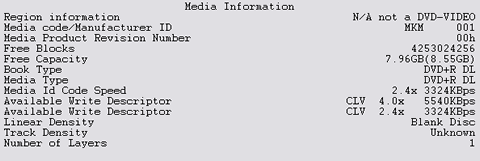
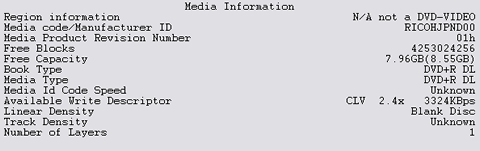

You might notice that the Ricoh media Id Code speed cannot be read by the drive. This means that this media is not supported with the current firmware loaded on the Ricoh MP5316DA. It's funny, a drive bearing the Ricoh brand not supporting Ricoh media, isn' it?

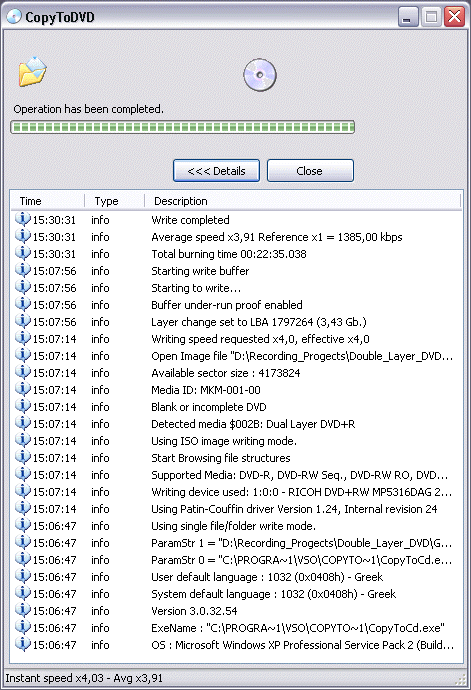
We then used CopyToDVD v3.0.29.48 with Verbatim Double Layer media, and specifically the "Movie & Pictures" option, and then "Write DVD Video". The software prompts us to select the Video_TS/ISO image folder. We chose the "GLADIATOR.ISO" image and we selected the RICOH MP5316DA burner.


After pressing "OK", the burning procedure started without any unexpected delays. It should be noted that we did change the default booktype setting prior to writing the disc to DVD-ROM booktype, with the latest DVDInfoPro software.


The writing process was finished after 22:35 minutes. The average speed was 3.91X as reported by the CopyToDVD software.
Performing the same with the Ricoh DL media, we got the following:
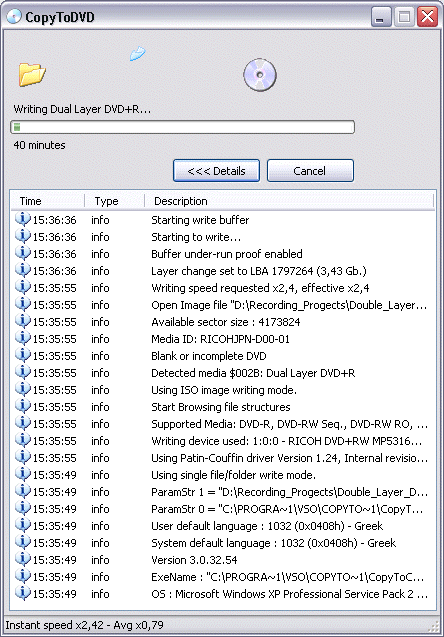
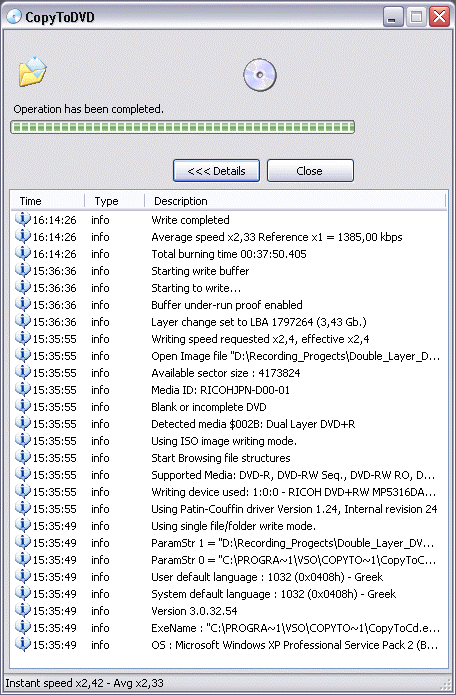

The writing process was finished after 37:50 minutes. The average speed was 2.33X as reported by the CopyToDVD software. The drive burned the Ricoh DL media at 2.4X speed, apparently because it could not read the media id code speed field that we saw in the second screenshot previously on this page.


Review Pages

1. Introduction
2. Transfer Rate Reading Tests
3. CD Error Correction Tests
4. DVD Error Correction Tests
5. Protected Disc Tests
6. DAE Tests
7. Protected AudioCDs
8. CD Recording Tests
9. Writing Quality Tests - 3T Jitter Tests
10. Writing Quality Tests - C1 / C2 Error Measurements
11. DVD Recording Tests
12. CDSpeed/PlexTools Scans - Page 1
13. CDSpeed/PlexTools Scans - Page 2
14. CDSpeed/PlexTools Scans - Page 3
15. CDSpeed/PlexTools Scans - Page 4
16. CDSpeed/PlexTools Scans - Page 5
17. CDSpeed/PlexTools Scans - Page 6
18. CDSpeed/PlexTools Scans - Page 7
19. DVD+R DL - Page 1
20. DVD+R DL - Page 2
21. BookType Setting
22. Conclusion


Pages

  • « first
  • ‹ previous
  • …
  • 14
  • 15
  • 16
  • 17
  • 18
  • 19
  • 20
  • 21
  • 22
  • next ›
  • last »

Ricoh

Tags: Ricoh
Previous Post
Abit SV-1A AMD Athlon 64 Server Board
Next Post
SATA 3Gb/s, the Next Generation of Serial ATA Speed

Related Posts

  • RICOH announces GR IV 30th Anniversary Edition Kit

  • Ricoh announces GR IV Monochrome

  • RICOH announces GR IV Monochrome and GR IV HDF High-end Compact Digital Cameras

  • RICOH announces GR IV and GF-2 external flash

  • Ricoh 360 Theta A1 camera officially announced

  • RICOH announces development of GR IV

  • Ricoh establishes new industrial computer company in Japan

  • PENTAX 17 is simply a fixed-focal length compact film camera

Latest Reviews

Fanxiang MP83 M.2 NVMe SSD Enclosure
Enterprise & IT

Fanxiang MP83 M.2 NVMe SSD Enclosure

Ugreen CM642 USB4.0 Enclosure
PC components

Ugreen CM642 USB4.0 Enclosure

be quiet! Dark Power 14 IO
PC components

be quiet! Dark Power 14 IO

SanDisk High Endurance 512GB microSDXC
Cameras

SanDisk High Endurance 512GB microSDXC

Samsung PRO Ultimate 512GB microSDXC
Cameras

Samsung PRO Ultimate 512GB microSDXC

Popular News

MSI’s Latest AMD X870E MAX & EVO Series Motherboards

MSI’s Latest AMD X870E MAX & EVO Series Motherboards

COLORFUL Launches iGame B850M ULTRA Series Micro-ATX Motherboards

COLORFUL Launches iGame B850M ULTRA Series Micro-ATX Motherboards

COLORFUL Presents Limited Edition Chitu MAG-60 Magnetic Keyboard Inspired by the Year of the Horse

COLORFUL Presents Limited Edition Chitu MAG-60 Magnetic Keyboard Inspired by the Year of the Horse

COLORFUL Presents iGame Z890 ULTRA-S W and iGame Z890M ULTRA Z Motherboards

COLORFUL Presents iGame Z890 ULTRA-S W and iGame Z890M ULTRA Z Motherboards

COLORFUL Launches iGame B850I MINI OC V14 Motherboard

COLORFUL Launches iGame B850I MINI OC V14 Motherboard

COLORFUL Expands B850 Motherboard Lineup with New CVN, Battle-Ax, and MEOW Models

COLORFUL Expands B850 Motherboard Lineup with New CVN, Battle-Ax, and MEOW Models

ASRock Adds Support for One Sub-Channel DRAM Module on Intel DDR5 Motherboards

ASRock Adds Support for One Sub-Channel DRAM Module on Intel DDR5 Motherboards

Exceed the Infinite with New ASRock X870E Taichi White Motherboard

Exceed the Infinite with New ASRock X870E Taichi White Motherboard

Main menu

  • Home
  • News
  • Reviews
  • Essays
  • About
    • Submit News

    • Contact Us
    • Privacy

    • Promotion
    • Advertise

    • RSS Feed
  • About
  • Privacy
  • Contact Us
  • Promotional Opportunities @ CdrInfo.com
  • Advertise on out site
  • Submit your News to our site
  • RSS Feed