Breaking News

Geometric Future Unveils Model 3 Case, Eskimo Plus 36 AIO, and Squama 3003-12 Fans ZOTAC GAMING Launches GeForce RTX 5080 SOLID CORE OC 20th Anniversary Edition Google Unveils Pixel 11 Series, Pixel 11 Pro Fold, Pixel Watch 5, and Pixel Tag Insta360 Expands Its Content Creation Ecosystem with Flagship X6 8K 360 Camera and Next-Generation Audio Solutions Razer Unveils the Artisan Keycap – Triple-Headed Snake Edition

logo

  • Share Us
    • Facebook
    • Twitter
  • Home
  • Home
  • News
  • Reviews
  • Essays
  • About
    • Submit News

    • Contact Us
    • Privacy

    • Promotion
    • Advertise

    • RSS Feed

Search form

Shuttle SP-45H7

Jul 6,2009 0

5. BIOS settings


Review Pages

1. Features, specifications
2. The package
3. Opening the case
4. Installing the components
5. BIOS settings
6. Installation, testbed
7. Benchmarks - page 1
8. Benchmarks - page 2
9. Summary


Most of you must be familiar with the Phoenix-Award BIOS:

Under 'CPU feature' we can disable the C1E (speedstep) and also enable/disable the Multi-core processors and the Virtualization Technology:

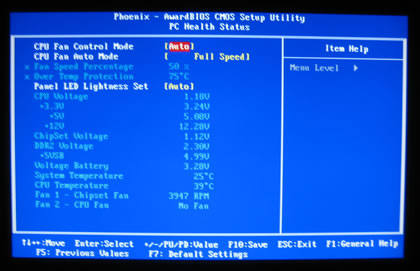
The 'PC Health status' is always useful for monitoring the system's voltages and the CPU temperature:
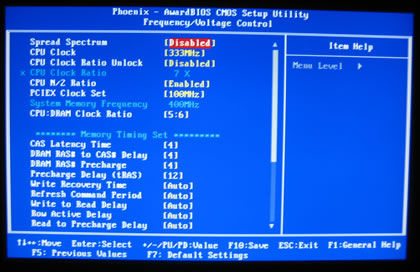
Under the 'Frequency/Voltage control' tab we can set various important elements like the CPU ratio, the FSB and the PCI-E clock. The CPU:DRAM clock ratio has many options to play with (Auto, 5:8, 5:6, 1:1, 1:2, 2:3, 4:5, 3:5.), but in our case we simply couldn't make the OCZ PC2-8500 memory work at 533MHz, despite the fact that we set CL5 and the DRAM voltage at 2.25V This will result to a lower performance compared with "normal" sized motherboards.
The 'Voltage control' options are rather limited. The CPU voltages are calculated with an offset of the default processor value:

  • CPU Voltage:1.2875V~2.0000V
  • DDR2 Voltage: 1.825V~2.500V or Auto
  • FSB Voltage: +0.05V, +0.10V, +0.15V or Auto
  • NB Voltage: 1.15V, 1.20V, 1.25V or Auto
  • SB Voltage (1.5V): 1.55V, 1.60V or Auto


Review Pages

1. Features, specifications
2. The package
3. Opening the case
4. Installing the components
5. BIOS settings
6. Installation, testbed
7. Benchmarks - page 1
8. Benchmarks - page 2
9. Summary


Pages

  • « first
  • ‹ previous
  • 1
  • 2
  • 3
  • 4
  • 5
  • 6
  • 7
  • 8
  • 9
  • next ›
  • last »

Shuttle

Tags: Shuttle
Previous Post
Lite-On iHAS324
Next Post
OCZ Vertex 60GB SSD

Related Posts

  • Shuttle Launches the XZ890G2

  • Shuttle Introduces SPCNV03 Ultra-Compact Edge AI Computer

  • Shuttle announces DN11H at InfoComm 2025

  • Shuttle announces NA10H - NT10H

  • Flat Mini-PC Barebones for the latest LGA1700 processors from Shuttle

  • Shuttle announces Xeon-compatible Mini-PC Barebone with 4x LAN and ECC RAM support

  • Shuttle announces Mini-PC Barebone in a 4.7-litre format for two PCI Express cards

  • Shuttle Announces DH32 Mini-PC

Latest Reviews

be quiet! Light Loop IO LCD
Cooling Systems

be quiet! Light Loop IO LCD

KIOXIA Exceria Pro G2 NVME 2TB
PC components

KIOXIA Exceria Pro G2 NVME 2TB

Online Casino Games That Offer Something Different
Consumer Electronics

Online Casino Games That Offer Something Different

SOUNDPEATS Air6 HS
Consumer Electronics

SOUNDPEATS Air6 HS

Arctic MX-7
Cooling Systems

Arctic MX-7

Popular News

CORSAIR announces Vanguard Pro 96 and Vanguard 96 Gaming Keyboards

CORSAIR announces Vanguard Pro 96 and Vanguard 96 Gaming Keyboards

MSI Launches FORGE GK600 TKL WIRELESS Special Edition Compact Mechanical Keyboard

MSI Launches FORGE GK600 TKL WIRELESS Special Edition Compact Mechanical Keyboard

TEAMGROUP Launches EXPERT P34F Find My External SSD

TEAMGROUP Launches EXPERT P34F Find My External SSD

Samsung announces Galaxy Tab S11 and Galaxy S25 FE series

Samsung announces Galaxy Tab S11 and Galaxy S25 FE series

Viltrox Showcases Upcoming Lens Lineup and New TTL Flash at IBC 2025

Viltrox Showcases Upcoming Lens Lineup and New TTL Flash at IBC 2025

Panasonic Introduces the First Ultra-Telephoto Zoom Lens in the LUMIX S Series

Panasonic Introduces the First Ultra-Telephoto Zoom Lens in the LUMIX S Series

MSI Launches DATAMAG 40Gbps Magnetic Portable SSD

MSI Launches DATAMAG 40Gbps Magnetic Portable SSD

Viltrox Joins the L-Mount Alliance, Expanding Creative Possibilities

Viltrox Joins the L-Mount Alliance, Expanding Creative Possibilities

Main menu

  • Home
  • News
  • Reviews
  • Essays
  • About
    • Submit News

    • Contact Us
    • Privacy

    • Promotion
    • Advertise

    • RSS Feed
  • About
  • Privacy
  • Contact Us
  • Promotional Opportunities @ CdrInfo.com
  • Advertise on out site
  • Submit your News to our site
  • RSS Feed